
Learning goals
After this chapter you can:
- explain the difference between a language model (LLM), a chat assistant and a coding agent.
- describe the agent loop — perceive, plan, act, check — and recognise where it typically fails.
- understand the context window: why an agent only knows what is currently “in front of it”, and what that means for your work.
- name strengths and limits, hallucinations in particular, and justify why verification matters more than trust.
- map the factory's guiding principle “You describe. The factory builds. You approve.” to concrete features.
- explain the five levels of the factory (project, artifacts, team, run, quality gate) and the role model from
VIEWERtoADMIN. - practise safely — with the public demo or the
mockadapter, without token costs.
1.1 From language model to agent
At the heart of every coding agent is a large language model (LLM). Put simply, an LLM is a function: it receives a text (the prompt) and produces the most probable continuation from it, piece by piece, in so-called tokens. Tokens are parts of words; a word often corresponds to one to three tokens. The model was trained on very large amounts of text and code and learned patterns in the process — how to structure a Java class, what a REST endpoint looks like, how to interpret an error message.
On its own, an LLM has three important properties you should keep in mind:
- It is stateless. It remembers nothing between two calls. What looks like a “memory” in a chat is in fact the conversation history so far, which is sent again with every call.
- It does not act. An LLM can write down a command like
mvn verify, but it cannot run it. It sees neither your file system nor the result of a test. - It is probabilistic. The same question can yield different answers. An answer is plausibly phrased, but not automatically correct.
The three levels
It helps to distinguish three levels of tool support:
| Level | What happens | Who acts |
|---|---|---|
| Code completion | The model suggests the next line or function in the editor. | You accept or reject each suggestion individually. |
| Chat assistant | You describe a problem, the model replies with an explanation and code. You copy it, run it, report errors back. | You are the model's “hands”: you carry code and error messages back and forth. |
| Coding agent | The model is given tools: read and write files, run commands, search. It works in a loop until the task is done or it gets stuck. | The agent acts on its own; you set the goal and check the result. |
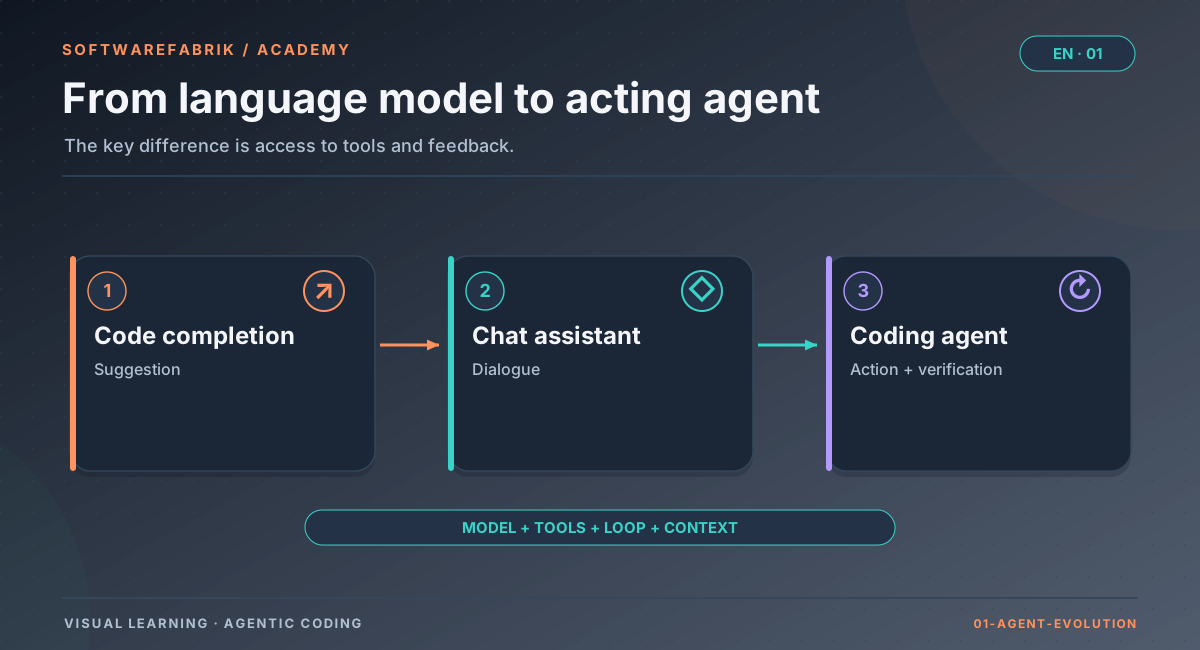
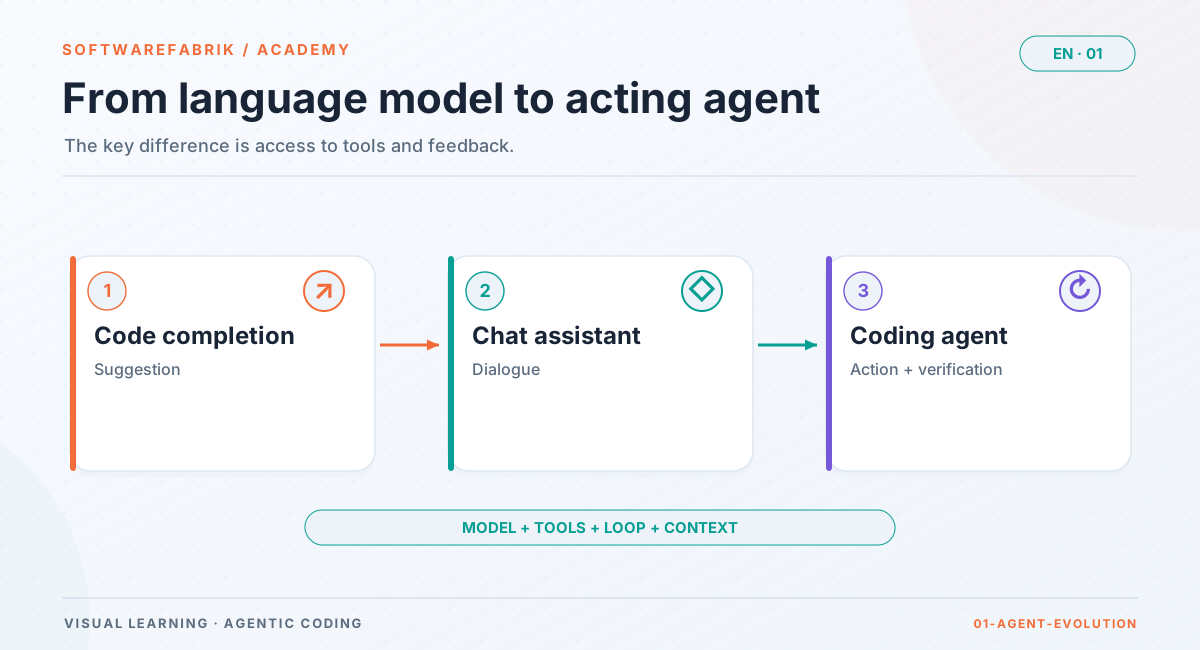
Agentic coding refers to the third level: software development in which an agent plans and carries out work steps on its own. The decisive leap is not a “smarter” model but the combination of model, tools and a loop that feeds results back into the model. The agent sees that its test is red, reads the error message and fixes the code — without you having to copy anything in between.
1.2 Tools: what an agent can do
Tools are functions the model is allowed to call. Technically it works like this: instead of normal text, the model produces a structured request such as “call read file with the path src/main/java/App.java”. The agent's runtime — the program in which the model is embedded — executes this call and returns the result to the model as new text. The model itself never executes anything; it asks for execution.
Typical tools of a coding agent:
- Read: open files, list directories, search for patterns (comparable to
cat,ls,grep). - Write: create files, change them selectively, delete them.
- Execute: start shell commands — build, tests, linters,
git status. - Look up: depending on configuration, fetch documentation or web pages and talk to external services (for example via the Model Context Protocol, MCP; more on that in Chapter 8).
This leads directly to the most important security consideration of the whole course: an agent can do everything its tools can do. If it may run arbitrary shell commands, it can also delete files, open network connections or read credentials — not out of malice, but because a mistake in the plan or a manipulated input leads it to do so. Which tools an agent gets and how to restrict them is covered in Chapter 2 (permissions) and in more depth in Chapter 8.
1.3 The agent loop
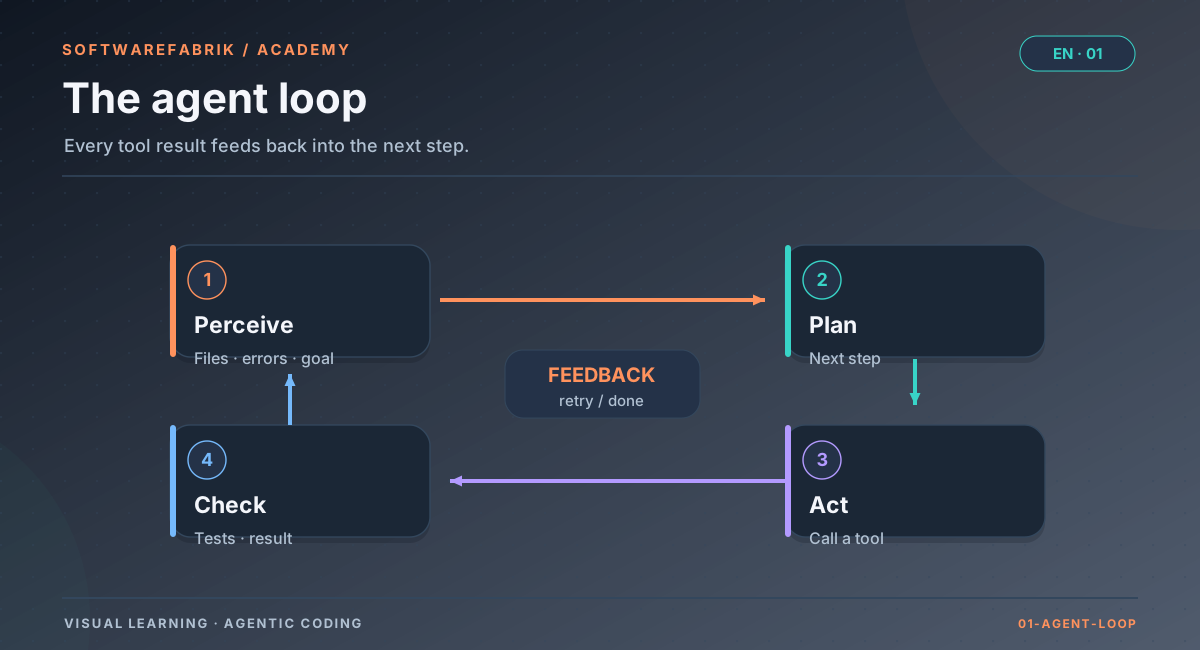
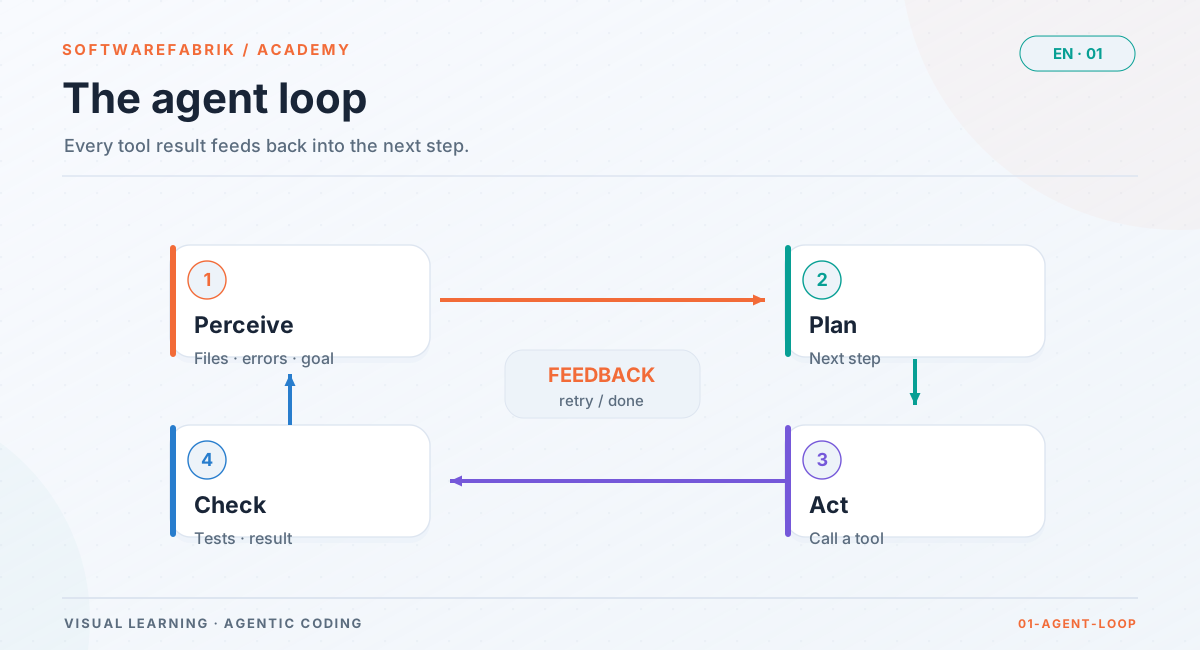
At its core, every coding agent follows the same pattern. It can be broken down into four steps that repeat until the goal is reached, a limit kicks in or the agent gives up:
Open full-size graphicOpen full-size graphic
1. Perceive
The agent gets its bearings: it reads the goal, looks at the project structure, opens relevant files. Important: it only sees what it actively reads or what it has been given. If the crucial convention is in a file it never opens, that convention does not exist for it.
2. Plan
From what it has perceived, the model derives the next step. For simple tasks this is implicit (“I'll change this method now”); for larger ones a good agent writes a short plan with sub-steps. This is where most consequential mistakes happen: a misunderstood requirement, a change that is too large, an overlooked edge case.
3. Act
The agent calls a tool: it writes code, creates a file, starts the build. Every action changes the world — at the very least the working state of the repository.
4. Check
The result of the action flows back: does it compile? Are the tests green? What does the linter say? If the goal is reached, the loop ends. Otherwise it starts over with the new information.
Where the loop fails
The loop is only as good as its checking step. Three typical failure patterns:
- No check: if there are no tests, the agent can only check whether the code compiles. “Compiles” does not mean “does the right thing”.
- The check is bypassed: an agent that wants green tests at any price may weaken or comment out a test instead of fixing the bug. That is not ill will but the shortest path to the formal goal.
- Endless loop without new information: the agent tries the same thing again and again. Good systems therefore limit the number of attempts and require every new attempt to be based on new information (such as a different error message).
These failure patterns lead to a basic stance that runs through the whole course: the checking step must not rest with the agent alone. You need independent verification — a build the agent cannot influence, reviewers that are not allowed to change anything, and in the end a human who approves.
In the factory
The guiding principle: You describe. The factory builds. You approve.
SoftwareFabrik takes the agent loop seriously and builds a controlled process around it. It is a local control plane for AI-assisted software development: instead of operating a coding agent (Claude Code, OpenAI Codex, Gemini, Aider and others) directly in the shell, you describe your project in a structured way in a web interface. From that, the factory builds precise input artifacts, starts supervised runs, collects logs, tokens and costs, and enforces Git discipline and a build gate.
The guiding principle on the home page sums up the division of labour in three sentences:
| Sentence | What you do | What the factory provides for it |
|---|---|---|
| You describe. | Formulate the project, goals, requirements and guardrails. | Project wizard (/wizard), project definition with 13 fields, generated Markdown artifacts, optionally specs with acceptance criteria. |
| The factory builds. | Trigger a run and follow it. | Isolated workspace, a dedicated branch per build run, the agent as a subprocess, live logs, mvn verify as the build gate, automatic correction loop. |
| You approve. | Check the result and approve it — or reject it. | Approval gate with inline diff, quality gate with reviewers, pull request, signed audit chain. |
Notice how the four steps of the agent loop reappear here: perceiving and planning are fed by good artifacts, acting takes place in isolation in the workspace, and checking is not left to the agent alone but safeguarded by the build gate, the quality gate and your approval.
1.4 The context window: what the agent “knows”
Because an LLM is stateless, everything relevant has to be sent again at every step of the loop: the system instructions, your goal, the history so far, the files read, the tool outputs. This entire text is called the context, and its maximum length is the context window. It is measured in tokens and varies in size from model to model — but it is always finite.
That has concrete consequences:
- The agent only knows what is in the context. Its trained general knowledge knows nothing about the details of your project. Your naming conventions, last week's architecture decision, the fact that migrations must never be changed — all of that has to go into the context.
- The context fills up. Every file read and every long build output takes up space. In long tasks, older parts are truncated or summarised; details can get lost in the process.
- More is not automatically better. An overloaded context with many irrelevant files is distracting. Precise, well-structured context beats large quantities.
- Context costs money. With per-token billing you pay for every token that goes into the model — again on every pass of the loop, unless caching applies. More on this in Chapter 10.
- Sessions end. Whatever the agent learned in one session is gone in the next unless it was recorded somewhere — in files, in the repository, in a project memory.
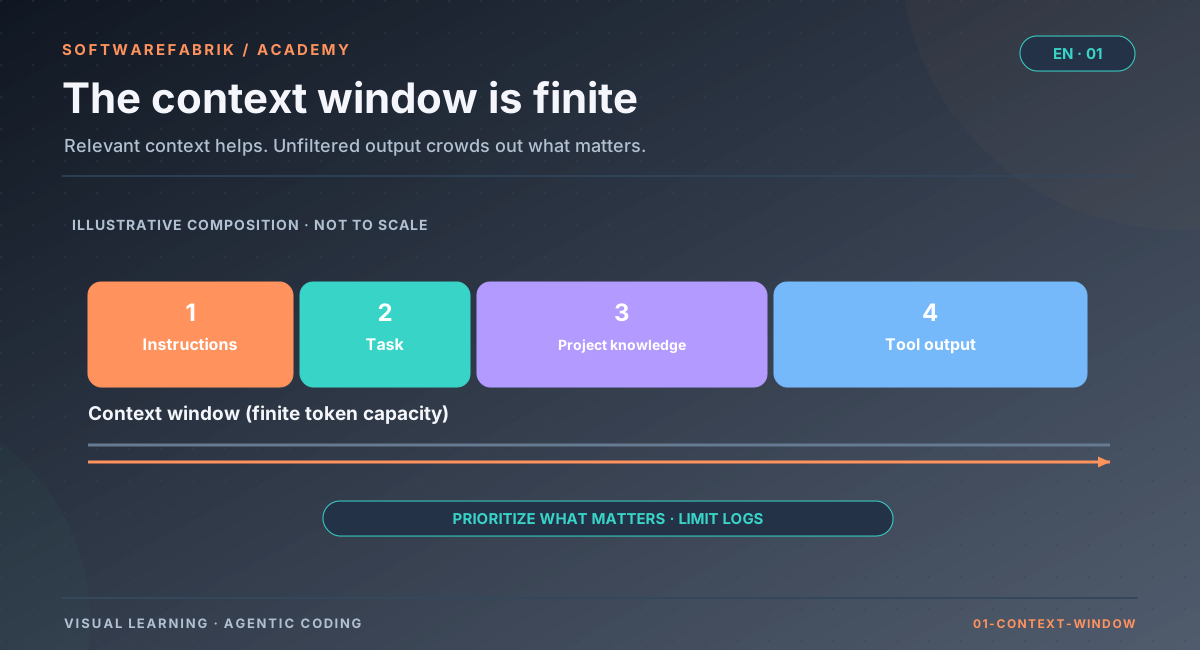
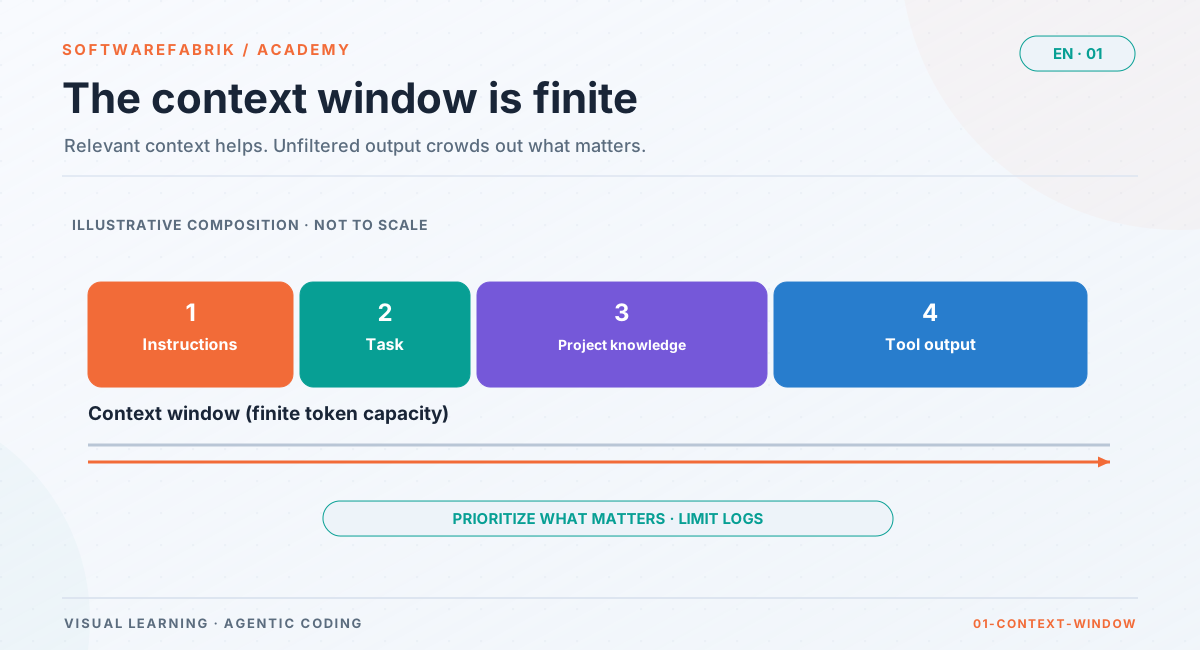
This gives rise to the central insight of Chapter 3: context is everything. The quality of an agent run depends less on the model than on what you give it.
In the factory
Five levels: how the factory organises context and control
The factory thinks in five levels. Once you understand them, you will find your way around the interface immediately — and see how each level addresses a problem from this chapter:
| Level | Content | Which problem does it solve? |
|---|---|---|
| Project | Idea, target picture, requirements — initially as a draft, created via the wizard (/wizard) or quickly via /projects/new. | The agent does not know your project by itself. |
| Artifacts | Generated Markdown files such as PROJECT.md, INSTRUCTIONS.md, AGENTS.md, WORKFLOW.md, DEFINITION_OF_DONE.md, README.md. | Context has to exist in writing, complete and versioned. |
| Team | A set of agent roles (Architect, Developer, Reviewer, QA, Security Reviewer, Documentation, Merge/Release) with guardrails and model assignment, maintained under /agents and /teams. | Different tasks need different instructions and limits. |
| Run | A concrete, supervised execution with status, phases, logs, token usage and costs. | Acting takes place in a controlled, isolated and traceable way. |
| Quality gate | Automatic assessment of the result by several read-only reviewers. | The checking step must not rest with the agent alone. |
The rule from the Introduction applies here too: Good runs begin with good artifacts. Plan deliberately before you click “Start run” for the first time.
1.5 Strengths and limits
Coding agents are neither a miracle cure nor a toy. If you want to use them well, you need a realistic picture.
Where agents are strong
- Well-described, clearly scoped tasks: “Add an endpoint that does X, with validation Y and tests for Z.” The clearer the goal and the more verifiable the result, the better.
- Familiar patterns: CRUD features, boilerplate, project skeletons, configuration of common frameworks, migration between versions according to documented rules.
- Mechanical breadth work: the same change in many places, renamings, adding tests to existing code, updating documentation.
- Exploration: getting to grips with an unfamiliar codebase, explaining relationships, sketching alternatives.
- Stamina: an agent does not get tired, reads even the twentieth error message in full and tries things systematically.
Where agents are weak
- Unclear goals: an agent fills gaps with assumptions — plausible ones, but not necessarily yours. It then cleanly builds the wrong thing.
- Implicit knowledge: business rules that are written down nowhere, political considerations in the team, “we tried that once before”.
- Large, cross-cutting decisions: architecture changes, security concepts, long-lived data models. Here the agent is a good sparring partner, but not a decision-maker.
- Self-criticism: an agent assessing its own code tends to consider it good. That is why writing and checking are separated.
- Long tasks without intermediate checks: errors in early steps propagate, the context fills up, the direction drifts.
Hallucinations
A hallucination is output that sounds plausible but is not true. In programming, hallucinations typically show up like this:
- A call to a method or class that does not exist — for example a library function that “ought to be called that”.
- Invented configuration keys, command-line options or API fields.
- False success reports: “All tests pass”, although no tests were run or changed.
- Placeholders instead of a solution:
// TODO: implementin a method that is reported as finished. - Invented explanations: a convincing-sounding explanation for behaviour that in reality has a different cause.
Hallucinations are not a rare defect that the next model will fix, but a consequence of how the model works: it produces probable text, not verified text. Tools mitigate this considerably — an agent that runs the compiler notices that the invented method does not exist. But only if it actually runs the check and evaluates it honestly.
1.6 Trust is not a process: verification
The obvious question is: “Can I trust the agent?” It is the wrong question. In professional software development, you do not blindly trust human colleagues either — you have code reviews, CI pipelines, tests, the four-eyes principle. The right question is: how do I make sure that wrong results are noticed before they cause damage?
The answer consists of several complementary layers:
- Verifiable goals: what “done” means is fixed in advance — ideally as acceptance criteria from which tests can be derived (Chapter 4).
- Automatic checks the agent does not control: a build that runs outside the agent loop and whose result is not negotiable.
- Independent reviews: reviewers who read the code but are not allowed to change it — static analysis and additional models.
- Human approval: before anything goes into the main branch or into production, a human looks at the diff.
- Traceability: later on, you can prove what happened, who agreed and why (Chapter 9).
In the factory
Verification built in: build gate, reviewers, approval
The factory implements the layers from 1.6 as a fixed part of every run. Here you get an overview; the details follow in Chapter 6.
- Build gate: in the
VALIDATIONphase, the factory itself runsmvn verify(Java-centric; without apom.xmlthe step is skipped). If the build is red, the run goes toNEEDS_CORRECTIONand the factory automatically feeds the build feedback into a new run on the same branch — up to two attempts. - Quality gate with read-only reviewers: six reviewers check the result without ever writing to the workspace. One of them,
hallucination-reviewer, looks specifically for the hallucination patterns from 1.5: invented classes and methods, TODO markers and the claim “tests pass” without any test changes. - No silent success: if a reviewer crashes, the verdict is
ERROR— never a silent “passed”. - Approval gate: depending on the policy, a run waits in
WAITING_FOR_APPROVALuntil a human with a sufficient role has seen and approved the inline diff. - Branch isolation: every build run works on its own branch
sdlc/run-<id>. If it fails, the base branch stays clean.
This turns “I hope the agent is right” into a process in which wrong results are very likely to be noticed — and in which you make the final decision.
1.7 The role of the human
Agentic coding shifts human work; it does not replace it. The human tasks can be grouped into four activities:
- Describe: what should be built, for whom, under which constraints? This work has always been the hardest part of software development — with agents it becomes even more important, because ambiguities are no longer cleared up in the kitchen over coffee but filled in by the agent with assumptions.
- Steer: slice tasks, set the order, choose the right tool and model, set budgets.
- Check and approve: read diffs, assess test results, weigh the reviewers' findings, say yes or no.
- Be accountable: in the end, a human stands behind the result — towards the team, customers and, where applicable, regulators.
In teams, these activities are spread across different people. A proven principle from regulated environments is segregation of duties: whoever triggers a change does not approve it themselves. With agents, this principle gains importance, because the “author” of the code is a machine and the human approval is the actual quality decision.
In the factory
Roles: who describes, who may trigger builds, who approves
In multi-user operation, the factory works with a tiered role model. Each higher role includes the permissions of the lower ones:
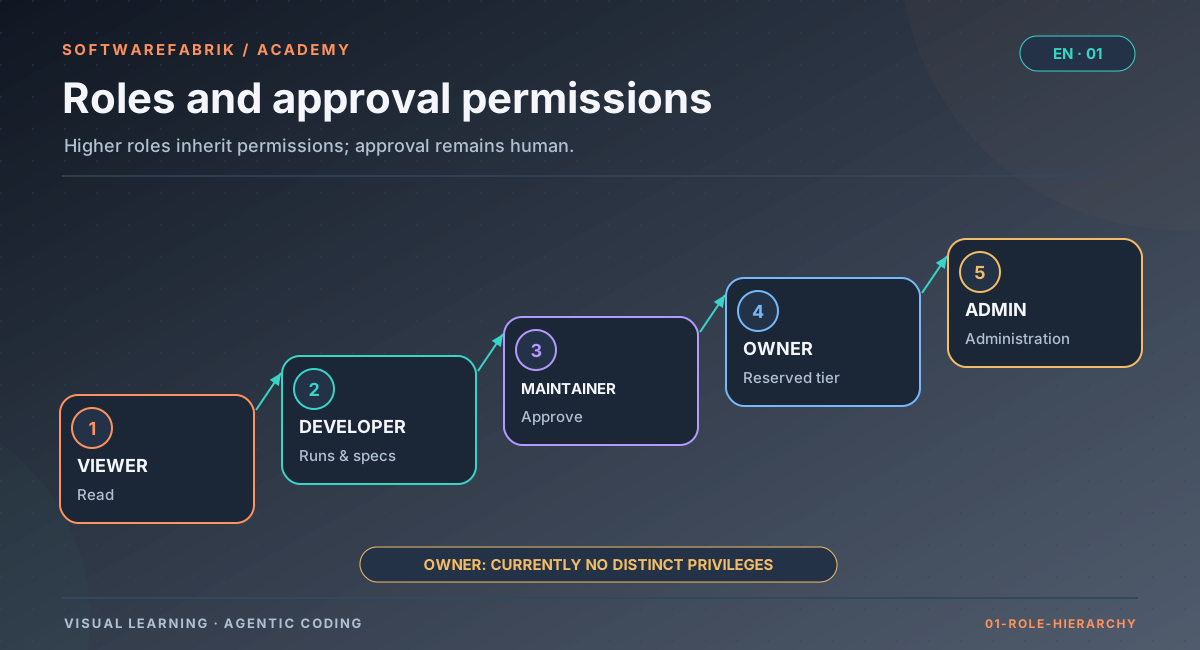
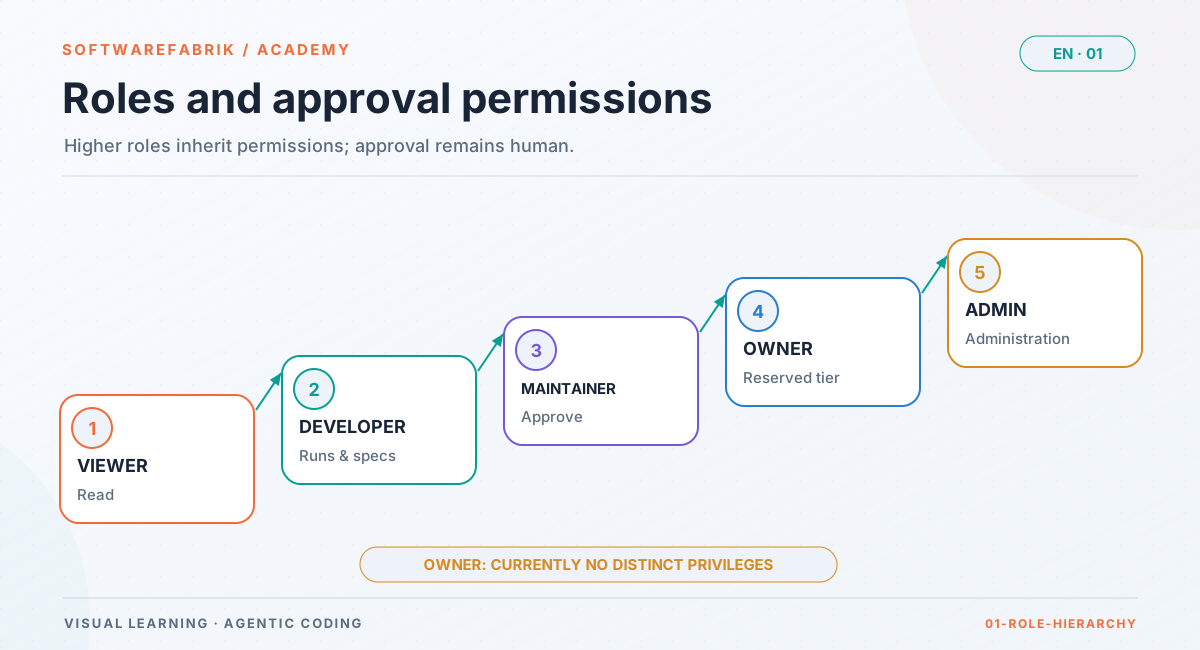
Open full-size graphicOpen full-size graphic
| Capability | From role | Relation to the principle |
|---|---|---|
| read (projects, runs, logs) | VIEWER | Follow along, understand |
| run runs, create and edit specs | DEVELOPER | You describe, the factory builds |
| approve runs, approve specs, manage integrations/secrets | MAINTAINER | You approve |
| tenant administration | ADMIN (the OWNER level is provided for in the role model but currently carries no permissions of its own) | Organisation |
| accounts, policy-as-code, compliance profiles, attestation, export | ADMIN | Operations and evidence |
Two details are worth noting:
- Segregation of duties is configurable: with
run.approval-segregation, whoever triggered a run may not approve it themselves. Without an active approval policy, every run by default stops for human approval before execution (run.approval-vor-merge, on by default); you require mandatory approval before the merge via an approval policy or the mandatory approval phases in policy-as-code. ADMINis not a super-admin for data. Even an administrator remains bound to their tenant for projects, runs, logs and costs. Only account management and project assignment are exempt from isolation.
If you work alone in single-seat operation, as the bootstrap admin you hold all roles in one person. The principle is still useful: treat approval deliberately as a separate step instead of clicking through it.
1.8 When is agentic coding worthwhile — and when not?
A simple rule of thumb: agents pay off where the goal can be described clearly and the result can be checked automatically. Both can be established deliberately — through good descriptions and through tests. The following matrix helps you classify a task:
| Result easy to check | Result hard to check | |
|---|---|---|
| Goal clear | Ideal use: the agent works, the checks catch errors. | Feasible, but first make it verifiable (tests, acceptance criteria). |
| Goal unclear | Sharpen the goal first — the agent can help with that (drafts, questions, alternatives). | Do not delegate. Clarify first, then break it down. |
This is what shapes the structure of this course: Chapter 3 and Chapter 4 make goals clear, Chapter 5 breaks them down, Chapter 6 makes results verifiable.
In the factory
Practise safely: demo and mock adapter
Before you spend real tokens or let an agent loose on real code, it pays to get to know the workflow. There are two ways to do this:
The public demo
A licence-free instance runs at demo.softwarefabrik.io. You are automatically logged in there as a demo user and see the full range of features, but calls to model providers are disabled. The database and workspaces are reset daily at 04:00 UTC — ideal for clicking around, not for persistent data.
The mock adapter in your own installation
If you have installed the factory locally (see Quickstart), set the execution adapter to mock:
SOFTWAREFABRIK_EXECUTION_ADAPTER=mock.env of the single-seat package.This lets you go through the complete run workflow — create a project, start a run, watch the phases, approval, quality gate — without a real agent and at no cost. The user manual recommends exactly this to get to know the interface and the lifecycle before you spend real money or subscription quota.
mock adapter first. Only once you have understood the workflow should you switch to a real adapter.
Summary
- An LLM produces text; an agent combines model, tools, loop and context and thereby acts on its own.
- The agent loop — perceive, plan, act, check — is only as good as its checking step.
- The context window is finite; the agent only knows what is in it. Project knowledge has to be provided in writing.
- Hallucinations are a consequence of how the model works. They are controlled not through trust but through verification.
- The factory translates this into its guiding principle: You describe. The factory builds. You approve. — with five levels (project, artifacts, team, run, quality gate) and a role model that separates describing, executing and approving.
- Practising costs nothing: demo or
mockadapter.
Exercise
Exercise: check a task for agent suitability
Take three tasks from your current day-to-day work (or use the examples below) and assess each one using the matrix from 1.8.
- “Add a search by postcode to the customer service.”
- “Make the application faster.”
- “Replace the outdated date library with
java.timein all modules; existing tests must stay green.”
For each task, answer in writing:
- Is the goal clear? What information is the agent missing?
- How would you check that the result is correct? Are there tests already, or would they have to be written?
- Which hallucination would be particularly likely for this task?
- Who should approve the result?
Hands-on part: open the demo or your local installation with the mock adapter. Find the five levels in the navigation (projects, a project's artifacts, teams, runs, a run's quality gate) and note down the URL for each level.
Solution hints
Task 1 is moderately suitable: the goal is roughly clear, but it is missing where the search appears, whether partial matches count and what happens with invalid input — typical candidates for acceptance criteria. Task 2 cannot be delegated without a metric: “faster” is not verifiable; first you need a measurable goal (such as a response time for a specific endpoint). Task 3 is well suited: a clear goal, mechanical breadth work and an existing check (the existing tests); likely hallucinations are invented methods of the new API or weakened tests. In each case, the approver should be someone who actually reads the diff — in the factory, role MAINTAINER or higher.
Chapter questions
-
What distinguishes a coding agent from a chat assistant that also produces code?
Model answer
The chat assistant only produces text; you run the code and carry error messages back. The agent has tools (read and write files, run commands) and works in a loop: it sees the results of its own actions and reacts to them. The model can be the same — the difference lies in the tools, the loop and the supply of context.
-
Name the four steps of the agent loop and explain why the fourth step is the most critical.
Model answer
Perceive, plan, act, check. The checking step decides whether an error is noticed. If there is no real check (no tests), if it is bypassed (test weakened) or if the agent evaluates it too favourably, the loop appears to finish successfully even though the result is wrong.
-
An agent does not follow your rule that database migrations must never be changed after the fact. What is the most likely cause, and what do you do?
Model answer
Most likely the rule was not in the context — the agent simply does not know it. Remedy: add the rule in writing to the project artifacts or guardrails (Chapter 3) and also check it automatically. In the factory, the
architecture-reviewerreports changes to existing Flyway migrations as CRITICAL. -
Why don't hallucinations simply disappear with better models?
Model answer
Because a language model produces probable text, not verified text. Better models hallucinate less often, but the principle remains. Hallucinations become manageable through tools that report back reality (compiler, tests) and through independent checks.
-
Map each of the three sentences of the guiding principle “You describe. The factory builds. You approve.” to at least one concrete feature of the factory.
Model answer
Describe: project wizard at
/wizard, project definition, generated artifacts such asPROJECT.md, specs. Build: a run with an isolated workspace, its own branch, live logs, the build gatemvn verify, correction loop. Approve: approval gate with inline diff (WAITING_FOR_APPROVAL), quality gate, pull request. -
What is the minimum role someone needs in the factory to approve a run, and what does the setting
run.approval-segregationdo?Model answer
Approval is allowed from role
MAINTAINERupwards. Withrun.approval-segregation, segregation of duties applies: whoever triggered the run may not approve it themselves. This creates a genuine four-eyes principle. -
A colleague says: “At the end, the agent wrote that all tests are green — we can merge.” How do you respond?
Model answer
The agent's summary is a claim, not evidence. What counts is the result of a build the agent does not control, plus review and approval. In the factory, the
VALIDATIONphase checks the build itself, andhallucination-reviewerspecifically detects success claims without test changes. -
You want to show the factory to a new team member without incurring costs. Which two options do you have, and how do they differ?
Model answer
The public demo at
demo.softwarefabrik.io(automatic demo login, vendor calls disabled, daily reset) or your own installation withSOFTWAREFABRIK_EXECUTION_ADAPTER=mock. The demo needs no installation; the mock adapter runs in your own environment with your data and your configuration and keeps them. -
Transfer: which tasks in your team would you not delegate to an agent today, and what would have to change to make that possible?
Model answer
Typical candidates are tasks with an unclear goal (“make it better”) or with no way to check them (code without tests, purely visual requirements). To make them delegable, you need a measurable goal, acceptance criteria and automatic checks — or a breakdown into smaller, verifiable subtasks. Major architecture decisions stay with the human; the agent can prepare alternatives.