
Learning goals
After this chapter you can:
- explain what the context of an agent call consists of — system instructions, project files, objective, tool results.
- distinguish tools from permissions and argue why an agent is never “allowed to do everything”.
- understand headless operation: what
--printmeans and why an agent without a human at the terminal has to be configured differently. - place sessions and models in context: what persists between two calls and by which criteria you choose a model.
- name the factory’s execution adapters and create a run under
/runs/newwith adapter, team and objective. - read the run lifecycle: seven phases, the technical statuses and the difference between a PLAN and a BUILD run.
- distinguish subscription mode from API-key mode and know how the factory reports costs in subscription mode.
2.1 Anatomy of an agent call
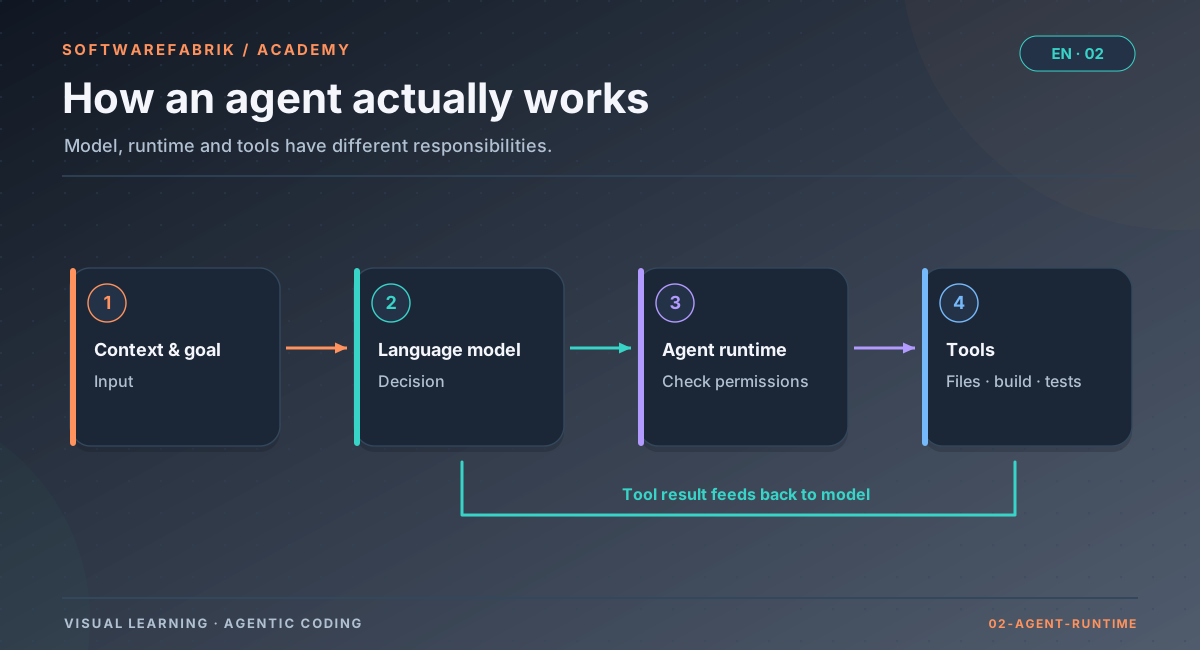
Modern coding agents such as Claude Code, OpenAI Codex, Gemini CLI, Aider or the Kimi CLI are command-line programs. They connect a language model (usually over the network at the provider, sometimes locally) with tools on your machine. When you start such an agent, roughly the following happens:
- The program assembles a starting context: a built-in system instruction from the vendor (“You are a coding assistant, you have these tools…”), possibly configuration files from your home directory and from the project, and your task.
- It sends the context to the model and receives either text or a tool call in return.
- It checks whether the tool call is allowed (permissions), executes it and appends the result to the context.
- It repeats steps 2 and 3 until the model considers the task done, a limit kicks in or an error occurs.
- It emits a final message — depending on the mode as text or as structured JSON with result, token usage and possibly a cost estimate.
The prompt is more than your task
When people talk about “the prompt”, they often mean only the sentence they type. In fact, an agent’s context consists of several layers:
| Layer | Source | Example |
|---|---|---|
| System prompt | Vendor of the agent | Description of the tools, rules of behaviour |
| Configuration and memory files | Home directory, project (e.g. AGENTS.md, CLAUDE.md) | Conventions, build commands, prohibitions |
| Task | you or the calling system | “Implement the endpoint …” |
| Working history | the loop itself | files read, build output, its own intermediate steps |
The second layer is treacherous: many agents load configuration automatically — from your home directory (personal settings, plugins, connected services) and from the project directory. What is convenient when you work alone on your own code becomes a problem when an agent runs in someone else’s repository or on a shared machine: then someone else has a say in what the agent knows and may do. How the factory handles this is shown below in the practice box “Ephemeral HOME” and in detail in Chapter 8.
2.2 Tools and permissions
In Chapter 1 you learned: an agent can do everything its tools can do. Permissions are the layer that determines which tool calls are actually executed. They are the most important dial between usefulness and risk.
Typical permission models
- Ask on every action: The agent shows every write or execution step and waits for your confirmation. Safe, but tedious in everyday work — and useless without a human at the terminal.
- Allowlists: Certain tools or command patterns are allowed in advance, such as “edit files” or “
mvnwith any arguments”. Everything else is rejected or requires a confirmation. - Denylists: Certain tools are explicitly blocked, such as writing for a pure review agent.
- Allow everything: Many agents have a mode that turns off all checks. It is meant for throwaway environments (a virtual machine that is deleted afterwards) — not for a machine with credentials, SSH keys and access to the corporate network.
The principle of least privilege
An agent should get exactly the permissions its task requires, and no more. For an agent that writes and tests code, that means, for example: read and write files in the project, run build and test tools, read-only Git commands. Not needed, on the other hand: arbitrary network access (curl, wget), deleting outside the project, git push. Commit and push are better handled by the surrounding system — then they are controlled and traceable.
A review agent (reviewer) needs even less: it should read and judge, but change nothing. This is exactly where a hard technical block is worth more than a friendly request in the prompt: “Please don’t change anything” is an instruction a model can misunderstand; a blocked write tool is a fact.
In the factory
The permission contract for Claude Code
For the Claude Code adapter, the factory defines the permissions explicitly — not via the UI, but only via YAML or environment variables, i.e. as a deliberate operational decision:
- Build and plan runs start the CLI with
--permission-mode acceptEditsand an--allowedToolslist. Without the flag, Claude Code in headless operation would not write any files but ask for permission in its text output. - Safe default allowlist (if nothing is configured): read, search, build and test tools, read-only Git,
ls— nogit commit/push, nocurl/wget, norm. - Configuration:
SOFTWAREFABRIK_CLAUDECODE_PERMISSION_MODE(defaultacceptEdits) andSOFTWAREFABRIK_CLAUDECODE_ALLOWED_TOOLS(comma-separated list in permission-rule syntax, e.g.Bash(mvn *)). - Rejected: the factory refuses
bypassPermissionsor--dangerously-skip-permissionsat startup — the CLI runs on the host, not in a throwaway VM. - Reviews run with
--permission-mode dontAskand--disallowedToolsfor Edit, Write and Bash. This makes them technically read-only.
SOFTWAREFABRIK_CLAUDECODE_ALLOWED_TOOLS=Read,Glob,Grep,Bash(mvn *),Bash(git status),Bash(git diff *)Bash(npx *) and Bash(node *) — both execute arbitrary code. If you don’t want that, set the allowlist explicitly, as in the example above. The flags depend on the CLI version; the isolation proof (canary, Chapter 8) checks the production invocation including these flags.
2.3 Headless: agents without a human at the terminal
In everyday work, many developers use agents interactively: you open a session in the terminal, enter a task, watch, answer questions, confirm actions. For automated workflows — CI pipelines, scripts, a control plane like the factory — you need headless operation: the agent receives its task as an argument, works through it and exits with a result.
In Claude Code the switch for this is --print (short -p); other CLIs have equivalents such as codex exec, gemini -p or, for Aider, --message together with --yes. What they all have in common:
- No follow-up questions possible. Nobody answers. The agent has to deal with ambiguity on its own — good instructions tell it how (record assumptions, choose the most conservative interpretation, clearly flag deviations).
- Permissions must be fixed in advance. An agent waiting for a confirmation that never comes either does nothing or asks for permission in its text output.
- Structured output. With an output format such as JSON, the result can be evaluated by machine: success or failure, token usage, possibly the CLI’s cost estimate.
- Time limits. A headless run needs an upper bound so that a hanging agent does not run forever.
claude --print --output-format json \
       --permission-mode acceptEdits \
       --allowedTools "Read,Glob,Grep,Bash(mvn *)" \
"Read PROJECT.md and INSTRUCTIONS.md and start the implementation. ..."2.4 Sessions and memory
A session is an agent’s continuous working history — everything that belongs together in one context window. Many agents can save sessions and resume them later. For reproducible, traceable work, however, this is of limited help: the content of a session is hard to inspect, is tied to one machine and one tool, and grows with every step.
It is more robust to keep persistent knowledge in files that live in the repository and are re-read on every run:
- Project description — what is being built and why.
- Working instructions — conventions, build commands, prohibitions.
- Memory — decisions and insights from earlier runs.
- The code itself and its Git history — the most reliable source for what has happened so far.
That way every run starts with a fresh, defined context, and the “memory” is human-readable, versioned and reviewable. The factory follows this strategy too: every run is a new headless call; whatever should persist between runs lives in the workspace (artifacts, MEMORY.md, code). Details in Chapter 3.
2.5 Models: which brain for which task?
Behind every agent there is a model, and most agents let you choose between several models. Without naming specific products — which change constantly — a few lasting criteria can be stated:
- Capability: Larger models are usually better at planning, architecture questions and hard bugs.
- Cost: They are also more expensive per token and often slower.
- Speed: Smaller models are suited to mechanical work and quick checks.
- Context window: How much fits into one call?
- Data residency and location: Where does the model run? May the code leave the company? For some environments only a locally operated model is an option.
A proven rule of thumb is: plan strong, implement cheap, review fast. Planning a project is rare but consequential — a strong model pays off here. The mechanical implementation of a clear plan also works with a mid-sized model. For reviews with a clear question, a small, fast model is often enough. How the factory maps this ranking (routing, team preference, role default) is covered in Chapter 10.
In the factory
Execution adapters: one agent, many vendors
The factory does not hard-wire coding agents but integrates them via execution adapters. An adapter knows how to call a particular CLI headless, how to hand it the task, which credentials it needs and how to evaluate its output. The factory calls the CLI as a subprocess.
| Adapter | Agent / backend | Access |
|---|---|---|
claude | Claude Code | Claude subscription or ANTHROPIC_API_KEY |
codex | OpenAI Codex | ChatGPT subscription or OPENAI_API_KEY |
gemini | Google Gemini CLI | GEMINI_API_KEY |
aider | Aider | depends on the backend model |
kimi | Kimi CLI (Moonshot AI) | Kimi subscription or KIMI_API_KEY/MOONSHOT_API_KEY |
local-llm | OpenAI-compatible local backend (Ollama, vLLM, LM Studio) | no cloud access needed (air gap) |
bedrock, vertex, azure-openai | Cloud gateways | Cloud credentials — experimental, not verified end to end |
mock | no real agent | — for practising at no cost |
The default adapter is set globally via SOFTWAREFABRIK_EXECUTION_ADAPTER or in the settings via execution.adapter.default. Project and tenant policies can restrict the allowed adapters — for example to local backends for particularly sensitive projects.
All adapters share the core of the task: the factory instructs the agent to read PROJECT.md and INSTRUCTIONS.md, to adhere strictly to the requirements, and appends the run’s objective. In front of the objective it places the vendor-neutral engineering guardrails (Chapter 3) — so every agent, no matter which vendor, gets the same guardrails.
In the factory
Creating a run: /runs/new
A run is a supervised execution of the agent against an objective. When creating one under /runs/new you choose three things:
- Adapter — which agent executes. Default from the settings, possibly restricted by project or tenant policy.
- Team — the participating agent roles (maintained under
/teams). Among other things, the team determines a preferred model (preferredModel). - Objective — free text per run, up to 4000 characters. This is exactly where you say what this run should do.
Objective: Create the Spring Boot skeleton per PROJECT.md, implement the
work-order CRUD (entity, repository, REST under /api/v1) and a React frontend
with a work-order list. mvn verify must be green.A good objective is concrete, refers to the project artifacts instead of repeating them and names a verifiable success criterion (“mvn verify must be green”). How to phrase objectives even more precisely — with acceptance criteria and IDs — is shown in Chapter 4.
In everyday SDLC work you don’t create many build runs by hand at all: a backlog item is “activated” and starts a build run whose objective is the associated plan (Chapter 5).
2.6 Why an agent run needs a lifecycle
If you simply call an agent in the terminal, there are exactly two states: running or done. That is not enough for controlled software development. You want to know: Is the working environment prepared? Is the run waiting for an approval? Is the check running right now? Has it failed, been cancelled, got stuck in a timeout? And you want to be able to intervene at certain points: pause, cancel, approve.
An explicit lifecycle with phases and statuses turns an agent run into a controllable process. Each phase has a clear task; each status change is an event that can be logged, evaluated and secured. This is the prerequisite for everything that follows in later chapters: approvals, quality gates, correction loops, evidence.
In the factory
The run lifecycle: seven phases, clear statuses
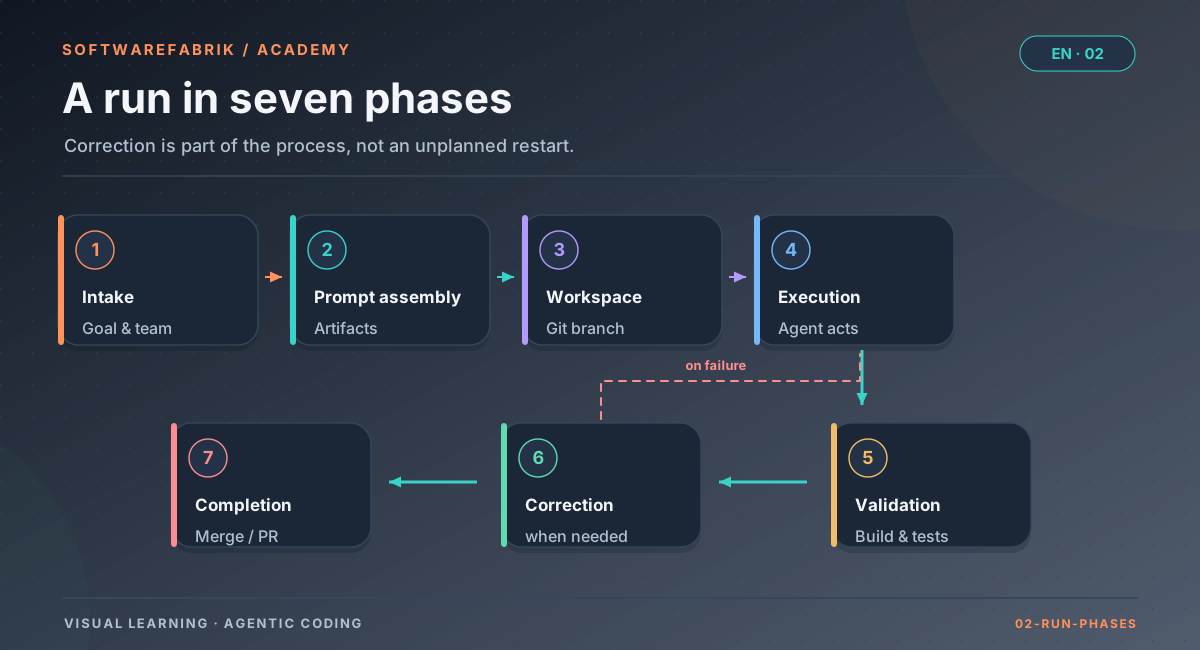
A run passes through seven functional phases:
Open full-size graphicOpen full-size graphic
| Phase | What happens |
|---|---|
INTAKE | Project and team are selected, plus the run’s adapter and objective. |
PROMPT_ASSEMBLY | The Markdown artifacts are generated and edited if needed; together with the objective they form the agent’s input. |
WORKSPACE_PREPARATION | The workspace is prepared (git init on the first run), the Markdown artifacts are written and committed as a checkpoint; build runs branch off onto their own branch. |
EXECUTION | The agent works; the live logs stream into the UI. |
VALIDATION | Build gate (mvn verify), then optionally the quality gate. |
CORRECTION | If the build is red, the factory automatically feeds the feedback into another run (at most two correction runs per run in total). |
COMPLETION | Completion: merge into the base branch or pull request, record the result. |
In addition there are technical statuses:
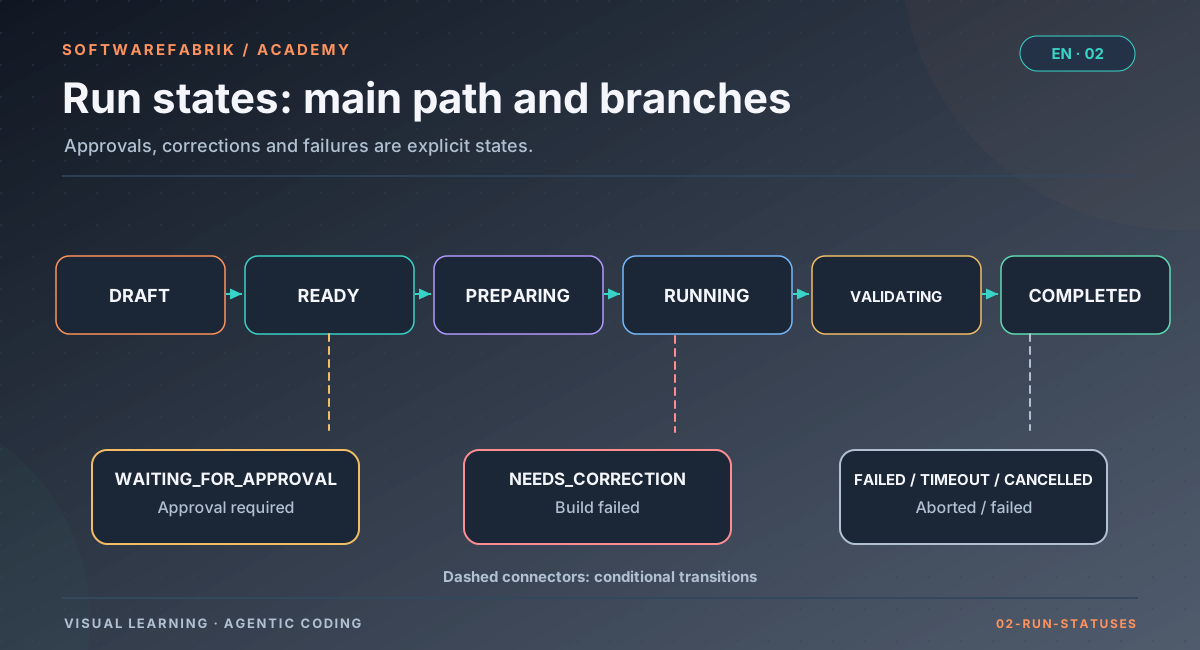
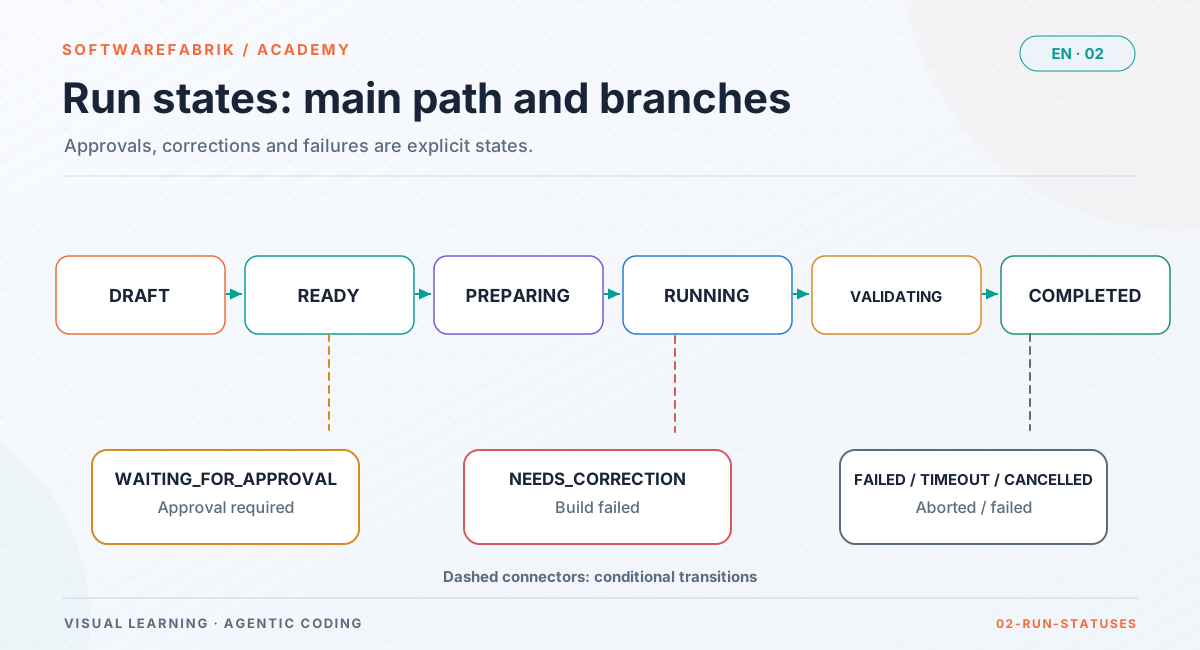
Open full-size graphicOpen full-size graphic
DRAFT → READY → PREPARING → RUNNING → (WAITING_FOR_APPROVAL) → VALIDATING → COMPLETED; plus NEEDS_CORRECTION, FAILED, TIMEOUT, CANCELLED, PAUSED and, with PR feedback enabled, WAITING_FOR_PR. The graphic shows the main path and the most common branches, not every status.How to operate a run
- “Mark ready” (
DRAFT→READY). - “Start run” (
READY→PREPARING): workspace, artifacts, checkpoint commit. RUNNING: The agent works; the live logs appear via Server-Sent Events on the run detail page.- Approval gate, if the policy requires it: the run waits in
WAITING_FOR_APPROVAL. VALIDATING:mvn verify.COMPLETEDorNEEDS_CORRECTION.
You can pause and resume as well as cancel runs at any time.
In the factory
Approval gate and inline diff
Depending on the policy, an approval gate kicks in. The run then goes into WAITING_FOR_APPROVAL. On the run detail page you see an inline diff of the workspace changes since the earliest checkpoint (up to 256 KB) and approve via “Approve and continue”. Without an active approval policy, this is the normal case: run.approval-vor-merge (on by default) makes every run wait for an approval before execution.
The administration manual knows two approval points per build run:
| Point | Effect |
|---|---|
before EXECUTION | The agent only runs after approval. Without an approval policy, the default run.approval-vor-merge (on) applies. |
before the merge (in VALIDATION) | The validated state is only merged or opened as a pull request after approval. Active only via an approval policy (/policies) or the mandatory-approval phase VALIDATION in policy-as-code. |
Approving requires at least the role MAINTAINER; every decision is recorded as an attested audit event. The second point is crucial for regulated environments: without it, the code would already be in the base branch before anyone had agreed.
Tip for approval: Actually read the diff. Pay particular attention to changed or deleted tests, new dependencies, configuration changes and files that have nothing to do with the objective. The engineering guardrails demand “surgical” changes from the agent — every changed line should be traceable to the objective. The diff shows you whether it complied.
2.7 Separating planning from building
A common mistake when working with agents is to mix planning and implementation in a single run: “Figure out what makes sense next and implement it right away.” The agent then makes consequential decisions without you being able to see them beforehand, and the result is hard to review because intent and execution merge.
A separation is better: a planning run analyses the current state and proposes steps without changing production code. A human reviews the proposals, selects, prioritises. Only then does an implementation run carry out a selected step. The plan thus becomes a reviewable intermediate result — and the yardstick against which the implementation can be measured.
In the factory
PLAN and BUILD runs
The factory knows two kinds of runs:
| Kind | Task | Result |
|---|---|---|
BUILD (default) | Implements an objective, changes code, validates via the build gate. | Code on its own branch sdlc/run-<id>, merge or pull request. |
PLAN | Analyses code, MEMORY.md and PROJECT.md and creates a file plans/NNNN-short-title.md for each sensible next step (rationale, scope, acceptance criteria, rough effort). Does not change production code. | Backlog items under Backlog / Plans. |
You start a PLAN run from the project’s backlog (/projects/{id}/backlog). If you activate an item there, a BUILD run starts with the plan as its objective — on the existing code. Chapter 5 covers the complete loop.
2.8 Access to the model: subscription or API key
A coding agent needs access to its model. There are basically two ways:
- API key: You get a key from the provider and pay by usage, typically per million input and output tokens. Transparent, good for teams and automation, but costs grow with usage.
- Subscription: Many providers let you use their coding agent with a personal subscription. You log in once interactively; the CLI stores the credentials locally. Billing is via the subscription and its usage limits, not per token.
Which terms apply to subscription use — especially for automated, headless use and for use by several people — is determined by the respective provider, and they change. Check them for your specific case before you use it. One important technical trap applies generally, though: if an API key is also set in the environment, the CLI may silently choose the paid API path even though you wanted to use the subscription.
In the factory
Subscription mode, API-key mode and ephemeral HOME
Auth mode per adapter
For Claude, Codex and Kimi there is one auth mode each: api-key (default) or subscription. It can be set in the .env or switched in the UI under Settings (takes effect without a restart, at most 5 minutes of caching).
# Claude subscription
SOFTWAREFABRIK_EXECUTION_ADAPTER=claude
SOFTWAREFABRIK_CLAUDECODE_AUTH_MODE=subscription

# Claude via API key
SOFTWAREFABRIK_EXECUTION_ADAPTER=claude
SOFTWAREFABRIK_CLAUDECODE_AUTH_MODE=api-key
ANTHROPIC_API_KEY=sk-ant-...- In subscription mode the factory actively removes the API key from the subprocess (
ANTHROPIC_API_KEYorOPENAI_API_KEY; for Kimi theKIMI_MODEL_*trio). This technically rules out exactly the trap from 2.8. - One-time login:
claude(OAuth flow),codex loginorkimi loginas the same operating-system user the factory runs as. That is why the single-seat setup runs hybrid: Postgres in a container, the factory natively. - Personal use: According to the docs, subscription mode is intended for personal use — you as the subscription holder, on your machine, with your subscription. If several people work with one instance, it belongs in the operating mode
TEAM_API_POOLwith an API key or gateway. Details: Subscription setup.
Costs in subscription mode
The factory reports EUR costs per run, calculated as tokens times price table. In Claude subscription mode this is an estimate at API rates that is not billed; the cost views label such runs as “estimate (API rates), not billed”. The cost overview lists Kimi subscription models at €0.00, because the flat rate incurs no token costs. More on this in Chapter 10.
Ephemeral HOME
Remember the treacherous second layer from 2.1: agents load configuration from the home directory. The factory therefore gives every call of an agent CLI a fresh, empty HOME. From your configuration directory it takes over, in subscription mode, only a copy of the credentials and writes renewed tokens back after the run. Your MCP servers, plugins, hooks, settings.json/config.toml and your Git identity therefore have no effect in agent runs — this is intentional (ADR-0017). You enable plugins selectively under Policy as Code → Allowed plugins. Why this matters for security is explored in Chapter 8.
Summary
- A coding agent is a CLI program: context (system prompt, configuration, task, history) + tools + permissions + model.
- Least privilege: keep write and execute permissions narrow, make review agents technically read-only, “allow everything” only in throwaway environments.
- Headless means: no follow-up questions, permissions in advance, structured output, time limit.
- Persistent knowledge belongs in files in the repository, not in sessions.
- The factory calls agents via execution adapters and takes every run through seven phases with clear statuses, approval gate and inline diff.
- PLAN runs propose, BUILD runs implement.
- In subscription mode the factory strips API keys, reports costs as an estimate and isolates every run with an ephemeral HOME.
Exercise
Exercise: Follow a run from start to finish
You do this exercise with the mock adapter (no cost) or in the public demo.
- Create a project (quick create under
/projects/newis enough) and generate the artifacts. - Open
/runs/new. Choose themockadapter and a team, and phrase an objective with a verifiable success criterion. - Mark the run ready and start it. Write down every status you see on the detail page, in the order in which they appear.
- Assign each status to the phase in which it occurs.
- Without an approval policy, the run stops in
WAITING_FOR_APPROVALbefore execution. Look at the inline diff: which files did the factory write itself (artifacts)? Then approve with “Approve and continue” and compare the diff after the run.
Thought exercise: Write an allowlist for an agent that is supposed to add tests to a Python project. Which tools does it need at a minimum? Which would you deliberately leave out, and why?
Solution hints
The expected sequence is DRAFT → READY → PREPARING → RUNNING → possibly WAITING_FOR_APPROVAL → VALIDATING → COMPLETED; without a pom.xml the build gate is skipped. For the allowlist, read, search, edit files and the test tool (e.g. a pattern for pytest) plus read-only Git are sufficient. You should leave out network tools, package installation from the registry, delete commands and writing Git — commit and push are handled by the surrounding system.
Chapter questions
-
Which layers make up the context of a coding agent, and which of them is particularly sensitive in terms of security?
Model answer
The vendor’s system prompt, automatically loaded configuration and memory files (home directory, project), the task and the working history. The sensitive one is the automatically loaded configuration: it can come from external sources (personal plugins, connected services, settings of an imported repository) and then has a say in what the agent knows and may do.
-
Why is it not enough to tell a review agent in the prompt that it should not change anything? How does the factory solve this?
Model answer
An instruction in the prompt can be misunderstood or ignored; a technical block cannot. The factory starts Claude Code reviews with
--permission-mode dontAskand--disallowedToolsfor Edit, Write and Bash — the reviewers are thus technically read-only. -
What changes when an agent runs headless instead of interactively? Name at least three points.
Model answer
Nobody answers follow-up questions, so the agent has to deal with ambiguity itself (record assumptions). Permissions must be fixed in advance, otherwise the agent writes nothing or merely asks for permission in its text. The output should be structured (e.g. JSON) so it can be evaluated by machine. And it needs a time limit.
-
Why does the factory reject
--dangerously-skip-permissions, even though it could make the agent more productive?Model answer
Because the agent CLI runs on the host and not in a throwaway VM. Without permission checks, the agent could execute arbitrary commands — delete files, access the network, read credentials. Instead, the factory uses
acceptEditswith a narrow allowlist. -
Name the seven phases of a run in the correct order and explain in which phase the build gate runs.
Model answer
INTAKE,PROMPT_ASSEMBLY,WORKSPACE_PREPARATION,EXECUTION,VALIDATION,CORRECTION,COMPLETION. The build gate (mvn verify) runs inVALIDATION; if it fails,CORRECTIONfollows with automatic feedback (up to two attempts). -
You use Claude subscription mode but forgot that
ANTHROPIC_API_KEYis still set in your shell. What happens in a factory run, and what would happen without the factory?Model answer
In subscription mode the factory actively removes the key from the subprocess; the run goes through the subscription. Without this measure, the CLI could prefer the key and silently bill via the paid API. It is still cleaner not to have the key in the environment in the first place.
-
What is the purpose of separating PLAN and BUILD runs?
Model answer
The PLAN run produces reviewable proposals (
plans/NNNN-*.mdwith scope and acceptance criteria) without changing production code. A human selects and prioritises; only the BUILD run implements. This makes consequential decisions visible before they become code, and gives the implementation a yardstick. -
A colleague is surprised that the MCP server he set up personally is not available in factory runs. Is that a bug?
Model answer
No, it is intentional. Every agent call gets a fresh, empty HOME; only the credentials are carried over. Personal MCP servers, plugins, hooks and settings have no effect (MCP null state, ADR-0017). Approved, read-only MCP tools can be provided selectively via the MCP gateway (Chapter 8).
-
Transfer: Your team wants to use a local model instead of a cloud provider in future. What changes in the factory process, and what stays the same?
Model answer
What mainly changes is the adapter configuration (
local-llmwith an OpenAI-compatible backend such as Ollama or vLLM) and possibly the model’s expected quality and speed. What stays the same are project artifacts, guardrails, run lifecycle, branch per run, build gate, quality gate, approvals and audit — that is exactly the point of the adapter layer.