
Learning goals
After this chapter you can:
- Choose models by task: explain why planning, building and reviewing deserve different model classes.
- Understand tokens: distinguish input, output and cache tokens and estimate where in an agent run the costs arise.
- Apply cost levers: keep context small, avoid repetitions, choose the right model class.
- Follow the factory’s model choice: explain the precedence override → team → role default → CLI choice and find it again in the why-trace.
- Read costs correctly: distinguish billed costs from estimates in subscription mode.
- Set limits: use budgets, hard caps and token limits deliberately.
- Understand operations: tell tenants, roles, SSO, operating modes, license tiers and deployment forms apart.
10.1 A model is not just a model: choosing by task
In the first chapters you learned that a coding agent consists of a language model, tools and a loop. The language model is the most interchangeable and at the same time the most expensive component. Providers almost always offer several model classes: large, slow, expensive models with a lot of judgment; mid-sized models as workhorses; small, fast, cheap models for simple, well-defined tasks. Names, versions and prices change on a monthly basis. The principle behind them stays stable.
The principle is: Not every task needs the strongest model. In everyday software work with agents, three task types can be distinguished that make very different demands.
Planning
When planning, the agent breaks a goal into work packages, weighs architecture options, and identifies dependencies and risks. Mistakes in this phase are expensive because they carry through all subsequent steps: a wrong cut produces ten wrong build runs. At the same time, the output of a planning run is comparatively short — a few Markdown files instead of hundreds of lines of code. A strong model pays off here: the extra cost per token applies to few tokens and avoids expensive downstream errors.
Building
When building, the agent implements a well-defined plan: creating files, writing code, adding tests, running the build, fixing errors. This work is extensive but mostly more mechanical. A solid mid-sized model usually handles it reliably if the task is precise — which is exactly what the spec and plan from chapters 4 and 5 ensure. This is where most of the token volume arises; the model class therefore has a strong effect on total costs.
Reviewing
When reviewing, a reviewer reads a diff and reports findings. Reviews are frequent, often run in parallel and work with limited context. A small, fast model is often sufficient here, especially since a good review process does not rely on an LLM alone anyway but adds rule-based checks (tests, static analysis, coverage checks) alongside it. Where a review is very demanding — a security assessment, for example — a stronger model can make sense.
Model choice is a configuration question, not a code question
Because models become outdated quickly, no model name should be hard-wired into tools, scripts or prompts. If you configure model choice centrally, you can switch in one place when a new model arrives — and know afterwards which run was produced with which model. This traceability is not just tidiness: when a result stands out, “which model was that?” is one of the first questions.
In the factory
Model choice precedence and capability routing
The factory separates model choice for planning and implementation via so-called capability routing: the settings run.routing.plan-model and run.routing.build-model determine which model plan runs get and which model build runs get. This way planning can get a stronger model than mechanical implementation, without a model name being hard-wired anywhere.
For every run, the factory resolves the model in a fixed order of precedence:
| Rank | Source | Where the value comes from |
|---|---|---|
| 1 | override | Routing override run.routing.plan-model or run.routing.build-model |
| 2 | team | The team’s preferred model: preferredModel of the developer agent, otherwise of the first agent with a model |
| 3 | rollen-default | Role default from the price table — only for the claude adapter |
| 4 | adapter-default | No --model flag; the CLI chooses itself |
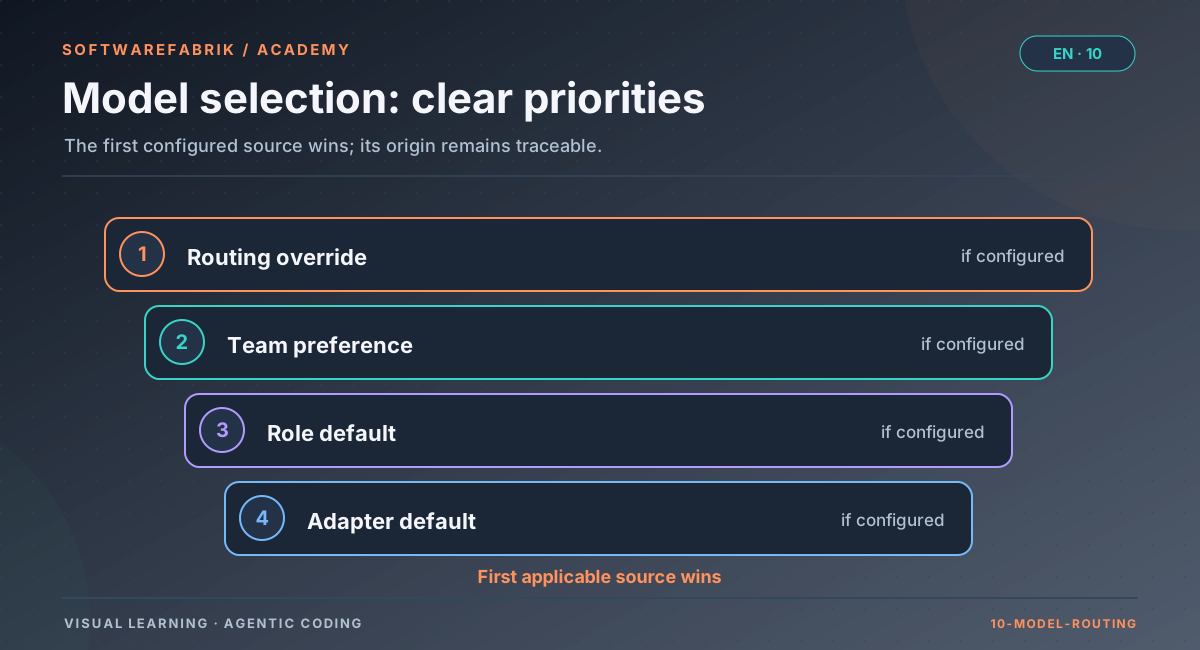
According to the administration manual (as of v0.38.0), the role defaults for Claude Code are: Plan → Opus (claude-opus-5-5), Build → Sonnet (claude-sonnet-5-5); reviews run with Haiku by default (claude-haiku-5-5, configurable via softwarefabrik.review.claudecode.model; empty means no --model flag). Because of its price, Fable (claude-fable-5-1) is never a default and can only be selected via the team setting or an override. The specific IDs change with new model generations — the administration manual of the installed version is always authoritative.
Other adapters (Aider, Bedrock/Vertex/Azure, Local-LLM, Kimi) deliberately do not receive the Claude role default, because they pass --model unchanged to their own CLI. For Codex, Kimi, Gemini and Aider there is instead a default model per adapter under execution.<adapter>.model. This setting does not exist for Claude Code — since v0.33.0, its model comes from routing, team or role default.
Traceable in the why-trace
Every resolution is written to the signed audit chain as RUN_MODELL_AUFGELOEST, with the field quelle=override|team|rollen-default|adapter-default. On the /runs/{id}/trace page you therefore see not only which model ran, but also why it was this one: whether someone forced it via override, whether it came from the team or whether the role default applied.
How to configure it
- Team level (ADMIN only): Under
/agents, open an agent definition (e.g. the developer) and enter a preferred model. Via/teams, you assemble the team you select for the run. - Routing level: Under Settings, set
run.routing.plan-modeland/orrun.routing.build-modelif you want to force a fixed choice for all runs (or, via scope, for one project). - Check: After the run, look in the why-trace to see which
quelleapplied.
10.2 Tokens: the currency of agents
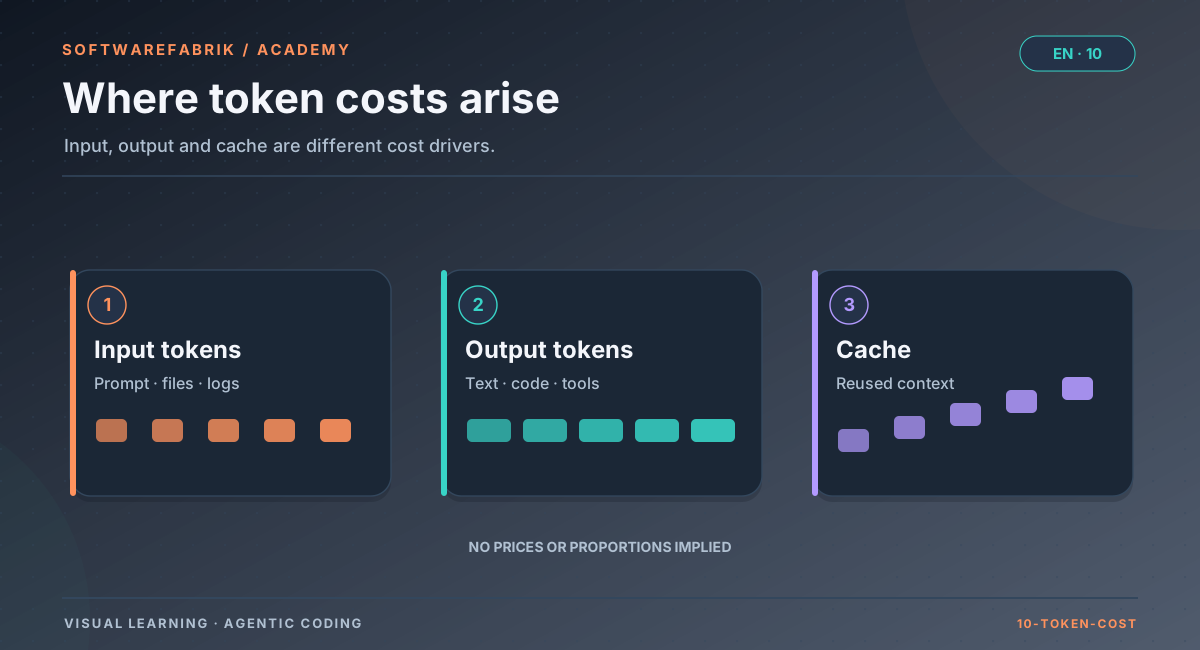
Language models compute in tokens. A token is a piece of text — roughly a word fragment; in German a word often takes more tokens than in English, and source code with many special characters is also token-heavy. With API usage, billing is typically split into three kinds:
| Token type | What it is | Typical share in agent runs |
|---|---|---|
| Input | Everything the model reads: system instruction, project context, tool definitions, prior conversation, file contents, tool results | Very high — every round of the agent loop sends the growing conversation again |
| Output | What the model generates: text, code, tool calls | Much smaller, but usually more expensive per token than input |
| Cache | Reused input portions (reading from the cache) or storing them in the cache for the first time (writing) | With long, unchanging prefixes, often the bulk of the input |
Why agent runs consume so much input
Remember the agent loop from chapter 2: the model thinks, calls a tool, gets the result, thinks further. In every round, the entire context so far is processed again — the instructions, the project context, all previous tool calls and their results. A run with forty tool calls therefore processes the beginning of the context roughly forty times. If the agent reads in a large log file or a long test report along the way, that text travels along into all following rounds.
This leads to an important insight: The cost of an agent run does not grow linearly with the size of the task, but rather with the number of rounds times the context size. An unclear task that forces the agent to search and experiment is therefore doubly expensive: more rounds and more context.
Prompt caching
Many providers offer prompt caching: an unchanging beginning of the context (prefix) is stored the first time and reused more cheaply in subsequent requests. This fits agents well, because instructions, tool definitions and project context stay identical from round to round. The details differ by provider (cache lifetime, minimum size, surcharge for writing, discount for reading); in general:
- Writing to the cache usually costs somewhat more than normal input, reading costs considerably less.
- Caching only works on a stable prefix. If you keep putting changing content at the beginning of the context (timestamps, random orderings), you prevent cache hits.
- Agent CLIs usually use caching automatically. You influence it mainly indirectly: through stable project files and instructions.
Subscription instead of a token bill
Besides per-token API billing, providers of coding agents also offer subscriptions in which runs count against usage limits rather than a bill. The terms change frequently and are bound to the respective provider’s terms of use — in particular, who a personal subscription is intended for and for what purpose. For the factory, the current state is described in the user manual and on the subscription setup page.
In the factory
Recording, reporting and correctly reading costs
For each run, the factory records the tokens reported by the adapter and values them using a model price table. It lives in application.yml under softwarefabrik.models with input, output and cached prices per million tokens. Checking it against the official price pages is a fixed item in the release routine; the euro values are derived via a fixed approximation factor, not a daily exchange rate.
What goes into the valuation
- Input, output and cache-read tokens per model.
- Cache-write tokens (recorded since v0.34.0): they are not included in the input tokens and are valued at 1.25 times the input price.
- The CLI’s own cost estimate is shown in the why-trace as a cross-check — it is not a bill.
- If several models run within one Claude run (subagents, for example), the tokens of all models count; as a known limitation, the price of the most expensive model is applied to all tokens.
Three special cases you need to know
| Case | Reported as | Meaning |
|---|---|---|
| Unknown model (no entry in the price table) | €0 | Deliberately conservative: better no value than an invented one. A €0 run with many tokens is a hint to check the table. |
Flat-rate models (k3, kimi-for-coding) | €0 | With a flat rate there are no token costs; the view shows marginal costs, not license costs. |
| Claude subscription mode | Euro value with label | Valued like API runs, but labeled “estimate (API rate), not billed”. |
The last point is the most important reading note: in Claude subscription mode, runs count against your subscription’s usage limits; no separate API bill arises. The euro values the factory still reports represent the generated load at the API rate. They still count in consumption and therefore against the budget and hard cap.
The cost views
| Route | Content |
|---|---|
/analytics | Costs per project, run, provider and in comparison, each as CSV |
/mandanten/kosten | Consumption per tenant (also as .csv), with a column “of which estimate (EUR)” |
/mandanten/seat-kosten | Consumption per seat, i.e. per triggering user (derived from run.triggered_by, also as .csv) |
/runs/{id}/trace | Costs of a single run alongside model, policy, approvals and gate result |
In the CSV exports, the estimate column is called Davon-Schaetzung-Abo-EUR. Runs without an auth marker (e.g. with the mock adapter) and runs from versions before the marker was introduced carry no label. On the dashboard you additionally see token consumption and costs for the last 14 days.
10.3 Cost levers: what really saves
Anyone who wants to reduce agent costs often thinks of a cheaper model first. That is one lever, but rarely the biggest. The most effective levers act earlier.
Lever 1: Precise tasks
A precise goal with clear acceptance criteria drastically reduces the number of rounds. The agent has to search less, guess less and rework less. This is where the work from chapter 4 (specs and EARS) and chapter 5 (planning) pays off directly in tokens: a build run against a well-cut backlog item with bound acceptance criteria is shorter than a run with the goal “finish the order management”.
Lever 2: Keep context small and stable
- Small: Only put into the context what the task needs. Huge log outputs, generated files or dependency directories are expensive ballast.
- Stable: Project files, instructions and guardrails should not change with every run. This helps caching and makes results more comparable.
- Curated: A well-maintained project memory with the most important decisions is better than a growing pile of unfiltered notes.
Lever 3: The right model class
As described in 10.1: a strong model for planning, the workhorse for building, a small model for reviews. What matters is measuring the choice, not guessing. If a cheaper build model needs twice as many correction loops, it is not cheaper in the end.
Lever 4: No blind repetitions
A failed run that is restarted unchanged costs the same again — with a similar chance of success. A repetition is only worthwhile if new information is added: compiler output, test failures, a reviewer finding, a merge conflict, a changed instruction. This is exactly the principle the factory implements in its correction loop (chapter 6): it feeds the build or gate feedback into the repeated run and limits the number of attempts.
Lever 5: Small steps
A large run that fails on a trifle after an hour burns a lot. Several small runs, each with a verifiable result, fail more cheaply and can be corrected in a more targeted way. It is the same logic as with small pull requests — except that money is also at stake here.
In the factory
Budgets, token limits and capacity protection
The factory offers several levels for limiting consumption. They complement each other:
| Mechanism | Level | Effect |
|---|---|---|
mandant_budget | Tenant, monthly in EUR | Either observe-only or as a hard cap (enforce): when exceeded, no new runs are started. |
budget.daily.tokens / budget.weekly.tokens | Settings | Token limits per day or week with a soft threshold |
| Workflow budget | Workflow | Applies before the start of the next task of a parallel workflow (chapter 7) |
| Capacity protection | Instance | Limits the number of concurrent runs |
| One active run per workspace | Project | Only one run at a time per project workspace; different projects and separate worktrees run in parallel |
A known limitation: the per-seat evaluation exists (/mandanten/seat-kosten), but the hard cap only applies per tenant. If you need to limit users individually, today that requires organizational rules or separate tenants.
Recommended setup order
- Observe first: set a budget per tenant without
enforceand collect typical runs for a week or two. - Evaluate in
/analyticswhich projects and run types drive consumption. - Then activate the hard cap with a buffer and set token limits as an early warning.
- For cost-free practice, use the
mockadapter (SOFTWAREFABRIK_EXECUTION_ADAPTER=mock): it goes through the complete run lifecycle without a real agent.
10.4 Tenants, roles and the four-eyes principle
As soon as more than one person works with agents, two questions arise: Who may do what? and Who sees what? The first is answered by a role model (RBAC, role-based access control), the second by tenant separation.
Roles: graduated permissions
Good role models for agent platforms separate at least three things: reading, executing and approving. Executing means letting agents write code — this costs money and changes repositories. Approving means taking responsibility for a result. If you do not separate these permissions, you lose the four-eyes principle: the same person commissions the agent and waves its result through.
Tenants: hard visibility boundaries
A tenant is an isolated unit — a department, a customer or a subsidiary, for example. A tenant’s data must not be visible to others, not even via guessed IDs. This is more than a convenience feature: agent runs contain source code, requirements, logs and costs, i.e. often confidential information.
Single sign-on
In companies, identity usually comes from a central identity provider (OIDC). An important security principle here: the integration must never accidentally extend access. New, automatically created users should start with minimal permissions; the actual assignment remains a deliberate administrative act.
In the factory
Roles, tenants and SSO
Role model
The factory has five roles in ascending order: VIEWER < DEVELOPER < MAINTAINER < OWNER < ADMIN.
| Capability | from role |
|---|---|
| Reading | VIEWER |
| Executing runs, creating and editing specs | DEVELOPER |
| Approving runs, approving specs, managing integrations/secrets | MAINTAINER |
| Tenant administration | ADMIN (the OWNER level is planned but currently carries no permissions of its own) |
| Account management, policy-as-code, compliance profiles, attestation, export | ADMIN |
You manage accounts under /admin/nutzer (ADMIN only): create them, assign tenant and role, set active/inactive, reset passwords. A lockout protection prevents the last active administrator from being demoted or deactivated. With run.approval-segregation you enforce segregation of duties: whoever triggered a run may not approve it themselves.
Tenants
Under /mandanten you create tenants and assign projects. A user belongs to exactly one tenant; without a tenant, the instance runs in single-tenant mode. Projects, runs and all derived data are tenant-scoped — access via a foreign ID fails, safeguarded by a dedicated test. Policy, audit, costs and export are separated per tenant. For maximum separation (e.g. VS-NfD), a separate instance per tenant remains the most conservative option.
SSO
OIDC login is optional and configuration-driven. Users who are created automatically at their first SSO login (just-in-time provisioning) deliberately receive the role VIEWER without a tenant. An administrator then assigns role and tenant.
Model and adapter governance on three levels
- Global:
execution.adapter.defaultand the default models in the settings. - Project: allowed adapters per project, maintained as the model policy on the project page (MAINTAINER and above). It is enforced when a run is created; a violation produces
RUN_POLICY_DENIED. - Tenant: Policy-as-code (
/policy-as-code, fielderlaubteAdapter, chapter 9) can restrict the allowed adapters tenant-wide. A tenant policy can only tighten the global one, never undercut it.
A run with a disallowed adapter is rejected and documented as RUN_POLICY_DENIED.
10.5 Deployment forms and operating modes
Agent platforms are operated in very different ways: from an individual on their own laptop to an isolated government installation without internet. The deployment form decides three questions:
- How does the model come into play? Personal subscription, API key, cloud gateway or local model.
- How many people share the instance? Roles, tenants and budgets depend on this.
- How much network is allowed? From “everything” to “nothing” (air gap).
One point deserves special attention: Personal subscriptions are personal. A subscription intended for an individual’s use of a coding agent is not access that a team should share via a common platform. As soon as several people use an instance, the runs belong on API keys or a gateway — with clean billing and clear terms of use.
Configuration without restarts
A configuration hierarchy is helpful in everyday work: general defaults globally, deviations per user or project. That way not every project has to define everything anew, and special cases remain visible where they belong.
In the factory
Operating mode, deployment forms, license tiers and settings
Operating mode betrieb.modus
| Mode | Intended for | Effect |
|---|---|---|
EINZELPLATZ_ABO | Personal use: the subscription holder runs the factory themselves on their own machine, with their own subscription, on the unmodified CLI | Subscription mode (execution.<adapter>.auth-mode=subscription) possible for Claude, Codex and Kimi; a configured API key is then actively removed from the subprocess |
TEAM_API_POOL | Several people on one instance | Blocks subscription login and enforces API key mode |
The factory does not check whether a key is present in TEAM_API_POOL mode. For Claude Code, ANTHROPIC_API_KEY must be set in the environment of the app process; according to the administration manual (v0.38.0), an Anthropic key stored under /integrations is displayed and validated but currently not passed on to the CLI.
Deployment forms
| Form | Description |
|---|---|
| Single workstation | One person, one machine, usually subscription mode of a coding CLI; Postgres in a container, factory native |
| Team | Several users on one instance, RBAC active |
| Multi-tenant | Several mutually isolated tenants on one instance |
| Air gap | Without network access: local-llm adapter (e.g. Ollama, vLLM, LM Studio), container sandbox with --network=none, license without back channel, PR poller off |
A public SaaS offering with self-registration is not covered.
License tiers
The factory comes in three tiers with the same signed license format. Runs, agents and team features per the license model, the spec rows per the administration manual (section 13b) and SPEC-005:
| Criterion | Community | Professional | Enterprise |
|---|---|---|---|
| Runs per day | 10 | 100 | 1000 |
| Parallel agents | 3 | 10 | 50 |
| Team features, SSO, audit log | — | — | yes |
| Specs (spec-driven development) | — | yes | yes |
| SDD governance (policy obligation, export 2.1, metrics; target state per SPEC-005) | — | — | yes |
Without an active license system (softwarefabrik.license.v1.enabled=false), the respective feature flag alone decides, e.g. softwarefabrik.spec.enabled. LLM costs are not included in any license; you pay for model usage directly to the provider.
Settings
All settings follow the scope hierarchy PROJECT > USER > GLOBAL > YAML and take effect without a restart, with at most five minutes of caching; values you change via the user interface apply immediately. Every change creates an audit entry. Vendor keys are not maintained in the settings but under /integrations — AES-GCM-encrypted, with provider validation.
Monitoring and backup
/actuator/health(incl. secrets health),/actuator/info(version, build number),/actuator/prometheus(metrics, ADMIN only).- You need to back up three things: the PostgreSQL database, the workspace directory with the projects’ Git repositories, and the attestation key together with the secrets master key.
- After every restore, run the chain verification under
/attestierung: an incomplete backup shows up there asCHAIN_BREAK.
10.6 Summary
- Choose model classes by task: strong for planning, workhorse for building, small for reviews — and measure the choice.
- Agent costs grow with rounds times context size. Precise tasks and a small, stable context are the biggest levers.
- Prompt caching rewards stable prefixes; cache writes cost somewhat more, reads considerably less.
- Repeat only with new information.
- The factory resolves the model by override → team → role default (Claude only) → CLI choice and attests the source.
- Euro values in Claude subscription mode are estimates at the API rate, not a bill.
- Budgets first observe-only, then as a hard cap per tenant; the seat view evaluates but does not limit.
- Roles separate executing and approving; ADMIN is not a data super admin; SSO users start as VIEWER without a tenant.
- Personal subscriptions belong on a single workstation; teams work in
TEAM_API_POOL.
Exercise
Exercise: A cost and model concept for a team
Starting point: A team of five developers and a technical lead wants to use the factory for two products. Product A is an internal tool, product B processes customer data. The lead wants nobody to approve their own runs and the costs per product to be visible.
- Decide which operating mode fits and justify it in one sentence.
- Sketch a role concept: Who gets
DEVELOPER, whoMAINTAINER, whoADMIN? Which setting ensures that nobody approves their own run? - Decide whether you create one or two tenants. What are the pros and cons of each option for cost reporting and visibility?
- Define a model strategy for plan, build and review runs. Via which settings or team fields do you implement it, and where do you check after a run whether it applied?
- Plan the budget rollout in three steps.
Solution outline
(1) TEAM_API_POOL, because several people use one instance; personal subscriptions are intended for a single workstation. (2) The five developers as DEVELOPER, two experienced people additionally as MAINTAINER for approvals, a dedicated operations account as ADMIN for tenants, accounts and budgets; enable run.approval-segregation. (3) Two tenants cleanly separate visibility, policy and budget — sensible because product B processes customer data and needs stricter rules; downside: users belong to exactly one tenant, so anyone working on both products needs an organizational solution. With one tenant, the project costs in /analytics are sufficient for cost reporting. (4) Plan runs with a strong model (run.routing.plan-model), build runs with the workhorse (run.routing.build-model or preferredModel of the developer agent), reviews with the small review model; check in the why-trace via RUN_MODELL_AUFGELOEST and the quelle field. (5) Observe-only mandant_budget → evaluation in /analytics and /mandanten/kosten → hard cap with buffer plus token limits as an early warning.
Chapter questions
-
Why is a more expensive model often worthwhile for planning runs compared to build runs?
Model answer
Planning mistakes multiply, because all subsequent build runs build on the plan. At the same time, a plan run produces comparatively little output. The extra cost per token therefore applies to few tokens and prevents expensive downstream errors. Build runs, by contrast, produce most of the volume for rather mechanical work, where a mid-sized model is usually sufficient.
-
Explain why the cost of an agent run does not grow linearly with the size of the task.
Model answer
In every round of the agent loop, the entire context so far is processed again: instructions, project context, all tool calls and their results. Costs therefore grow roughly with the number of rounds times the context size. Unclear tasks increase both, and large outputs that are read in inflate every subsequent round.
-
A build run with the
claudeadapter ran with Sonnet, even though you entered Opus on the developer agent. What is the most likely cause, and where do you check?Model answer
A routing override
run.routing.build-modeltakes precedence over the team’s preferred model. Alternatively, a different team was selected. In the why-trace (/runs/{id}/trace),RUN_MODELL_AUFGELOESTwithquelle=override,team,rollen-defaultoradapter-defaultshows where the model came from. -
Why does a run with the Aider adapter not get a Claude role default?
Model answer
Aider (like Bedrock/Vertex/Azure, Local-LLM and Kimi) passes
--modelunchanged to its own CLI or backend. A Claude model name would be wrong or meaningless there. For these adapters, the default model per adapter or the CLI’s choice applies. -
In the cost view, a Claude run shows a euro amount with the note “estimate (API rate), not billed”. What does that mean, and does the amount count against the budget?
Model answer
The run ran in subscription mode and counts against the subscription’s usage limits; no API bill arises. The factory still values the tokens at the API rate to make the generated load visible. The amount counts in consumption and therefore against the budget and hard cap.
-
A run with several hundred thousand tokens shows €0. What are the two possible explanations?
Model answer
Either it is a flat-rate model (e.g.
k3,kimi-for-coding), for which €0 is deliberately recorded, or the model has no entry in the price table inapplication.ymland is conservatively valued at €0. In the second case, the table should be extended. -
An administrator complains that she cannot see another tenant’s projects. Is that a bug? What needs to be done?
Model answer
Not a bug: in the factory,
ADMINis not a super admin for data. Projects, runs, logs and costs remain tenant-scoped. Only account management and project assignment are isolation-free. The solution is the tenant assignment (assign the account or project to the right tenant) or a deliberate organizational arrangement. -
Why do users newly created via SSO receive the role
VIEWERwithout a tenant, and which general principle lies behind this?Model answer
An SSO integration must never accidentally extend access. Minimal permissions at first login and a deliberate administrative assignment of role and tenant implement the principle of least privilege and fail-safe defaults.
-
Transfer: You are asked to cut your team’s agent costs by a third. Name three measures in the order in which you would examine them, and justify the order.
Model answer
Example: (1) Make tasks more precise and cut them smaller (specs with acceptance criteria, backlog items instead of a mega-goal), because that reduces rounds and context at the same time. (2) Stop repetitions without new information and evaluate correction loops, because blind retries are pure waste. (3) Only then adjust the model classes per task and measure the effect in
/analytics, because a cheaper model with more corrections can end up more expensive. -
Which three things do you need to back up, and why does the attestation key belong to them?
Model answer
The PostgreSQL database, the workspace directory with the Git repositories, and the attestation key together with the secrets master key. Without the attestation key, the signed audit chain can no longer be verified later; without the master key, stored secrets can no longer be read. After the restore, the chain verification under
/attestierungshows whether the backup was complete.