Learning goals
After this chapter you can:
- Walk the whole path: take a feature from idea through spec, approval, plan, build, quality gate and acceptance to release with the factory.
- Assign responsibility: say for every step what you decide, what the factory does automatically and where a human deliberately stops.
- Recognize anti-patterns: name and avoid typical mistakes in working with agents.
- Work with checklists: before the first run, before spec approval, before merge approval and after the release.
- Staff roles in the team: who writes specs, who approves, who operates the instance.
- Continue your learning path: know where to look things up and what to practise next.
11.1 The loop at a glance
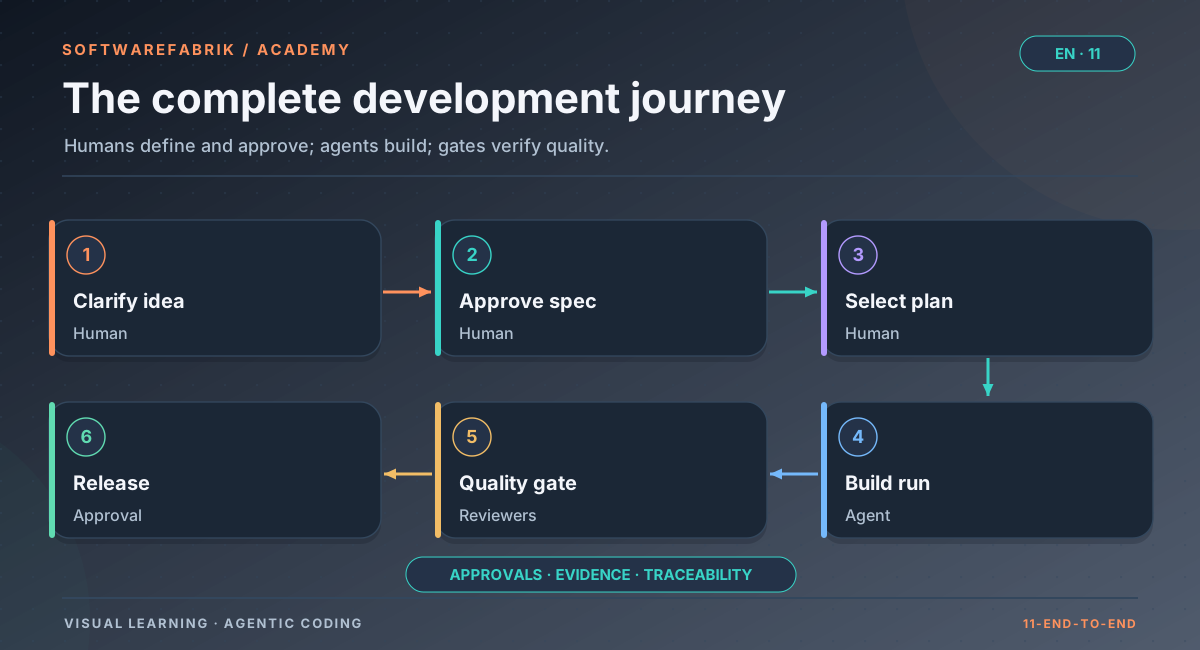
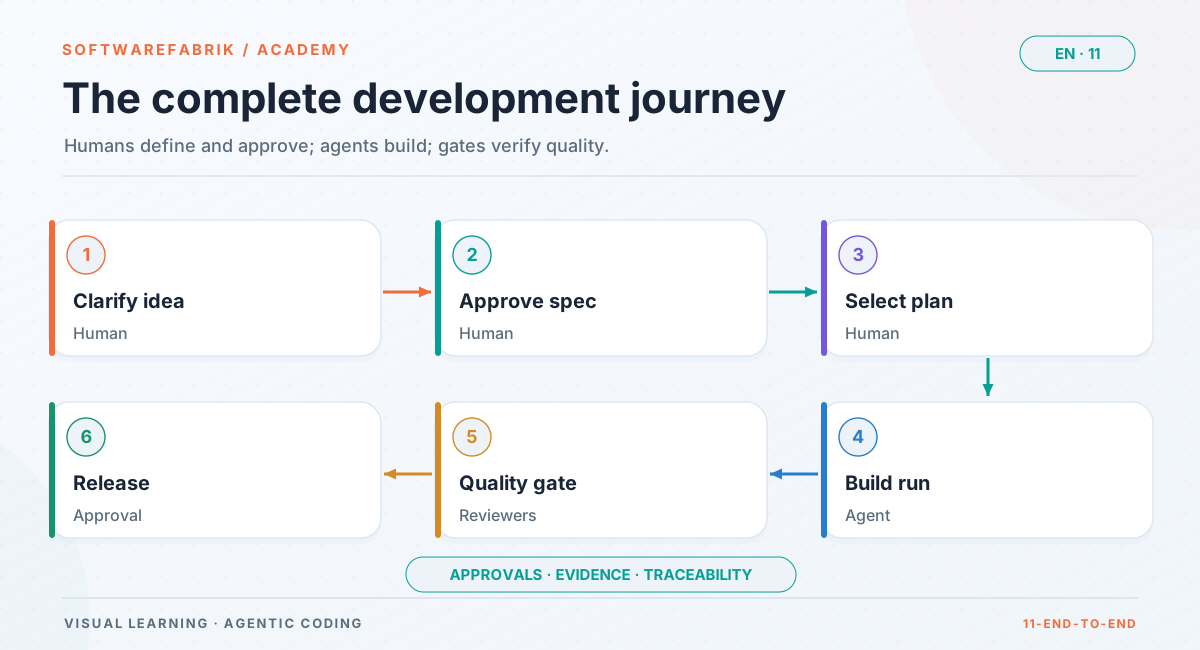
The previous chapters explained each building block on its own. In everyday work they mesh together. The factory’s guiding principle sums it up in three sentences: You describe. The factory builds. You approve. In between lies a cycle that you go through again for every feature:
Idea
  → Spec (goal, non-goals, acceptance criteria with IDs)
  → Spec approval (human, MAINTAINER or higher)
  → Plan run (plans/*.md with Spec:/AC: reference)
  → Activate backlog item
  → Build run on its own branch
  → Validation (build) → correction loop if needed
  → Quality gate (reviewers, incl. acceptance criteria)
  → Approval before merge / pull request
  → Check why-trace, maintain memory
  → Milestone release
→ next ideaTwo things matter about this cycle. First, there are deliberate stops where a human decides — spec approval, approval before execution (the default without an approval policy) and approval before merge (set up via an approval policy or compliance profile). Second, between the stops the factory works on its own, including corrections. You don’t need to watch an agent type; you need to take the stops seriously.
softwarefabrik.spec.enabled and, with an active licensing system, tier Professional or Enterprise), the project is in spec mode STRENG (strict; the other modes are AUS (off) and LEICHT (light)), the project has a Git remote URL set and a GitHub token is stored under /integrations. Without a remote everything works the same, except that the merge happens locally instead of via a pull request. To practise at no cost, use the mock adapter.
11.2 Step 1: Sharpen the idea
Our example project is MaintHub, the maintenance order portal from the user manual: Spring Boot backend with a REST API under /api/v1, React frontend, roles ADMIN and DISPONENT (dispatcher), hexagonal architecture. The project already exists; a few build runs have produced order CRUD and the order list.
The business department gets in touch: “Dispatchers should be able to cancel orders.” That is a typical idea — short, plausible and full of unresolved questions:
- Can any order be cancelled, even one that is already completed?
- Is a cancelled order deleted, or does it stay visible with a status?
- Is a reason required? Who sees it?
- What happens if two dispatchers cancel at the same time?
- May a technician cancel?
If you hand this idea unchanged to an agent as a run goal, it will answer every one of these questions — silently, at its own discretion, somewhere in the code. The factory’s engineering guardrails do require the agent to disclose its assumptions and choose the most conservative interpretation, but that does not replace a business decision. That is why the first step is not the run but the conversation: you clarify the questions with the business department or record them as open questions.
What you do
- Collect business questions and get them answered.
- Record what is explicitly not included (e.g. “no restoring of cancelled orders in this step”).
- Check whether the idea fits into one run or breaks down into several backlog items.
11.3 Step 2: Write the spec
The answers become the spec. Chapter 4 covered structure, EARS templates and typical mistakes in detail; here is just the result, in compact form:
---
id: SPEC-007
titel: Cancel order
version: 1
status: DRAFT
owner: Dispatch business unit
contracts: []
ersetzt: null
---

# SPEC-007 — Cancel order

## Ziel
Dispatchers can cancel open maintenance orders with a reason, so that
erroneous entries and called-off appointments disappear cleanly from
planning without losing the history.

## Nicht-Ziele
- No restoring of cancelled orders.
- No notification of technicians (separate spec).

## Akzeptanzkriterien
- **AC-007-01** — When a user with role DISPONENT cancels an order in
  status OFFEN with a reason of 10 to 500 characters, the system shall
  set the status to STORNIERT and store the reason, user and timestamp.
- **AC-007-02** — If the order is not in status OFFEN, then the system
  shall reject the cancellation with HTTP 409 and leave the status
  unchanged.
- **AC-007-03** — If the reason is missing, shorter than 10 or longer
  than 500 characters, then the system shall reject the cancellation
  with HTTP 400 and an understandable message.
- **AC-007-04** — If a user without role DISPONENT or ADMIN cancels,
  then the system shall reject the request with HTTP 403.
- **AC-007-05** — The system shall hide cancelled orders in the order
  list by default and show them via a filter.

## Edge cases
- Two simultaneous cancellations of the same order: exactly one wins,
  the second receives 409.

## Open questions
- (none)Ziel, Nicht-Ziele and Akzeptanzkriterien stay in German because the factory validates them literally.Note what this spec achieves: every criterion describes behaviour, not implementation. Limits are concrete (10 to 500 characters, HTTP codes). The non-goals prevent the agent from “helpfully” building a restore function or email notification. The concurrency edge case is recorded; you could also turn it into its own AC if it is to be formally accepted.
In the factory
Create and approve the spec
- On the project page, open the Specs button (
/projects/{id}/specs). The project’s spec mode is shown there too (AUS/LEICHT/STRENG); every change of mode is audited asPROJECT_SPEC_MODUS_SET. - Create a new spec from the template (role
DEVELOPERor higher). The factory assigns the next number and saves the text as version 1 in statusDRAFT. Every edit creates a new draft version; nothing is overwritten. - Optionally, instead of writing by hand (since v0.38.0): start a spec run that sharpens the idea into a spec, uncovers gaps and edge cases and asks open questions. The run then ends in status
WAITING_FOR_INPUT, you answer the questions on the spec detail page, and “Continue (follow-up pass)” starts a new, linked spec run that produces a newDRAFTversion. A spec run never approves anything itself. - A second person with role
MAINTAINERor higher reads the spec and approves it. The factory checks the mandatory sections (Ziel= goal,Nicht-Ziele= non-goals,Akzeptanzkriterien= acceptance criteria), the ID schemeAC-<nnn>-<nn>and uniqueness; errors appear as an understandable validation message. - On approval the version becomes
APPROVEDand immutable; an older approved version of the same spec becomesSUPERSEDED. The audit chain recordsSPEC_APPROVEDwith spec ID, version and content hash, and the acceptance criteria block is stored as contractSPEC-007-acunder Contracts.
A spec’s detail page shows all versions, the approval history and a comparison of two versions at the level of acceptance criteria (new, removed, changed).
11.4 Step 3: Plan and fill the backlog
Five acceptance criteria sound manageable, but they touch the domain, persistence (new columns or a migration), the REST interface, permissions and the frontend. Instead of packing everything into one run, you let the factory plan. A plan run changes no production code; it writes proposals as Markdown under plans/.
A good plan for this feature could look like this:
| Plan | Content | AC | Depends on |
|---|---|---|---|
plans/0012-storno-backend.md | Domain model, status transition, migration, REST endpoint with validation and authorization, tests | AC-007-01 to AC-007-04 | — |
plans/0013-storno-frontend.md | Cancellation dialog with reason field, “show cancelled” filter in the order list | AC-007-05 (and error messages from AC-007-02/03) | 0012 |
Each plan file states its spec reference in two lines — exactly as chapter 5 described:
Spec: SPEC-007
AC: AC-007-01, AC-007-02, AC-007-03, AC-007-04In the factory
Plan run, backlog and activation
- Start a plan run under Backlog / Plans (
/projects/{id}/backlog). In spec modeLEICHTorSTRENGthe plan directive requires the linesSpec:andAC:in every plan and lists the available specs with their approval status for the agent. - After the plan run, the factory indexes the files as backlog items. Content lives in the repo (
plans/), status and order in the database. - In the backlog you check each item’s spec reference. The factory warns if the spec is missing, not approved, or if AC IDs are unknown. In mode
STRENGsuch an item cannot be activated. - Set dependencies: item 0013 gets 0012 as a blocker. An item can only be activated once all its blockers are
DONE; blocked items appear greyed out. - Reject unsuitable plans instead of leaving them lying around — a clean backlog is context for the next plan run.
- Activate item 0012: the factory starts a build run whose goal is the plan, on top of the existing code.
DONE once its build run has been merged — not as soon as code has been written. In PR mode this applies only with PR feedback enabled (git.pr-feedback.enabled); otherwise opening the PR already counts. This prevents a successor from building on a state that never reached the base branch.
11.5 Step 4: Build
Now the agent works. For you this is the phase where you have the least to do — and where the temptation to intervene is greatest. Resist it. What you do instead:
- Skim the live logs, don’t read every line. Things that stand out are loops (the agent keeps reading the same file), tool errors and signs of missing context.
- Don’t work in parallel in the same workspace. Only one agent ever writes per workspace; your own changes belong on a separate branch or have to wait.
- Abort on genuine wrong turns instead of watching — and then improve the task rather than restarting the same run.
If the build goes red, that is no cause for concern. That is exactly what the correction loop is for: the factory gives the agent the build output as new information and lets it fix things. Only if that repeatedly fails is it your turn.
In the factory
What happens during the build run
| Phase | What the factory does |
|---|---|
| Preparation | Fast-forward the base branch to the remote state, create its own branch sdlc/run-<id8>, write and commit the artifacts (PROJECT.md, INSTRUCTIONS.md, AGENTS.md with guardrails and spec index, MEMORY.md, specs/SPEC-007-…/spec.md) |
| Binding | Bind the version of SPEC-007 approved at start time and attest it as RUN_SPEC_GEBUNDEN with spec=…;version=…;hash=…;ac=…; model resolution as RUN_MODELL_AUFGELOEST, guardrails as RUN_GUARDRAILS_ANGEWENDET |
| Approval before execution | Without an active approval policy the default (run.approval-vor-merge, on), otherwise depending on the policy: the run waits in WAITING_FOR_APPROVAL |
| Execution | The agent works; behind the guardrails its task contains the bound acceptance criteria (ID and text) — the same for every adapter. Live logs via server-sent events |
| Validation | Build gate (for Java stacks mvn verify); on red, automatic correction with the build feedback on the same branch, at most two correction runs per run in total, then NEEDS_CORRECTION |
| Quality gate | Reviewers check the diff (see 11.6) |
| Approval before merge | If an approval policy or pflichtFreigabePhasen requires the VALIDATION phase, the validated state waits for an approval before merging or opening a PR |
| Completion | Factory commit with trailers Spec: SPEC-007 and Implements: AC-007-01 …; with remote and token, push and pull request (PR body names spec and AC IDs), otherwise local merge |
If the agent changes the file under specs/ during the run — say because it notices a contradiction — the factory adopts it after the build as a new DRAFT version. Nothing is approved as a result; a human has to look at the draft. A merge conflict does not abort the run; it goes into the correction loop with the conflicting files as work instructions.
11.6 Step 5: Read the quality gate
A green build says: the code compiles, the existing tests pass. It does not say whether the code is secure, respects the architecture or does the right thing. That is what the quality gate is for. In everyday work you read its result like a review comment from an experienced colleague — with the same mix of trust and scrutiny.
What you check
- The verdict:
PASSED,WARNING,FAILED,SKIPPEDorERROR.ERRORmeans a reviewer crashed. That is never a silent pass but a reason to look. - The findings by category: security findings (e.g. SQL concatenation, hard-coded keys) and architecture findings (e.g. a modified existing Flyway migration) weigh heavily.
- AC coverage (checked automatically by the
spec-conformancereviewer since v0.38.0): for every bound criterion there must be at least one test that references the AC ID (test name, an annotation such as@Spec("AC-007-02"), or a comment). If one is missing, the criterion is not evidenced. - Uncovered behaviour: changed production files not mapped to any criterion deserve a look — perhaps the agent “helpfully” built something that is listed in the non-goals.
In the factory
Gate modes and reviewers in the example
You find the gate result on the run detail page or under /runs/{id}/quality-gate. In mode advisory (default) findings are shown but do not block; in mode blocking a FAILED or ERROR triggers the correction loop. For a feature with an authorization check like cancellation, blocking is the right choice.
Besides the six familiar reviewers (claude-review, aider-review, security-reviewer, architecture-reviewer, hallucination-reviewer, dependency-scan), for runs with a spec reference the rule-based reviewer spec-conformance (category REQUIREMENTS, no agent CLI) checks whether every bound AC is referenced by at least one test, whether tests refer to AC IDs that do not exist in the bound version, and whether production files were changed without an AC mapping. In spec mode STRENG it is a mandatory reviewer, missing AC coverage is CRITICAL, and the gate runs in blocking mode, even if the global gate mode is advisory; in mode LEICHT its findings are advisory.
A typical case in the example: the agent tested AC-007-01 to 03 cleanly but wrote no test for AC-007-04 (403 without role), because the authorization “applies anyway through the security configuration”. The gate reports AC-007-04 as not evidenced, the correction loop receives this finding as new information, and the second attempt delivers the missing negative test.
@Test
@Spec("AC-007-04")
void stornierung_ohne_disponentenrolle_wird_mit_403_abgelehnt() {
    // Given: order OFFEN, user without role DISPONENT or ADMIN
    // When:  POST /api/v1/auftraege/{id}/stornierung with a valid reason
    // Then:  HTTP 403, status stays OFFEN
}11.7 Step 6: Acceptance and approval before merge
The gate is green. Now comes the stop that is most often underestimated: human approval before the merge. It does not happen by itself: set it up via an approval policy (/policies) or a compliance profile with mandatory approval VALIDATION; without it, the factory merges (or opens the PR) directly after a green gate, and your review takes place in the PR. It is not a formality. With your approval you take responsibility for the code — just as you would for a colleague’s pull request.
How to read an agent diff
- Spec first, then the diff. Read the acceptance criteria again before you look at code. That way you check against the task, not against your gut feeling.
- Tests first. Check whether the tests really capture the behaviour of the criteria. A test that only checks “no error” proves nothing. Look for negative and boundary cases (9 and 501 characters for the reason).
- Then the production changes. Every changed line should be traceable to a criterion. Large-scale reformatting, “clean-up work” in unrelated classes or new dependencies are warning signs.
- Read the agent’s decision notes. The guardrails require it to disclose assumptions and deviations. If anything there touches business logic, it belongs back in the spec.
- Be especially thorough with migrations and security. Database changes are hard to undo; authorization errors are the most expensive errors.
In the factory
Approval, pull request and why-trace
- Approval: On the run detail page, in status
WAITING_FOR_APPROVAL, you see an inline diff of the workspace changes (up to 256 KB) and approve via Approve and continue. Approval requires roleMAINTAINERor higher; withrun.approval-segregationthe person who triggered the run may not approve it. Every decision is recorded asapproval_decisionand as an attested audit event. Optionally you enter your own review effort in minutes — it feeds into the metrics as self-reported data. - Pull request: With remote and token, the factory pushes the branch and opens a PR whose body names the spec and AC IDs. If PR feedback is active (
git.pr-feedback.enabled, default off), the run waits inWAITING_FOR_PRfor green CI and merge; red CI also starts a correction. - Why-trace: Under
/runs/{id}/traceyou check after completion whether everything went as intended: bound spec version (version, hash, AC IDs), model and source of the model choice, policy version, approvals with names, gate result, plan origin and costs. - Memory: Under Memory on the project you record what you learned — for example “always protect status transitions with optimistic locking”. The entry lands in the workspace as
MEMORY.mdbefore every subsequent run.
Then you activate item 0013 (frontend). It now builds on the merged backend, because the workspace belongs to the project, not to the run.
11.8 Step 7: Release and the next pass
Both items are DONE. For the business department, only the shipped version counts. A release bundles completed work, documents it and marks the state in the repository. Then the cycle starts over — either with the next idea or with a change to the spec, because after the first few weeks the business department wants a list of predefined reasons instead of free text after all.
This second case in particular shows the value of the spec: you change SPEC-007, a new version is created, and the comparison on the spec detail page already shows today which criteria are new, removed or changed. Since v0.38.0, after approval the factory additionally marks open backlog items bound to a changed or removed criterion as stale, moves bound workflow tasks to WAITING_FOR_REPLAN and writes the comparison as SPEC_DRIFT into the audit chain. Instead of “something changed”, you get a precise list.
In the factory
Milestone release, routines and automatic follow-up suggestions
- Milestone: Under
/projects/{id}/milestonesyou group backlog items into a milestone with a name and target version. The release creates aCHANGELOG.mdsection in the project from theDONEitems, sets a Git tagv<version>and — with a GitHub remote and token set — a GitHub release. - Automatic follow-up suggestions: With
run.auto-followup-plana successful build run automatically triggers a plan run; the loop plan → build → plan closes itself. - Routines: Under
/projects/{id}/routinesyou create scheduled plan or build runs. Together with the follow-up suggestions, the loop keeps going without manual triggering — the approval points remain the deliberate stops.
blocking.
11.9 Anti-patterns: please don’t
The following patterns show up in almost every team that starts working with agents. Each has a simple countermeasure.
| Anti-pattern | Why it hurts | Instead |
|---|---|---|
| The mega goal — “Build the complete order management including statistics” | Long runs, huge diffs nobody reviews; an error at the end costs the whole run | Spec, plan run, small backlog items with dependencies |
| Free text instead of a spec | The agent silently decides business questions; the gate cannot check whether the right thing was built | Spec with EARS criteria and IDs, spec mode LEICHT or STRENG |
Gate set to off “because it’s annoying” | Security and architecture findings disappear; errors land in the base branch | At least advisory, blocking for production code; understand annoying findings instead of switching them off |
| Blind retry — restarting the same failed run unchanged | Same costs, similar result | Only repeat with new information: refine the goal, extend the spec, add a memory entry |
| Approval without reading the diff | The stop becomes a facade; responsibility without control | Read the spec, check the tests, check the production changes (11.7) |
| Agent writes and approves its own spec | The requirement confirms itself; plausible but wrong criteria get through | Agents only create drafts; approval is for a human with MAINTAINER or higher, ideally not the one who triggered the run |
| Working alongside in the same workspace | Two writers, one directory: conflicts, lost changes | Separate branch or wait; for parallelism, use the workflow layer with worktrees |
| Context dump — tipping everything into memory and the project description | Expensive, contradictory contexts; the agent follows the wrong note | Curate memory, delete outdated entries, record decisions rather than conversation logs |
| Trusting third-party configuration — an imported repo brings its own hooks and MCP servers | Foreign code runs with the agent’s privileges | Keep the null state, check findings in the audit chain (chapter 8) |
| Only looking at costs at month end | Automation and long runs add up unnoticed | Budgets and token limits up front, regular look at /analytics |
11.10 Checklists for everyday work
Before the first run in a project
- Project definition complete: vision, target audience, stack, architecture, security, NFRs, Git conventions filled in; no empty placeholders in the generated artifacts.
- Artifacts read: skimmed
PROJECT.md,INSTRUCTIONS.md,AGENTS.mdonce. - Team chosen: suitable agent roles, preferred models set deliberately.
- Adapter and auth mode settled: subscription only for personal use; in a team, API key or gateway.
- Sandbox decided: container mode for build runs if Docker is available.
- Gate mode set: at least
advisory. - Budget set (at least observing) and spec mode chosen.
- Practise with
mockfirst if you don’t know the flow yet.
Before spec approval
- Goal phrased from the user’s perspective, not as a technical task.
- Non-goals named.
- Every criterion has an ID, describes a behaviour and is testable (no vague words like “fast” or “user-friendly”).
- Negative and boundary cases covered.
- No open questions left in the “Open questions” section.
- Confirmed from a business perspective by someone who is not implementing it.
Before merge approval
- Gate verdict understood, no
ERRORignored. - Every bound AC evidenced by a test, negative cases included.
- No changes outside the task (uncovered behaviour checked, non-goals respected).
- Migrations and permissions checked separately.
- Agent’s decision notes read; business assumptions fed back into the spec.
- Not your own run, if segregation of duties applies.
After the release
- Why-trace spot-checked: bound spec version, model, approvals.
- Memory extended with learnings, outdated entries removed.
- Backlog tidied: rejected plans removed, stale items reassessed.
- Costs of the milestone reviewed in
/analytics. - Spec changes for the next version started as a new draft version.
11.11 Roles in everyday team work
Agents change who does what, not that someone has to carry responsibility. In practice the following responsibilities have proven themselves; they can be mapped onto the factory’s role model.
| Human role | Tasks | Typical factory role |
|---|---|---|
| Business owner (spec owner) | Define goals and non-goals, answer open questions, confirm criteria from a business perspective | DEVELOPER (drafts) or VIEWER contributing via the team |
| Developer | Flesh out specs, start plan and build runs, maintain the backlog, curate memory | DEVELOPER |
| Reviewer / technical lead | Approve specs and runs, assess gate findings, approve workflow plans | MAINTAINER |
| Product or team lead | Tenant, project assignment, budgets | ADMIN (platform operations; the OWNER level currently carries no rights of its own) |
| Operations / platform | Accounts, policy-as-code, compliance profiles, isolation evidence, backup, attestation, export | ADMIN |
Alongside these are the agent roles in the factory’s teams (Architect, Developer, Reviewer, QA, Security Reviewer, Documentation, Merge/Release). They describe the mission and rules an agent works with — they replace none of the human roles above, and in particular not approval.
run.approval-segregation enforces this technically.
11.12 Where to go from here
You now have the theoretical and practical tools to work effectively with the factory. Knowledge becomes skill through repetition. A proven path:
- First pass with
mock: create a project with the project wizard, write and approve a spec, plan run, activation, build — at no cost, to get to know the UI. Guides: Quick start and Tutorial. - Real adapter, small feature: a spec with three to five criteria, spec mode
LEICHT, gateadvisory. Goal: learn to read gate findings. - Get stricter: spec mode
STRENG, gateblocking, approval before merge with segregation of duties. - Existing repo: import one of your own repositories and start with a spec for existing behaviour.
- Team and operations: set up roles, tenants, budgets and policies (administration manual).
- Parallel and regulated: try out the workflow layer (chapter 7) and compliance profiles with audit export and offline verifier (chapter 9).
For reference: user manual, administration manual, FAQ and the known limitations. And if you want to refresh a concept: the overview leads to all chapters; looking back at chapter 4 (Specs and EARS) is especially often worthwhile.
Exercise
Exercise: your own pass
Pick a small feature from your work environment (or take “assign an order to a technician” for MaintHub) and play through the loop on paper, ideally also in practice with the mock adapter:
- Write down five open questions about the idea and answer them.
- Write a spec with a goal, two non-goals and three to five EARS criteria with IDs, at least one of them an “If …, then …” criterion.
- Cut the implementation into two to three plans with
Spec:/AC:lines and dependencies. - For each criterion, define which test evidences it (test name with AC ID).
- Note which stops in your flow a human decides, who that is and which factory role they need.
- Name the anti-pattern your team would be most likely to fall into, and your countermeasure.
Self-check hints
Check your criteria against the “Before spec approval” checklist: does each have an ID, does it describe behaviour rather than implementation, is it testable without interpretation? Does each criterion have at least one positive test and, where sensible, a negative or boundary test? Are the plans small enough that their diff can be read in one sitting? Do spec approval and merge approval each have a person with MAINTAINER or higher who did not trigger the work themselves?
Chapter questions
These questions draw on the entire course. If you can answer them confidently, you have understood the essentials.
-
Name the stops in the loop where a human decides, and explain for each what could go wrong without it.
Model answer
Spec approval: without it the agent builds against unconfirmed requirements, and the gate checks against the wrong criteria. Approval before execution (default without an approval policy): without it an agent starts without consent, e.g. with the wrong goal or adapter. Approval before merge: without it code would be in the base branch before anyone agreed — a signed commitment would be a facade. In workflows, plan approval is added.
-
Why does a backlog item only become
DONEonce its build run has been merged, and not as soon as the code is written?Model answer
Because successors build on the base branch. An item whose work is still on the run branch (e.g. with
NEEDS_CORRECTIONor an open PR) is not available to dependent items. A prematureDONEwould release dependencies that are in fact not yet satisfied. -
In the example, a test for AC-007-04 was missing. Describe the path from finding to corrected state and explain why this is not a blind retry.
Model answer
spec-conformancereports AC-007-04 as not referenced by any test. In spec modeSTRENGthis is aCRITICALfinding in the blocking gate and triggers the correction loop; the new run on the same branch receives the finding as feedback and delivers the negative test. It is not a blind retry, because new information (the concrete finding) goes in and makes the second attempt deliberately different. -
During a build run, an agent changes
specs/SPEC-007-…/spec.mdand adds a criterion. What happens to it, and what is your job?Model answer
The factory adopts the change after the build as a new
DRAFTversion; it is never approved automatically, and the running run stays bound to the version bound at start. Your job: review the draft, get it clarified from a business perspective and have it approved or discarded — by a person withMAINTAINERor higher. -
You are asked to approve an agent’s pull request. In which order do you read, and why that order?
Model answer
First the spec’s acceptance criteria (set the yardstick), then the tests (do they evidence the behaviour including negative and boundary cases?), then the production changes (can every line be traced to a criterion?), then the agent’s decision notes, with special attention to migrations and permissions. That way you check against the task instead of your gut feeling and spot uncovered behaviour.
-
A colleague suggests setting the quality gate to
offbecause thehallucination-reviewerproduces too many notices. What do you answer?Model answer
With
off, security, architecture, dependency and spec findings disappear too. Better: understand the findings (they often point to real gaps such as missing tests), refine the task or the spec, and if necessary useadvisoryinstead ofblocking. Switching off a gate because it reports something is like unplugging a smoke detector because it beeps. -
After three weeks the business department changes SPEC-007: AC-007-03 gets a list of predefined reasons instead of free text. What does the factory show you after the new version is approved, and what do you do?
Model answer
The AC-level comparison shows AC-007-03 as changed; the factory writes
SPEC_DRIFTwith the affected AC ID into the audit chain, marks open backlog items bound to AC-007-03 as stale and moves bound workflow tasks toWAITING_FOR_REPLAN. You then plan the adjustment (plan run or new item) with reference to the new version; the tests for AC-007-03 are adjusted. -
Half a year later, an auditor asks why cancellation was built without notifying technicians. Which traces in the factory help you answer?
Model answer
The approved spec version with the non-goal “No notification of technicians”, its approval (
SPEC_APPROVEDwith version and hash, who and when), the why-trace of the build runs withRUN_SPEC_GEBUNDEN(which version), the commit trailersSpec:/Implements:and the run approvals. If needed, an admin creates an audit-ready bundle under/exportthat the auditor can verify independently with the offline verifier. -
Transfer: your team wants to use routines so that a plan run happens every night and build runs every morning. Which three prerequisites do you put in place first?
Model answer
Example: (1) Budgets and token limits, because automation continuously generates costs (hard cap per tenant). (2) Quality gate set to
blockingand approval before merge, so that nothing reaches the base branch unchecked. (3) Spec modeSTRENGwith approved specs, so that automatically planned work is bound to confirmed requirements. Also sensible: segregation of duties and a fixed time at which someone works through the approvals. -
Summarize the guiding principle “You describe. The factory builds. You approve.” in your own words and assign at least two factory functions to each sentence.
Model answer
Describe: project definition and project wizard, specs with acceptance criteria, memory, guardrails. Build: plan and build runs with adapters, a branch per run, correction loop, quality gate, workflow layer. Approve: spec approval by
MAINTAINERor higher, approval before execution and before merge with inline diff, segregation of duties, why-trace and signed audit chain as evidence. The core: the human is responsible for the what and the whether, the factory for the how — verifiably.