
Prerequisites
- Quickstart completed: platform running locally at
http://localhost:8080, you're logged in asadmin. - Anthropic API key: a key with access to
claude-sonnet-5orclaude-opus-4-8. Generate one at console.anthropic.com. Keys are billed per token, so a few euros of credit are enough for a first tutorial. - Claude Code CLI installed: the platform invokes
claudeas a subprocess. Install e.g. vianpm install -g @anthropic-ai/claude-codeor the plugin manager (see the Claude Code docs). Verify withclaude --version. - Claude Code logged in interactively at least once: the platform reuses your locally stored credentials.
- JDK 25 installed locally: the workspace build (
mvn verify) needs a local JDK. Verify withjava -version. - Maven (≥ 3.9): verify with
mvn -v. Alternatively the./mvnwwrapper from the generated workspace works.
1. Configure the Anthropic API key
Two ways to get the key into the platform:
Variant A: through the UI (recommended)
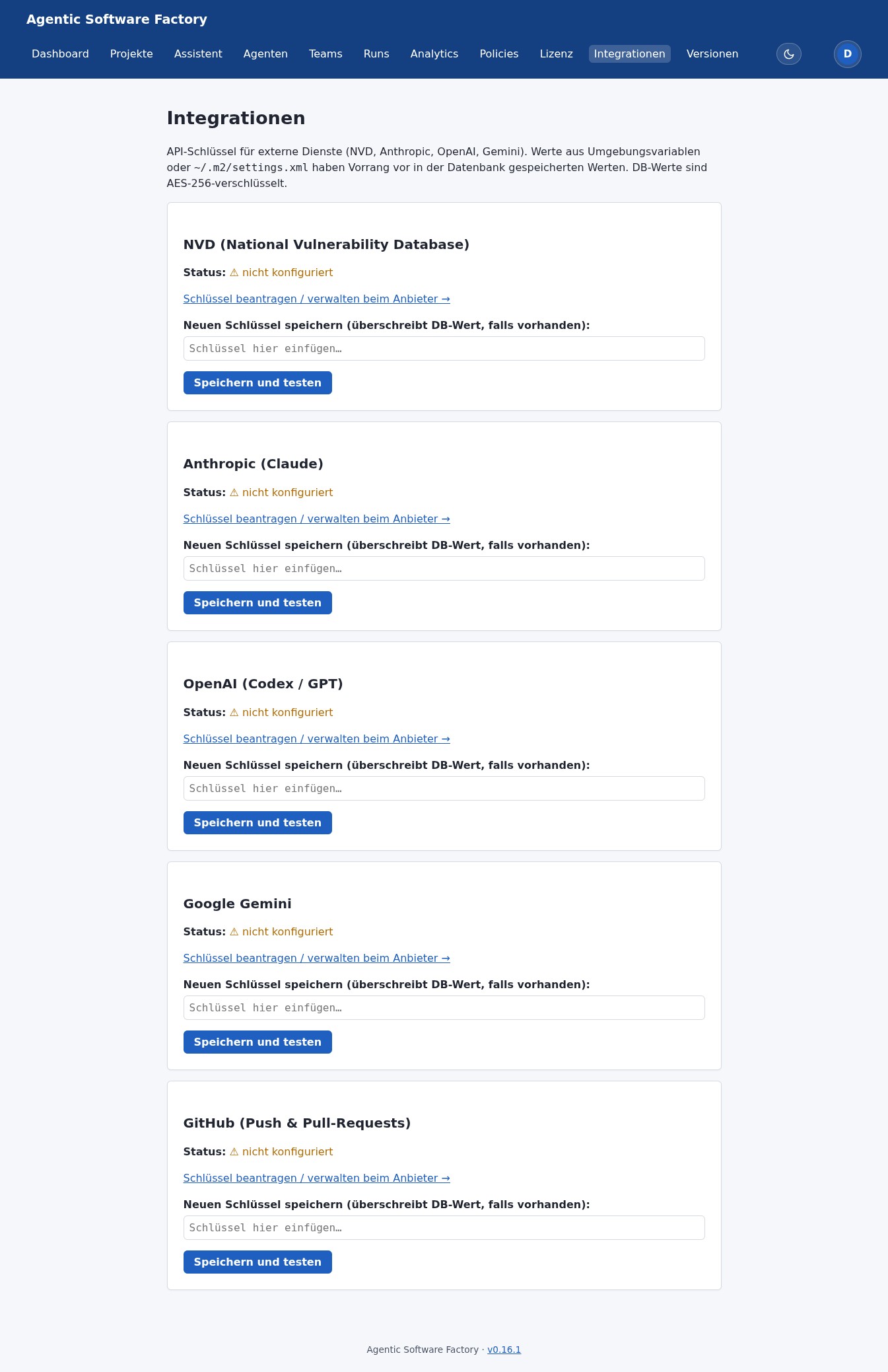
- Click your user icon in the top right and choose Integrations (or navigate to /integrations).
- On the Anthropic card click Set key / "Add Anthropic API key".
- Paste the key (starts with
sk-ant-...) and save.
The key is AES-GCM-encrypted under the master key from your .env and stored in the database. Nobody sees it in plaintext after saving.
Variant B: via env variable (air-gap)
If you'd rather set it as an env var (e.g. for air-gap setups), add to your .env:
SOFTWAREFABRIK_ANTHROPIC_API_KEY=sk-ant-...
Then: docker compose down && docker compose up -d.
audit_event — recording who (user subject) and when (timestamp) set the key. The env variant is anonymous.
2. Set the default adapter to claudecode
To avoid picking the adapter on every run, set the global default:
- Click Settings in the top right (or navigate to /einstellungen) and choose the Adapter tab.
- Set Default execution adapter (
execution.adapter.default) toclaudecode. - Set Default model for Claude Code (
execution.claudecode.model) toclaude-sonnet-5(good price/performance for most tasks). For deeper architecture work,claude-opus-4-8is stronger but more expensive. - Save.
Changes propagate within at most 5 minutes (TTL cache). To see them immediately, click "Invalidate cache now" at the bottom of the settings page.
audit_event. Right under the value in the settings UI you can see who last changed it (user subject + timestamp).
3. Activate container sandbox (optional)
If you have Docker on the host and want the agent to run isolated:
- Settings →
execution.sandbox.variant→container. - Optional:
execution.sandbox.image→ custom image with Claude CLI preinstalled.
If Docker is missing from the PATH, the platform falls back to the local sandbox with a log warning.
4. New project with the wizard
Click "New project with assistant" or navigate to /wizard:
- Step 1 – template: choose "Modern Spring Boot Backend".
- Step 2 – questions: use realistic values:
- Project title: Phonebook API
- Vision: "REST API for a simple phonebook with CRUD endpoints and Postgres persistence."
- Java version: 25
- Database: Postgres
- Architecture: hexagonal
- Language: English
- Step 3 – quality gates: turn on ArchUnit and OWASP Dependency-Check. Leave Trivy and Playwright off (Trivy is for container builds, Playwright for frontends).
- Step 4 – summary: review all values and the cost estimate, then click "Create project".
You land in the project editor with all fields sensibly pre-filled. Among other things the wizard turned your answers into:
technologyPreferences: "Java 25, Spring Boot 4.x, Maven, Postgres 16"architecturePreferences: "Hexagonal architecture (domain / application / web / infrastructure)"qualityGates: "ArchUnit layer tests, OWASP Dependency-Check"
wizard_draft. The next visit to /wizard offers "Resume draft".
5. Review and adjust the artifacts
In the project editor click "Generate Markdown artifacts". The platform produces six files. Read them once:
PROJECT.md— the charter. Is the vision clear? Is the audience right?INSTRUCTIONS.md— the concrete brief for the agent. This is the most important file. Typos or ambiguities here are taken at face value by the agent.AGENTS.md— the role description of the team. AdjustpreferredModelper role if needed.WORKFLOW.md— phase model and approval gates.DEFINITION_OF_DONE.md— when is the run done?README.md— entry point for the agent inside the workspace.
Fix anything that's unclear. Example: if INSTRUCTIONS.md says "create CRUD endpoints", spell out which fields a Person has (name, phone, email). The more precise, the smaller the chance of hallucinations.
The full SDLC loop at a glance
From here you play the platform's canonical loop through once, end to end. It has eight stations that close back on themselves:
- Plan — a plan run produces
plans/*.mdand from them a backlog. - Select — you activate a backlog item.
- Build — a build run works on its own branch (
sdlc/run-…) in the persistent workspace. - Self-correction — on a red build the agent automatically retries with feedback (bounded).
- Quality gate — off, advisory or blocking.
- Deliver — with a Git remote and a GitHub token: push + pull request, otherwise a local merge.
- Learn — findings land in the project memory and flow into follow-up runs.
- Continue — optional auto follow-up proposals close the loop back to selection.
Steps 6 through 15 walk you through exactly these eight stations.
6. Plan – the plan run produces the backlog
Instead of generating code right away, you first let the agent plan. Click "New run" (/runs/new) and choose run mode "Plan" instead of "Build":
- Project: Phonebook API.
- Run mode: Plan.
- Goal:
Create an implementation plan for the Phonebook API.
Break the work into small, individually testable work packages
(skeleton, persistence, CRUD endpoints, tests, docs) and write
one file per package into plans/ with a title, goal and
definition of done.
- Start the run as usual: "Move to READY", then "Start run".
A plan run writes no production code. It creates several Markdown files in the workspace under plans/ — one per work package. The platform reads these files and turns each into a backlog item with a title, goal and status OPEN.
plans/*.md by hand before building.
7. Select – activate a backlog item
Open the "Backlog" tab in the project. You see the items produced by the plan run, each with a title, goal and status. Pick the first, smallest package — typically "Create skeleton" — and click "Activate".
The activated item becomes the goal of the next build run: the platform pulls its goal and definition of done straight into the run form. Completed items later move to DONE, so you can read progress off the backlog at any time.
8. Build – build run on its own branch
From the activated backlog item you start a build run. Keep it small. Navigate to /runs/new (or use "Build from backlog item"):
- Project: Phonebook API.
- Run mode: Build.
- Run title: Create skeleton
- Goal: pre-filled from the backlog item. For a manual run, use a concrete prompt like this:
Set up the initial Maven project with Spring Boot 4.x.
Create:
- pom.xml with spring-boot-starter-web, spring-boot-starter-data-jpa, postgresql, h2 (test)
- Application class with @SpringBootApplication
- application.yml with Postgres config (local) and H2 (test profile)
- a simple Person entity with id, name, phone
- a PersonRepository as a Spring Data JPA repository
- a REST controller with GET /persons (return all)
- smoke test with @SpringBootTest that loads the context
- README explaining "how to start" and "how to test"
- Adapter: claudecode (default settings). Model: claude-sonnet-5.
- Click "Create run", then "Move to READY" and "Start run".
The build run works in the project's persistent workspace and creates its own branch sdlc/run-<run-id> for its changes. That keeps main clean, prevents multiple runs from colliding, and makes every run traceable as a self-contained branch history.
9. Click through phase approvals
While the run executes, it goes through seven phases. At critical transitions the platform waits for your explicit approval:
| Phase | What happens | Approval? |
|---|---|---|
INTAKE | Run is validated (project, goal, adapter, budget) and accepted. | No, automatic. |
PROMPT_ASSEMBLY | Platform reads PROJECT.md + INSTRUCTIONS.md and builds the initial prompt. | No, automatic. |
WORKSPACE_PREPARATION | Persistent workspace opened (or, on the first run, git init + artifacts copied in), branch sdlc/run-<run-id> checked out. | No, automatic. |
EXECUTION | Platform launches claude --print <prompt> in the workspace. Agent writes files, makes commits. | Yes (default policy). You click "Approve" before the agent starts. |
VALIDATION | Platform launches mvn verify in the workspace. Build and tests run. | No, automatic. |
CORRECTION | On a red build the agent gets a corrective prompt and tries to fix build/tests. On a green build it's skipped. | Depends on policy — automatic by default. |
COMPLETION | On green build: status COMPLETED. On red build: NEEDS_CORRECTION. | Yes. You confirm whether the result is acceptable. |
Approval buttons appear next to the current phase. You can Approve or Reject — rejection moves the run to CANCELED. Browser notifications can be activated top right; they fire on WAITING_FOR_APPROVAL or run end.
10. Read logs, inspect Git diff, approve with inline diff
During the EXECUTION phase Claude Code outputs stream live into the log area (tab Logs). Look for:
- "Reading PROJECT.md..." — agent has read the charter.
- "Reading INSTRUCTIONS.md..." — agent has read the brief.
- "Creating pom.xml..." — first file is being written.
- "git commit -m 'chore: initial scaffold'" — first commit.
On the right side the Git view shows branches, commits and a diff viewer. Click any commit to see its diff. That's the most honest view of what the agent actually did — no marketing language, just code.
At WAITING_FOR_APPROVAL the detail view embeds the git diff since run start directly — no terminal switch needed. If OK: Approve and continue with a short justification.
11. Self-correction – automatic feedback retry
If the build goes red in the VALIDATION phase (compile errors, failing tests), the run does not abort. Instead it moves to NEEDS_CORRECTION and the platform starts self-correction:
- The platform collects the error output of
mvn verify(compiler and test logs). - It builds a corrective prompt from it and sends it to the agent — the run goes back to
RUNNING. - The agent fixes things on the same branch, then
mvn verifyruns again.
This loop is bounded: after a configurable number of correction attempts (in the settings) the platform gives up and leaves the run at NEEDS_CORRECTION for you to step in. That way a stubbornly red task doesn't burn tokens forever.
12. Quality gate – off, advisory or blocking
After COMPLETION click the "Quality gate" tab. You launch the six reviewers:
- aider-review — calls the Aider CLI in read-only mode, hunts for smells.
- claude-review — calls Claude Code in read-only mode, has the model critique itself.
- security — static heuristic: hardcoded passwords, weak crypto, SQL injection patterns, …
- architecture-reviewer — checks layer and module boundaries against the artifacts.
- hallucination-review — looks for invented methods, packages or API calls.
- dependency-scan — Trivy scan for CVEs and licence violations in dependencies.
Per reviewer you see findings with severity (LOW / MEDIUM / HIGH / CRITICAL) and a confidence score. The aggregated verdict is one of:
How strict the quality gate is depends on the policy (Settings → Quality gate, overridable per project):
- Off: the quality gate doesn't run at all; the run counts as done on a green build alone.
- Advisory: the reviewers run and report findings but block nothing — a
FAILEDverdict is just a hint. Good to start with. - Blocking: a
FAILEDverdict prevents delivery (step 13). Only once the gate isPASSEDorWARNINGmay you push or merge.
Regardless of policy, SECURITY/HIGH and ARCHITECTURE/CRITICAL are always blocking — they flip the verdict to FAILED. Reviewer crashes appear as ERROR — they are reported, not silently swallowed.
Typical findings on a first run:
- "Hardcoded password in application.yml" — the agent baked in a default Postgres password. Fix: reference a property like
${POSTGRES_PASSWORD}. - "Missing test coverage" — the smoke test only covers context loading. Fix: a follow-up run with the goal "write tests".
13. Deliver – push + pull request or local merge
Once the quality gate is green (depending on policy), you deliver the result. What happens depends on whether you've configured a Git remote together with a GitHub token.
Variant A: with Git remote + GitHub token → pull request
- Under /integrations, on the GitHub card, store a personal access token (scope
repo) and set the Git remote in the project (e.g.git@github.com:your-user/phonebook-api.git). - On the finished run, click "Deliver" / "Open pull request".
- The platform pushes the branch
sdlc/run-<run-id>to the remote and opens a pull request againstmain— with the run goal as the title and a summary (diff, quality-gate verdict) as the description. - You review the PR on GitHub like any other and merge it there.
Variant B: without a remote → local merge
Without a remote or token the platform falls back to a local merge: the branch sdlc/run-<run-id> is merged into main inside the persistent workspace. The result is then available locally, and you can push it yourself later (see step 16).
sdlc/run-…, delivery is the single point at which anything reaches main — either via PR (reviewable) or via local merge.
14. Learn – project memory
Every finished run leaves traces in the project memory: decisions made, recurring quality-gate findings, conventions the agent has established. You find it in the project's "Memory" tab.
On the next build run the platform reads this memory and appends it to the prompt. That way the agent doesn't repeat the same mistakes, sticks to once-chosen patterns (e.g. "passwords always as env vars, never hardcoded") and builds on what's already there instead of starting from scratch.
15. Continue – auto follow-up proposals close the loop
One mega-run that does everything in one go rarely works in practice. Much better: small, focused follow-up runs. That's exactly what the platform proposes after every run — automatic follow-up items derived from open quality-gate findings, the definition of done and the remaining backlog. Examples:
- Proposal: "Write unit tests for PersonRepository and PersonController, cover all CRUD operations. Target: ≥ 85 % line coverage."
- Proposal: "Fix the 'Hardcoded password' quality-gate finding and replace the value with an env var reference in application.yml."
- Proposal: "Extend README.md with a 'Deployment' section including a docker-compose example, and an 'API examples' section with curl calls per endpoint."
You accept a proposal into the backlog with one click (status OPEN) — and you're back at step 7 (Select). That closes the loop: plan → select → build → correct → check → deliver → learn → continue. Each pass uses the same persistent workspace and the grown project memory.
16. Inspect & export the workspace
The workspace lives at ./workspaces/<run-id>/ (or the path configured in settings). Switch into it and look at what the agent built:
cd ./workspaces/<run-id>
ls -la
git branch -a
git log --oneline -20
git diff HEAD~5 HEAD
You can keep working from here — make your own commits, push to a remote, branch, merge. The platform leaves the workspace alone unless you start another run.
If you merged locally in step 13 (variant B), you can export the result by hand at any time:
# push into a fresh GitHub repo:
cd ./workspaces/<run-id>
git remote add origin git@github.com:your-user/phonebook-api.git
git push -u origin main
Tips for good prompts and run goals
- Concrete beats generic. "CRUD for Person" is weak. "GET /persons (list), GET /persons/{id} (detail), POST /persons (create with body {name, phone}), PUT /persons/{id}, DELETE /persons/{id}" is strong.
- State the definition of done. "Build must be green", "Tests must reach ≥ 85 % line and ≥ 81 % branch coverage", "README must contain API examples". That's what makes the quality gate meaningful.
- Provide example data. If the agent should write a migration, hand a sample: "Sample person: Max Mustermann, +49 30 12345678, max@example.org". Prevents generic Lorem-Ipsum data.
- Say what NOT to do too. "Use no external libraries beyond Spring Boot starters" stops the agent from pulling in some exotic lib you'd then have to maintain.
- Think iteratively. Three runs of 10 minutes each beat one run of 30 minutes. You can correct in between.
When things go wrong – debug strategies
| Symptom | Cause | Fix |
|---|---|---|
claude: command not found | Platform can't find the CLI on PATH. | In settings → Adapter, set the absolute path: /usr/local/bin/claude (Linux/macOS) or C:\Users\<user>\AppData\Local\claude\claude.exe (Windows). Or set env var SOFTWAREFABRIK_CLAUDECODE_COMMAND. |
Run hangs in EXECUTION | Claude is waiting for interactive input (e.g. login required). | Check the logs. Usually the fix is to run claude manually once and log in. |
mvn verify fails immediately | Agent didn't produce a Maven project or a broken pom.xml. | Inspect the workspace by hand, understand the error, fire a follow-up run with a corrective goal. |
Quality gate says ERROR | A reviewer crashed (e.g. because the Aider CLI is missing). | The quality-gate detail shows the failure per reviewer. Disable reviewers whose CLIs aren't installed in the settings. |
| No pull request, only a local merge | No GitHub token or no Git remote configured. | Set a PAT (scope repo) under Integrations and add the Git remote in the project, then deliver again. |
| Backlog stays empty after a plan run | The agent wrote no files into plans/. | Sharpen the plan run's goal (explicitly "write one file per package into plans/") or create the plans/*.md by hand; the platform parses them next time you open the backlog. |
| Token budget exhausted | Platform blocks new runs at 100 % of the daily budget. | Settings → Budget. Raise the cap or wait until midnight (reset). |
Run cancelled with WORKSPACE_LOCKED | Previous run didn't release the lock (platform crash). | Delete the workspace directory, create the run again. Known edge case. |
What you can do now & next steps
- Structure a project, describe it and send it into a run.
- Produce a backlog with a plan run and activate items.
- Run build runs on their own branch and watch them live.
- Inspect what the agent changed before approval.
- Use self-correction on a red build and apply the quality gate (off/advisory/blocking).
- Deliver results via pull request or local merge.
- Close the loop from project memory and auto follow-up proposals.
Next steps: Introduction for glossary and mental model, Architecture for the substructure, Licensing for tiers and limits, or the FAQ for typical pitfalls.