
Learning goals
This chapter is the heart of the Academy and also its longest. Take your time with it, do the exercises, and only read the model answers after you have formulated an answer yourself. After this chapter you can:
- explain why a coding agent needs a spec, and why tests alone only prove that code is good, not that it does the right thing;
- build a product spec: frontmatter, goal, non-goals, context, acceptance criteria with stable IDs, edge cases, open questions;
- apply the five EARS templates (ubiquitous, event-driven, state-driven, unwanted behaviour, optional feature) and their combinations with confidence;
- spot bad requirements and rewrite them: vague words, compound requirements, implementation instead of behaviour, untestable statements;
- place Given/When/Then as an alternative and choose it deliberately;
- derive tests from every acceptance criterion (positive, negative, boundary) and link them to the spec via the AC ID, in Java/JUnit and TypeScript;
- understand traceability and spec drift: commit trailers, the bound version, the why-trace, outdated work after a spec change;
- in the factory, create a spec from the template, approve it (from MAINTAINER), choose the spec mode and have specs worked out by a spec run or a reverse spec.
4.1 Why specs: good is not the same as right
Imagine you give a coding agent the task: “Build a CSV export for the order list.” Twenty minutes later the build is green, all tests pass, the code is cleanly structured, the static security reviewer finds nothing. Is the task done?
You don’t know. Does the function export all orders or only the filtered ones? Comma or semicolon as the delimiter (a real difference in German-locale spreadsheets)? Which encoding? What happens with a million rows? May technicians export, or only dispatchers? What about a customer name that starts with an equals sign and would be executed as a formula in the spreadsheet? The agent has answered every one of these questions somehow, and it did so silently. The tests it delivered check exactly its own assumptions. They are green because they share the same understanding as the code they test.
That is the core of the problem, and with agents it grows rather than shrinks. A human developer would have asked, or at least mentioned in the daily stand-up that they went with the semicolon. In the factory an agent works headless: nobody answers questions during the run (see Chapter 2). That is why the engineering guardrails explicitly require surfacing assumptions instead of asking (“surface, don’t ask”). But a surfaced assumption is still an assumption that somebody has to check afterwards.
Two questions, two tools
Quality assurance answers two different questions, and they need different tools:
| Question | Classic term | Tools | Possible without a spec? |
|---|---|---|---|
| Is the code good? (compiles, secure, maintainable, consistent with the architecture) | Verification: “Are we building the product right?” | Build, tests, linters, static analysis, architecture rules, reviewers | Yes |
| Does the code do the right thing? (does it fulfil what was wanted) | Validation: “Are we building the right product?” | Comparison against an agreed, checkable description of what is wanted | No. Without a description there is nothing to check against. |
For a long time the factory answered the first question very thoroughly: build gate, six reviewers, architecture rules, dependency scan. The foundational decision on spec-driven development (ADR-0027) describes the gap itself like this: The quality gate checks whether code is good, not whether it does the right thing. Before version 0.35, acceptance criteria simply did not reach the quality gate; the field for them in the review request was hard-wired to empty. The spec closes this gap by putting what is wanted into a form that people can approve and machines can check.
What a spec is and what it is not
“Spec” is an overloaded word. In this Academy, as in the factory, we mean the product spec: a short, versioned document that describes from the user’s point of view what a feature should do, what is explicitly not part of it and how you can tell that it is done. How it differs from neighbouring artifacts:
| Artifact | Answers | Lifetime | In the factory |
|---|---|---|---|
| Project definition | What is the whole product about? Stack, architecture, guardrails | Project lifetime | 13 fields, from which PROJECT.md, INSTRUCTIONS.md are generated (Chapter 3) |
| Product spec | What should a feature do, and how do we measure it? | As long as the feature exists, versioned | specs/SPEC-<nnn>-<slug>/spec.md, database is authoritative |
| Plan / backlog item | How and in what order do we implement it? | Until implemented | plans/NNNN-*.md, backlog (Chapter 5) |
| Design/architecture decision | Why this technical solution? | Long-lived | ADRs in the project repo |
| Test | Is a specific criterion met in a specific case? | With the code | In the repo, linked to the spec via the AC ID |
So a spec is not an 80-page requirements document, and it is not a one-sentence ticket. A good product spec fits on one to three screens. It is solution-neutral (it does not prescribe which class produces the export), but precise about behaviour (it says which delimiter applies).
Why especially with agents
- Agents are literal. Whatever is not written down gets filled in, with what is statistically most plausible rather than what is right for the domain. A spec moves decisions from “some time during the run, implicitly” to “beforehand, explicitly, approved”.
- Agents are fast. When code becomes cheap, clarity about which code should be written becomes the bottleneck. An hour of spec work then saves not one hour of programming but several correction loops and reviews.
- Agents work in parallel. When three child runs build one feature (Chapter 7), they need a shared, immutable point of reference. Otherwise each one builds against its own interpretation.
- Agent results must be provable. In regulated environments “the build was green” is not enough. You have to be able to show which approved requirement was built against and accepted (Chapter 9).
In the factory
Spec-driven development: enabling it and the spec mode
The factory treats the product spec as the single source of truth for requirements (ADR-0027). The SDD roadmap states the guiding idea as a chain:
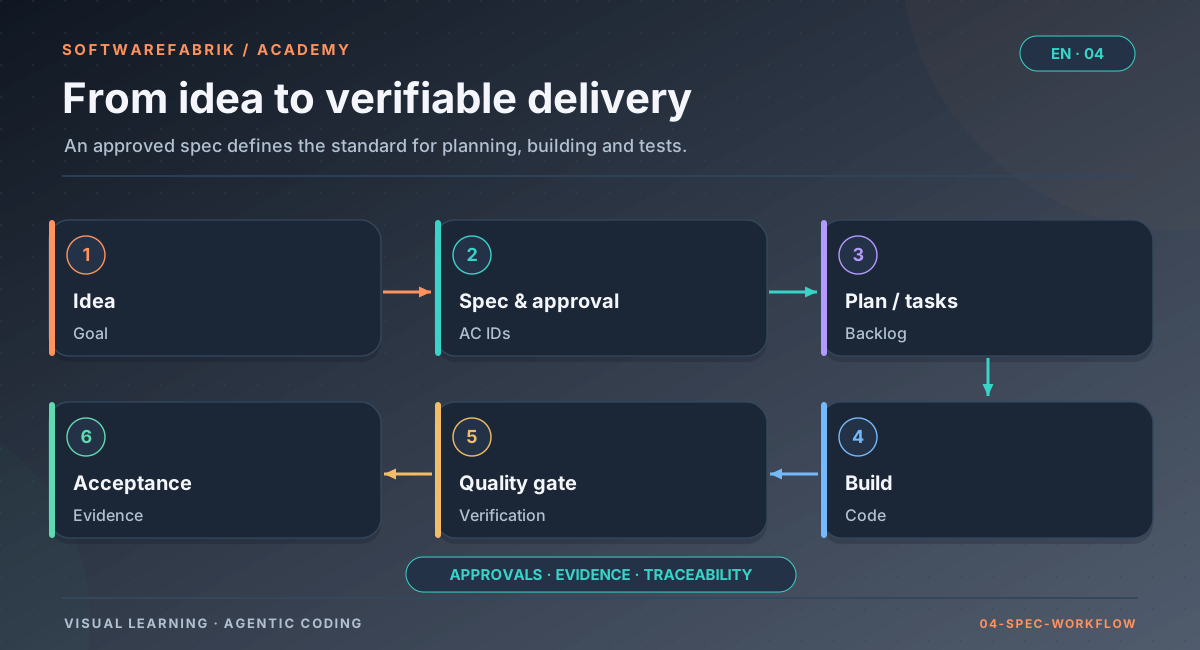
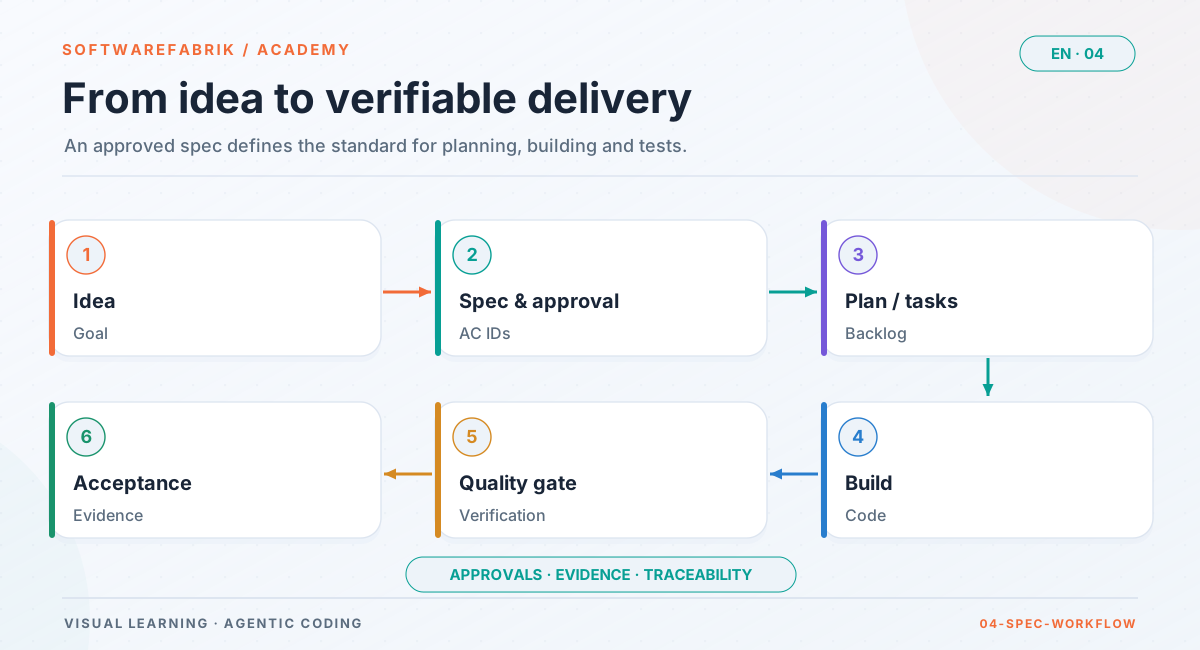
Open full-size graphicOpen full-size graphic
Enabling
Specs are opt-in. For the Specs button to appear on the project page, two things are needed:
- the feature flag
softwarefabrik.spec.enabled(environment variableSOFTWAREFABRIK_SPEC_ENABLED=true, off by default), and - with an active license system, the Professional or Enterprise tier. Without an active license system the flag alone decides. Community sees no spec interface.
If a license expires, existing specs remain readable; creating, editing and approving are then locked. If the flag is off, the platform behaves exactly as it did before the extension.
The spec mode per project
On the project’s spec overview (/projects/{id}/specs) you set the spec mode from role DEVELOPER: AUS (off), LEICHT (light) or STRENG (strict). The project wizard asks for it in step 5 as soon as SDD is enabled. Every change is audited as PROJECT_SPEC_MODUS_SET.
| Mode | Effect | When it makes sense |
|---|---|---|
AUS (default) | Current behaviour. Specs can be created but are not projected into the workspace. | Trying things out, existing projects without SDD |
LEICHT | Runs project specs into specs/, agent changes are taken over as drafts, plan runs write spec and AC references, runs with an approved spec are bound and traceable. A missing approval does not block; it produces hints. | Solo work, getting started with SDD |
STRENG | In addition, an approved spec is a start condition: backlog items without an approved spec or with unknown AC IDs cannot be activated, and workflow plans with writing tasks without a spec reference cannot be approved. The spec-conformance reviewer becomes a mandatory reviewer, missing AC coverage is a CRITICAL finding, and the quality gate runs in blocking mode, even if the global gate mode is advisory or off. | Teams, regulated environments, anything that requires approval |
spec-conformance reviewer with its blocking effect in mode STRENG since v0.38.0 (SPEC-003).
Database authoritative, file as projection
An important design decision: the database is authoritative, the file in the workspace is a projection. Every version is an immutable version with a SHA-256 content hash. In mode LEICHT/STRENG every run writes the approved version to specs/SPEC-<nnn>-<slug>/spec.md (the latest draft if there is no approval); if there is a newer draft alongside an approval, it is placed next to it as spec.draft.md. If an agent changes a file under specs/, the factory takes the change over after the build as a new draft, never as an approval. If someone deletes the file, the next run restores it from the database.
Why this way? Because immutability, signability and tenant separation can be enforced cleanly in a database, while the file keeps agents and people in their usual workflow: an agent reads specs/ like any other file in the repo.
4.2 Structure of a product spec
A product spec in the factory is Markdown with YAML frontmatter. The template lives at specs/_vorlage/spec.md. The mandatory sections are Ziel (goal), Nicht-Ziele (non-goals) and Akzeptanzkriterien (acceptance criteria); context, edge cases and open questions are optional but almost always helpful in practice.
The frontmatter
---
id: SPEC-012                 # SPEC-<nnn>, sequential per project
titel: CSV export of maintenance orders
version: 1                   # incremented by the factory for each new version
status: DRAFT                # DRAFT | APPROVED | SUPERSEDED — only the factory sets APPROVED
owner: k.berger              # accountable on the business side
contracts: []                # optional: names of linked contracts in the contract registry
ersetzt: null                # optional: SPEC-<nnn> that this spec replaces
---idis the stable identifier. It reappears in every AC ID (AC-012-01), in plans, commits and the audit trail.versionandstatusare managed by the factory: every change creates a new version with statusDRAFT; only approval by a human setsAPPROVED.owneris the person accountable on the business side, not the agent that wrote the text.contractslinks the spec to contracts in the contract registry, for example an OpenAPI description (Chapter 7).ersetzt(“replaces”) refers to an older spec that this one replaces, when a feature is fundamentally re-cut.
Goal
One to three paragraphs from the user’s point of view: Who gets what, and why? The goal is not an acceptance criterion but the rationale you weigh things against when in doubt. If an edge case is not covered, the goal helps you decide.
Dispatchers export the currently filtered order list as CSV in order to analyse it in a spreadsheet or pass it on to subcontractors. Today they copy the list by hand from the browser, losing umlauts and columns in the process.
Non-goals
The most underrated section. Non-goals state what the spec explicitly does not cover. They prevent scope creep, and they make “uncovered behaviour” checkable: if an agent adds an Excel export on the side even though “no Excel format” is listed as a non-goal, that is a clear finding, not a matter of taste. Good non-goals are concrete and name obvious extensions that you deliberately do not want:
- No export in Excel format (
.xlsx). - No scheduled export and no export sent by email.
- No import of CSV files.
- No change to the filter logic of the order list.
Context
Optional: starting situation, affected modules and files, dependencies, linked contracts. Concrete paths are allowed here, because the context helps the agent find the right place in the code without prescribing the behaviour. The factory’s own specs list, for instance, affected classes and the next free migration number there.
Acceptance criteria
The heart of the spec. Each criterion has an ID following the scheme AC-<nnn>-<nn>, where <nnn> is the spec number. IDs are unique within the spec and stable across versions: a criterion keeps its ID even when its text is refined. A removed ID is never reused, otherwise an old test would suddenly “prove” a completely different criterion. Criteria are preferably written in EARS (section 4.4); Given/When/Then is allowed (section 4.6).
Edge cases
Boundary and negative cases that must not be forgotten. The template recommends turning them into a separate AC where needed. The rule of thumb: if an edge case requires observable behaviour, it belongs in the spec as an AC so that it gets an ID and is tested. If it is only a hint for the implementation, it can stay here.
Open questions
What has not been decided yet. A spec run writes here what it cannot decide (section 4.10). The template is unambiguous: A spec with open questions should not be approved. Open questions are not a flaw; they are the most honest part of a draft.
The lifecycle of a spec
  create / edit / agent changes specs/…
                 │
                 ▼
            ┌─────────┐   approval (from MAINTAINER,   ┌──────────┐  new version     ┌────────────┐
            │  DRAFT  │ ── validates mandatory     ──▶│ APPROVED │ ── approved ─────▶│ SUPERSEDED │
            └─────────┘    sections and AC IDs)       └──────────┘                   └────────────┘
                 ▲                                         │
└──── every change = new version ◀────────┘ (APPROVED stays unchanged)Three rules follow from this. First: an approved version never changes; anyone who wants to change something creates a new draft version. Second: approving a new version sets the previously approved one to SUPERSEDED. Third: because every version has a content hash, you can later prove exactly which text was built against.
A complete example
The following example accompanies us through the chapter. It is deliberately realistic: not perfect, but ready for approval.
---
id: SPEC-012
titel: CSV export of maintenance orders
version: 3
status: DRAFT
owner: k.berger
contracts: []
ersetzt: null
---

# SPEC-012 — CSV export of maintenance orders

## Ziel

Dispatchers export the currently filtered order list as CSV in order to
analyse it in a spreadsheet or pass it on to subcontractors. Today they
copy the list by hand, losing umlauts and columns in the process.

## Nicht-Ziele

- No export in Excel format (.xlsx).
- No scheduled export and no export sent by email.
- No import of CSV files.
- No change to the filter logic of the order list.

## Context

- Order list: io.beispiel.maint.auftrag.web.AuftragListeController
- Filter: AuftragFilter (existing, unchanged)
- Roles: ADMIN, DISPONENT (see PROJECT.md, section Security)

## Akzeptanzkriterien

- **AC-012-01** — When a dispatcher selects “Export as CSV” in the order list,
  the system shall deliver a CSV file containing exactly the orders that
  match the currently set filter.
- **AC-012-02** — The system shall generate CSV files in UTF-8 with a byte
  order mark, a semicolon as the delimiter and a header row with the
  column names.
- **AC-012-03** — If the filter yields more than 50,000 orders, then the
  system shall reject the export and display the message “Please narrow
  the filter (at most 50,000 rows)”.
- **AC-012-04** — While an export is running for a user, the system shall
  disable the export button for that user.
- **AC-012-05** — Where the “Cost centres” module is enabled, the system
  shall include the column “Cost centre” as the last column of the export.
- **AC-012-06** — If a field value contains a semicolon, a quotation mark
  or a line break, then the system shall enclose the field in quotation
  marks and double any quotation marks it contains.
- **AC-012-07** — If a field value starts with =, +, - or @, then the
  system shall prefix it with an apostrophe.
- **AC-012-08** — If a user without the role DISPONENT or ADMIN calls the
  export, then the system shall respond with HTTP 403 and deliver no
  order data.

## Edge cases

- Empty result set: file with header row and no data rows (AC-012-01).
- Exactly 50,000 orders: export allowed (boundary of AC-012-03).
- Umlauts and special characters in customer names (AC-012-02).

## Open questions

- (none)Note what is not here: no CsvExportService class, no library, no streaming technique. The spec describes observable behaviour. How the agent implements it is up to the agent, within the bounds of the project definition, guardrails and architecture rules.
In the factory
Creating, editing and comparing a spec
- Open the spec overview. On the project page, choose the Specs button (route
/projects/{id}/specs). The overview lists all specs with ID, title, latest version, approved version and path in the workspace, with the spec mode setting above. - New spec from the template. In the “New spec from template” area, enter a meaningful title (for example “CSV export of maintenance orders”) and choose Create spec. The factory assigns the next sequential ID, stores the spec as version 1 with status DRAFT and fills it with the template. Creating is allowed from role DEVELOPER.
- Edit. On the detail page, choose Edit (new draft version). Every saved change creates a new version; nothing is overwritten.
- Read the validation. For each version, the detail page shows whether it is ready for approval (“Validation passed”) or which findings stand in the way, plus the recognised acceptance criteria as a table (ID and text). If the factory does not recognise a criterion, the ID spelling is usually wrong.
- Compare. Once an approved version exists, the detail page offers a comparison with it (
/projects/{id}/specs/{specId}/vergleich). It works at the level of acceptance criteria: new, removed, changed.
LEICHT/STRENG can create or change files under specs/, for example with the objective “Read SPEC-012 and add missing edge cases as acceptance criteria”. The factory takes the result over as a new draft version, which you review and approve like any other. Two runs in a row produce two drafts; neither overwrites the other.
Other tenants requesting a spec get “not found” (HTTP 404), not “forbidden”: the existence of foreign data is not even confirmed.
4.3 What makes a good acceptance criterion
Before we get to sentence form, it is worth looking at the properties a single criterion must have. The list is based on the quality characteristics that the requirements engineering standard ISO/IEC/IEEE 29148 describes for individual requirements, translated into practice with agents:
| Property | Meaning | Check question |
|---|---|---|
| Necessary | Without this criterion, something the goal requires is missing. | What would be lost if I deleted it? |
| Unambiguous | There is exactly one reasonable reading. | Would two developers write the same test? |
| Singular (atomic) | It asks for exactly one thing. | Is there an “and” or “as well as” between two responses? |
| Verifiable | A test can confirm or refute it. | Can I write down a test case with an expected result? |
| Solution-neutral | It describes behaviour, not implementation. | Would it still be true if the code were built completely differently? |
| Consistent | It contradicts neither other criteria nor the non-goals. | Is there a situation in which two criteria demand opposite things? |
| Feasible | It can be implemented with reasonable effort. | Does it hold up against the constraints of the project definition and architecture? |
How many criteria?
There is no magic number. As a guide: a spec with two criteria is usually too coarse (the edge cases are missing), one with forty is usually too broad (really several features). Five to fifteen criteria per spec is a good range. If it grows beyond that, check whether the spec can be split along the non-goals. The factory itself still lists the question “one spec per feature, or an epic with sub-specs” as open; its roadmap recommends one spec per feature.
The right altitude
A criterion is at the right altitude when it is observable from the outside: through the UI, an interface, a file, a response, a log entry that someone is meant to see. “The system shall generate the export via a stream” is too low (implementation). “The system shall make dispatchers’ work easier” is too high (a goal, not testable). “If the filter yields more than 50,000 orders, then the system shall reject the export and display the message …” is exactly right: you can trigger it from the outside and check the result.
nonfunctionalRequirements, Chapter 3), not in every spec.
4.4 EARS: five sentence templates for precise requirements
EARS stands for Easy Approach to Requirements Syntax. Alistair Mavin and colleagues developed the method at Rolls-Royce to make requirements for engine control systems less ambiguous, and presented it in 2009 at the IEEE International Requirements Engineering Conference. The idea is strikingly simple: instead of writing requirements in free prose, you use a small number of templates with fixed keywords and a fixed order of clauses. This reduces typical problems of natural language (ambiguity, vagueness, missing conditions, omissions) without having to learn a formal language.
Every EARS requirement has the same basic structure:
[precondition(s)]  [trigger]  the <system>  shall  <response>
optional optional mandatory mandatory mandatoryThe keywords show which clause plays which role. Five basic patterns result from this. Below, each pattern is shown with the English original, alongside the German template that the factory’s spec template uses.
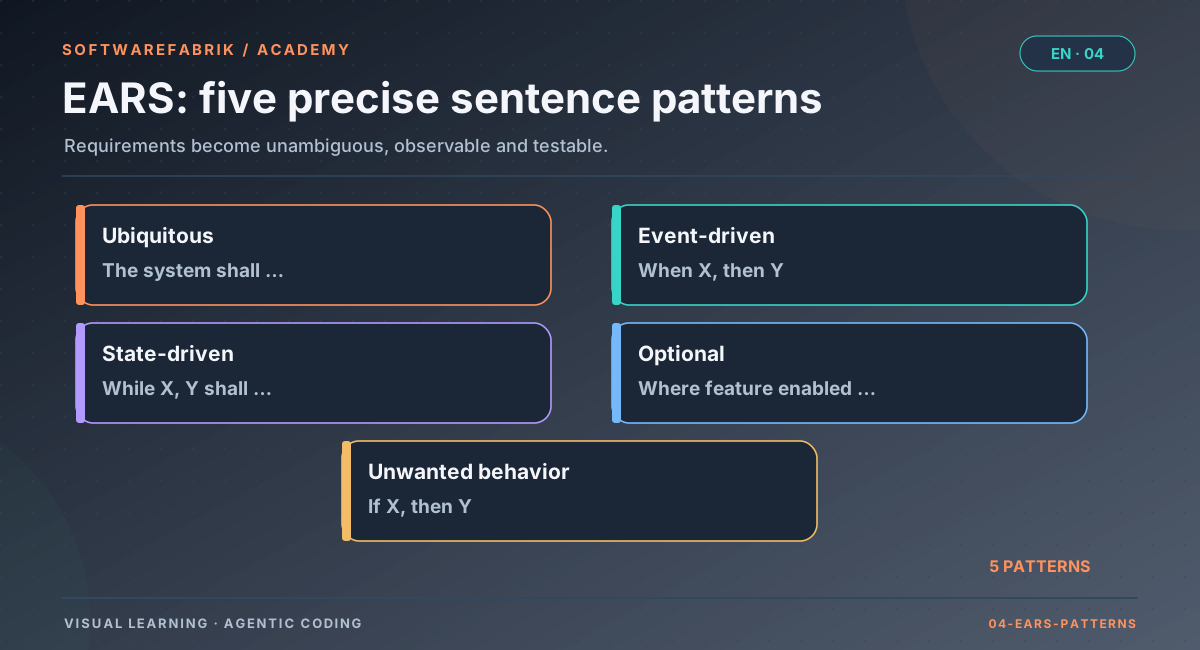
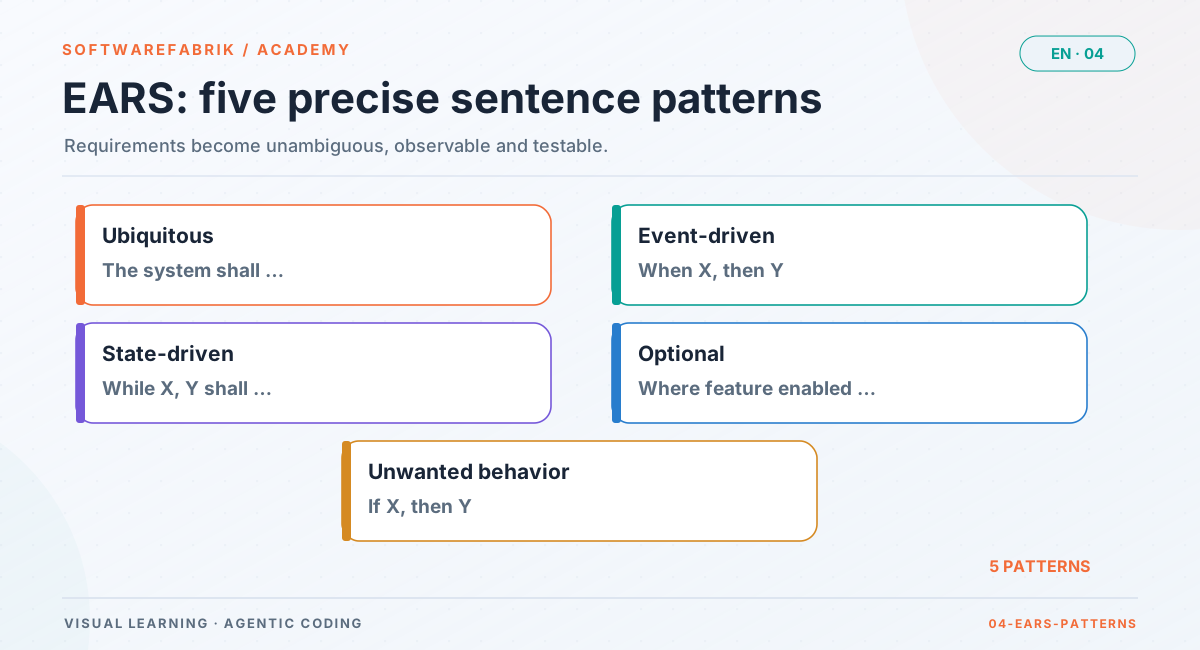
1. Ubiquitous
Requirements that always apply, with no trigger and no state. They describe invariants and fundamental properties.
English:   The <system name> shall <system response>.
German: Das System soll <Reaktion>.- AC-012-02 — The system shall generate CSV files in UTF-8 with a byte order mark, a semicolon as the delimiter and a header row with the column names.
- The system shall keep every order under a unique, immutable order number.
- The system shall output all timestamps in the API in ISO 8601 format with a time zone offset.
- From the factory itself (AC-001-07): The system shall keep approved versions immutable; a change shall create a new version with status DRAFT.
Careful: the ubiquitous template is the most convenient and therefore the most overused. For every ubiquitous requirement, check whether it really applies always. Often a condition is hiding (“… when the user is logged in”), and then one of the other templates is the right one.
2. Event-driven
Requirements that describe a response to an event: a user action, an incoming message, a point in time, a signal. The event is a moment, not a lasting condition.
English:   When <trigger>, the <system name> shall <system response>.
German: Wenn <Auslöser>, dann soll das System <Reaktion>.- AC-012-01 — When a dispatcher selects “Export as CSV” in the order list, the system shall deliver a CSV file containing exactly the orders that match the currently set filter.
- When an order receives the status “Done”, the system shall display a notification to the order’s dispatcher.
- When the daily maintenance planning starts at 02:00, the system shall mark all orders whose due date has passed as “overdue”.
- From the factory (AC-002-02): When a run with a spec reference starts, the system shall write
RUN_SPEC_GEBUNDEN… of the version approved at that moment into the audit chain.
3. State-driven
Requirements that apply while a state persists. The difference from an event: a state has a duration, and the response applies for its entire duration.
English:   While <precondition(s)>, the <system name> shall <system response>.
German: Solange <Zustand>, soll das System <Reaktion>.- AC-012-04 — While an export is running for a user, the system shall disable the export button for that user.
- While the application is in maintenance mode, the system shall answer write API calls with HTTP 503.
- While an order is assigned to a technician, the system shall prevent its assignment to further technicians.
- From the factory (AC-001-10): While a project is in spec mode
streng, the system shall reject the activation of a PlanItem whose spec has no approved version.
4. Unwanted behaviour
Requirements for handling errors, faults and unwanted situations: invalid input, missing permissions, outages, limits being exceeded, attacks. These are exactly the requirements most often missing from free-text tasks, and exactly where an agent guesses the most.
English:   If <trigger>, then the <system name> shall <system response>.
German: Falls <unerwünschte Situation>, dann soll das System <Reaktion>.- AC-012-03 — If the filter yields more than 50,000 orders, then the system shall reject the export and display the message “Please narrow the filter (at most 50,000 rows)”.
- AC-012-08 — If a user without the role DISPONENT or ADMIN calls the export, then the system shall respond with HTTP 403 and deliver no order data.
- If the database becomes unreachable during an export, then the system shall abort the export, deliver no incomplete file and display the message “Export failed, please try again later”.
- From the factory (AC-001-03): If a spec contains duplicate AC IDs, AC IDs outside the scheme or no
Akzeptanzkriteriensection, then the system shall reject the approval with an understandable validation message (HTTP 400, not a server error).
5. Optional feature
Requirements that apply only where a particular feature is present: an enabled module, a product variant, a license tier, a configuration, a hardware feature.
English:   Where <feature is included>, the <system name> shall <system response>.
German: Wo <Merkmal vorhanden>, soll das System <Reaktion>.- AC-012-05 — Where the “Cost centres” module is enabled, the system shall include the column “Cost centre” as the last column of the export.
- Where sign-in via SSO is configured, the system shall display the button “Sign in with company account” on the login page.
- Where the device has a camera, the app shall offer capturing photos for an order.
- From the factory (AC-002-09): Where the FeatureGate enables SDD, the system shall offer the choice of spec mode in the project wizard and store it on the created project.
The difference from the state-driven form: an optional feature is a property of the system’s configuration (setup, variant) that typically does not change during use. A state changes during operation (export running, maintenance mode active).
Complex forms
Real requirements often have several conditions. EARS allows the keywords to be combined. The usual order: optional feature, then state, then trigger, then system and response.
English:   Where <feature>, while <precondition>, when <trigger>, the <system> shall <response>.
           While <precondition>, if <trigger>, then the <system> shall <response>.

German:    Solange <Zustand>, wenn <Auslöser>, dann soll das System <Reaktion>.
           Wo <Merkmal>, solange <Zustand>, soll das System <Reaktion>.
Solange <Zustand>, falls <unerwünschte Situation>, dann soll das System <Reaktion>.- While an export is running for a user, when the same user reloads the page, the system shall display the progress of the running export instead of starting a second export.
- Where the “Cost centres” module is enabled, if no cost centre is assigned to an order, then the system shall leave the column “Cost centre” empty for that order.
- While the application is in maintenance mode, when an administrator signs in, the system shall grant them full access.
- From the factory (AC-001-01), a state-driven requirement with two linked conditions: While
softwarefabrik.spec.enabledis off or an active license system reports the Community tier, the system shall offer no spec interface …
Complex forms are powerful, but they come at a price: each additional condition roughly doubles the number of cases you should test. If a sentence has three conditions, check whether it would be better as two or three criteria.
Overview
| Pattern | Keyword | English template | Typical content |
|---|---|---|---|
| Ubiquitous | (none) | The <system> shall <response>. | Invariants, formats, fundamental properties |
| Event-driven | When | When <trigger>, the <system> shall <response>. | User actions, messages, points in time |
| State-driven | While | While <state>, the <system> shall <response>. | Modes, ongoing operations, locks |
| Unwanted behaviour | If … then | If <condition>, then the <system> shall <response>. | Errors, missing permissions, limits, outages, attacks |
| Optional feature | Where | Where <feature is included>, the <system> shall <response>. | Modules, variants, license tiers, configuration |
| Complex | several | Where …, while …, when/if …, (then) the <system> shall … | Responses with several conditions |
“shall”, “must” and the subject
In requirements, the English shall expresses a binding obligation. The factory template renders it in German as “soll”, and that is how it is meant in factory specs: binding. Worth knowing: some organisations use a graded convention, in German requirements engineering for example “muss” (mandatory), “sollte” (recommended) and “kann” (optional) following Chris Rupp’s sentence templates, in English similarly shall/should/may. If your organisation works that way, decide deliberately and write the convention into the project definition. Mixing is the real mistake: a spec in which “shall” is sometimes meant as binding and sometimes as recommended is not unambiguous.
In the template, the subject is “the system”. In larger products you may be more precise (“the order API shall …”, “the web UI shall …”), as long as it remains clear which part is responsible. Avoid, on the other hand, passive sentences without a subject (“It shall be possible to export”): then it is missing who does what.
In the factory
EARS in factory specs: recommended, not enforced
On approval the factory checks the structure, not the sentence form (ADR-0027, decision E4). The parser requires:
- the mandatory sections
Ziel,Nicht-ZieleandAkzeptanzkriterien, - AC IDs following the scheme
AC-<nnn>-<nn>, - uniqueness of the IDs within the spec.
Whether a criterion starts with “When” or “If”, the factory does not check. The rationale in ADR-0027: precise requirements without a formalism hurdle; Given/When/Then remains possible for test-oriented criteria. But that also means: the quality of the wording is up to you and to the person who approves. Approval is the moment when a human checks whether the criteria are unambiguous, verifiable and complete.
How to write AC that the parser recognises
## Akzeptanzkriterien

- **AC-012-01** — When …, the system shall ….
- **AC-012-02** — The system shall ….
- **AC-012-03** — *Given* … *When* … *Then* ….
The factory dogfoods the approach: the spec features themselves are described as SPEC-001 to SPEC-005 in the repository, and their acceptance criteria consistently follow the EARS templates. If you are looking for examples, the AC-001-… and AC-002-… quoted above are real criteria from these specs.
AC-12-1 instead of AC-012-01, or an AC ID with the wrong spec number (AC-011-03 in SPEC-012). The detail page then shows a finding, and the approval is rejected with a validation message (HTTP 400), not with a server error.
4.5 Typical mistakes and how to rewrite them
Most bad requirements fail because of a handful of recurring patterns. Once you have seen them, you will find them in every ticket. For each pattern: how to recognise it, why it is particularly costly with agents, and a rewrite.
Vague words
Telltale signs: fast, user-friendly, intuitive, appropriate, robust, flexible, modern, secure, as far as possible, if applicable, as a rule, etc., and so on, sufficient, promptly. Each of these words invites the agent to insert its own definition, and every definition passes the test the agent writes for it.
| Vague | Precise |
|---|---|
| The export should be fast. | When a dispatcher starts an export of up to 50,000 orders, the system shall deliver the file within 10 seconds. |
| Error messages should be user-friendly. | If an export fails, then the system shall display a message that states the cause in one sentence without an error code and includes a recommended action. |
| Large exports should be handled appropriately. | If the filter yields more than 50,000 orders, then the system shall reject the export and display the message “Please narrow the filter (at most 50,000 rows)”. |
| Exported are order number, customer, status, etc. | The system shall output the columns order number, customer, status, due date and technician in the export, in this order. |
Compound requirements
Telltale signs: two independent responses joined by “and”, “as well as”, “also”, “/”. The problem: a test can turn only one of them red, and traceability becomes blurred. If a commit carries “Implements: AC-012-09”, which half is meant?
| Compound | Split |
|---|---|
| When an export is complete, the system shall download the file and record the export in the log. | AC-a — When an export is complete, the system shall start the download of the file in the browser. AC-b — When an export is complete, the system shall record user, time, filter and row count in the audit log. |
Not every “and” is a mistake. “… reject the export and display the message” describes one coherent response to a situation: rejection without a message would be incomplete, a message without rejection pointless. The check question is: could the two parts sensibly be implemented, prioritised or tested separately? Then split them.
Self-criticism of the example: AC-012-02 in the version above bundles encoding, byte order mark, delimiter and header row. That is borderline. All four properties are part of “valid CSV for German-locale spreadsheets”, but a test for the header row says nothing about the encoding. In a fourth version you would list the header row as a separate criterion.
Implementation instead of behaviour
Telltale signs: class, table or library names, algorithms, data structures in the criterion. The problem: the criterion becomes true as soon as the technique is used, regardless of whether the behaviour is right; and it rules out better solutions.
| Implementation | Behaviour |
|---|---|
The system shall generate the export with Apache Commons CSV in a StreamingResponseBody. | When a dispatcher starts an export of 50,000 orders, the system shall begin the download within 2 seconds. |
The system shall set a column export_lock in the table app_user. | While an export is running for a user, the system shall disable the export button for that user. |
Technical requirements still have their place: project-wide in the project definition (technology and architecture preferences), for a single feature in the spec’s context section. There they are constraints, not acceptance criteria.
Not verifiable
Telltale signs: negations without bounds (“shall never crash”), absolutes (“all”, “always”, “at any time”) without a reference set, subjective judgements, a missing metric. The problem: no test can confirm it, so it is never proven, so in the factory it becomes a permanent finding without a resolution.
| Not verifiable | Verifiable |
|---|---|
| The export shall never fail. | If an error occurs during an export, then the system shall deliver no incomplete file and display the message “Export failed, please try again later”. |
| The export shall work with all spreadsheet applications. | The system shall generate CSV files that the spreadsheet applications named in PROJECT.md open without an import dialog, with correct umlauts and columns. |
| The system shall be secure against manipulation. | If a field value starts with =, +, - or @, then the system shall prefix it with an apostrophe. |
Other common patterns
- Hidden condition. “The system shall disable the export button.” When? A ubiquitous requirement that is really state-driven. Rewrite with “While …”.
- Missing error case. Every “When” comes with the question: what if it goes wrong? Count the “If” criteria in a spec. If there are none, something is very probably missing.
- Pronouns without a referent. “When he starts the export, it shall notify him.” Who is he, what is it, whom does it notify? Spell out every role.
- Weak modal verbs. “The system can …”, “should, if possible, …”. Either it is a requirement, in which case phrase it as binding, or it is a wish, in which case it does not belong in the acceptance criteria.
- Solution disguised as a goal. “Goal: an export button in the toolbar.” The goal names the solution; the actual goal (passing on data, analysing it) is missing. Without a real goal there is no yardstick for edge cases.
- Contradiction with a non-goal. A criterion demands sending by email although “no export sent by email” is listed as a non-goal. Before approval, read criteria and non-goals against each other.
- Indefinite quantities and limits. “With many orders …” How many? And is the limit included or not? “More than 50,000” is unambiguous, “50,000 or more” is too, and so is “up to 50,000”, but you have to decide on one.
Checklist before approval
- Every criterion has an ID following the scheme
AC-<nnn>-<nn>and exactly one response. - Every criterion starts with the matching keyword (or is deliberately ubiquitous).
- No criterion contains vague words, implementation details or indefinite quantities.
- For every event, at least one error case has been considered.
- Every limit is unambiguous (inclusive or exclusive).
- Criteria and non-goals do not contradict each other.
- For every criterion you can name a test case in one sentence.
- The “open questions” section is empty or contains only questions that will deliberately be resolved after approval.
4.6 Given/When/Then as an alternative
Given/When/Then (in German often Angenommen/Wenn/Dann) comes from behaviour-driven development and became widely known through the Gherkin language, which tools such as Cucumber execute. Instead of a general rule, Given/When/Then describes a concrete example: starting situation, action, expected result.
Given  a dispatcher has filtered the order list to status “Open”
  And  the filter yields 3 orders
When   they select “Export as CSV”
Then   they receive a file with a header row and 3 data rows
And every data row has the status “Open”EARS and Given/When/Then compared
| Aspect | EARS | Given/When/Then |
|---|---|---|
| Kind of statement | General rule | Concrete example |
| Strength | Completeness, brevity, clear conditions | Vividness, direct proximity to the test, concrete data |
| Weakness | Abstract; domain experts have to come up with examples themselves | One example does not cover the rule; many scenarios needed |
| Good for | Rules, limits, states, error handling, variants | Multi-step flows, calculations, UI behaviour |
| Mapping | “While/Where” ≈ Given; “When/If” ≈ When; “the system shall” ≈ Then | |
The two forms are not mutually exclusive. A proven practice: the rule in EARS as the acceptance criterion, and two or three Given/When/Then examples below it as test cases or edge cases. The factory template allows Given/When/Then directly as a criterion:
- **AC-012-09** — *Given* an order with the customer “Müller; Söhne” *When* it
  is exported *Then* the customer field contains the value "Müller; Söhne" in
quotation marks.Scenario tables
Gherkin has scenario templates with example tables (Scenario Outline with Examples). They are excellent for boundary values because they make the equivalence classes visible:
Scenario Outline: Upper limit of the export (AC-012-03)
  Given the filter yields <count> orders
  When  a dispatcher selects “Export as CSV”
  Then  the result is <result>

  Examples:
    | count  | result                             |
    | 0      | File with header row, no data      |
    | 49999  | File with 49999 data rows          |
    | 50000  | File with 50000 data rows          |
| 50001 | Rejection with message |4.7 From acceptance criteria to tests
An acceptance criterion is a promise. A test is the evidence that it is being kept, and not just once but with every build. The basic rule is simple: every acceptance criterion is backed by at least one test, and that test names the AC ID. In practice one test is almost never enough. A good criterion needs:
- at least one positive test showing that the required response occurs;
- at least one negative test showing that the response does not occur when the condition is not met;
- boundary tests where the criterion contains a limit (quantities, lengths, times, state transitions).
Why the negative test matters so much: an implementation that always disables the export button passes the positive test of AC-012-04 (“while an export is running, the button is disabled”) without any trouble. Only the negative test (“when no export is running, the button is enabled”) exposes it. Agents produce such overly broad solutions not out of malice, but because the positive test was the only signal they had.
Deriving test cases systematically
Two classic test design techniques fit EARS perfectly:
- Equivalence classes: divide the possible inputs into classes for which the system should respond in the same way, and test one representative per class. For AC-012-03: “0 orders”, “1 to 50,000”, “more than 50,000”.
- Boundary value analysis: bugs sit at the edges. Test the values right at and next to every limit: 49,999, 50,000, 50,001. A “greater than” instead of “greater than or equal” in the code only shows up this way.
Each EARS form also suggests a particular test strategy:
| EARS form | Positive test | Negative or boundary test |
|---|---|---|
| Ubiquitous | Property holds for typical inputs | Property also holds for extreme inputs (empty, very large, special characters); property-based testing where appropriate |
| Event-driven | Trigger occurs, response follows | No trigger, no response; trigger by the wrong role or in the wrong context |
| State-driven | In the state, the response applies | Outside the state, it does not; transition into and out of the state |
| Unwanted behaviour | Bring about the error situation (exceed the limit, make a dependency fail), check the response | Just below the error threshold, no error response |
| Optional feature | With the feature: response present | Without the feature: response absent, everything else unchanged |
The AC ID in the test
So that people and tools can tell which test backs which criterion, the test names the AC ID. Three places have proven themselves, and the factory template names all three: in the test name, in an annotation such as @Spec("AC-012-03"), or in a comment. Choose one convention for your project and stick to it; write it into the project definition or the project memory so that the agent knows it too.
Java has no standard annotation for this. Create it once in the test code:
package io.beispiel.maint.testsupport;

import java.lang.annotation.*;

/** Links a test to acceptance criteria of a product spec. */
@Retention(RetentionPolicy.RUNTIME)
@Target({ElementType.METHOD, ElementType.TYPE})
@Documented
public @interface Spec {
    /** AC IDs, e.g. "AC-012-03". */
    String[] value();
}@Spec annotation in the target project’s test code.Example in Java with JUnit 5
package io.beispiel.maint.auftrag.export;

import io.beispiel.maint.testsupport.Spec;
import org.junit.jupiter.api.*;
import org.junit.jupiter.params.ParameterizedTest;
import org.junit.jupiter.params.provider.CsvSource;
import static org.assertj.core.api.Assertions.*;

@DisplayName("SPEC-012 CSV export")
class AuftragCsvExportTest {

    private final AuftragTestdaten daten = new AuftragTestdaten();
    private final AuftragCsvExport export = new AuftragCsvExport(daten.repository());

    // AC-012-03: upper limit of 50,000 rows — boundary values at and next to the limit
    @Spec("AC-012-03")
    @ParameterizedTest(name = "AC-012-03: {0} orders → allowed = {1}")
    @CsvSource({ "0, true", "49999, true", "50000, true", "50001, false" })
    void ac_012_03_obergrenze(int anzahl, boolean erlaubt) {
        var filter = daten.filterMitTreffern(anzahl);

        if (erlaubt) {
            assertThat(export.erzeuge(filter).datenzeilen()).hasSize(anzahl);
        } else {
            assertThatThrownBy(() -> export.erzeuge(filter))
                .isInstanceOf(ExportZuGrossException.class)
                .hasMessage("Please narrow the filter (at most 50,000 rows)");
        }
    }

    // AC-012-06: escaping — positive (special characters) and negative (normal field)
    @Test
    @Spec("AC-012-06")
    @DisplayName("AC-012-06: field with semicolon and quotation marks is escaped")
    void ac_012_06_maskiert_sonderzeichen() {
        daten.auftragMitKunde("Müller; \"Söhne\"");
        var zeile = export.erzeuge(daten.filterAlle()).datenzeilen().getFirst();
        assertThat(zeile).contains("\"Müller; \"\"Söhne\"\"\"");
    }

    @Test
    @Spec("AC-012-06")
    @DisplayName("AC-012-06: field without special characters stays unchanged")
    void ac_012_06_normales_feld_unveraendert() {
        daten.auftragMitKunde("Meier GmbH");
        var zeile = export.erzeuge(daten.filterAlle()).datenzeilen().getFirst();
        assertThat(zeile).contains(";Meier GmbH;").doesNotContain("\"Meier GmbH\"");
    }

    // AC-012-07: formula injection — all four leading characters and one harmless case
    @Spec("AC-012-07")
    @ParameterizedTest(name = "AC-012-07: \"{0}\" → \"{1}\"")
    @CsvSource(delimiter = '|', quoteCharacter = '"', value = {
        "=SUM(A1)|'=SUM(A1)", "+49 123|'+49 123", "-5|'-5", "@cmd|'@cmd", "Customer A|Customer A" })
    void ac_012_07_formel_injection(String eingabe, String erwartet) {
        assertThat(AuftragCsvExport.zelle(eingabe)).isEqualTo(erwartet);
    }
}AuftragTestdaten is a project-specific helper class.Note two details. First, the AC ID appears three times; this redundancy is deliberate, so that it is immediately visible in test reports (via the display name), in code search (via the annotation) and when reading (via the comment). Second, the test for AC-012-07 also covers the harmless case: without it, an implementation that prefixes every field with an apostrophe would pass.
Example in TypeScript with Vitest
For the UI, for example the state-driven AC-012-04, a component test is a good fit. In TypeScript test frameworks such as Vitest or Jest, the easiest way is to put the AC ID into the description of describe and it:
import { describe, it, expect } from 'vitest';
import { render, screen } from '@testing-library/react';
import { ExportButton } from './ExportButton';

// SPEC-012, AC-012-04: While an export is running for a user,
// the system shall disable the export button for that user.
describe('AC-012-04 export button during a running export', () => {
  it('AC-012-04: is disabled while an export is running', () => {
    render(<ExportButton exportLaeuft={true} />);
    expect(screen.getByRole('button', { name: 'Export as CSV' })).toBeDisabled();
  });

  it('AC-012-04: is enabled when no export is running', () => {
    render(<ExportButton exportLaeuft={false} />);
    expect(screen.getByRole('button', { name: 'Export as CSV' })).toBeEnabled();
  });

  it('AC-012-04: becomes enabled again as soon as the export ends', () => {
    const { rerender } = render(<ExportButton exportLaeuft={true} />);
    rerender(<ExportButton exportLaeuft={false} />);
    expect(screen.getByRole('button', { name: 'Export as CSV' })).toBeEnabled();
  });
});toBeDisabled/toBeEnabled come from @testing-library/jest-dom (setup import @testing-library/jest-dom/vitest).And in Python?
With pytest the same pattern works: AC ID in a comment or docstring and in the test name, for example via the ids of a parametrisation. If you want an annotation, you can register your own pytest marker (for instance @pytest.mark.spec("AC-012-03")); a comment with the ID should still be there, so that simple text searches find it too.
import pytest

# AC-012-03: upper limit of 50,000 rows
@pytest.mark.parametrize(
    "anzahl, erlaubt",
    [(0, True), (49_999, True), (50_000, True), (50_001, False)],
    ids=["AC-012-03 empty", "AC-012-03 just below", "AC-012-03 limit", "AC-012-03 above"],
)
def test_ac_012_03_obergrenze(export, filter_mit_treffern, anzahl, erlaubt):
...At which level to test?
Not every criterion needs an end-to-end test. Choose the lowest level at which the criterion can still be fully verified: escaping rules (AC-012-06, AC-012-07) as fast unit tests, the permission check (AC-012-08) as an integration test against the web endpoint, the button state (AC-012-04) as a component test. A single end-to-end test for the main flow (AC-012-01) additionally ensures that the parts work together.
When no test can be written
If you cannot think of a test for a criterion, the criterion is almost always the problem, not the test. Go back to section 4.5: usually there is a vague word, a missing limit or a compound requirement in it. The reverse holds too and is a powerful tool while writing: for every criterion, immediately formulate a test case in one sentence. If you cannot, the criterion is not finished yet.
In the factory
Acceptance criteria in the quality gate and the spec-conformance reviewer
Today: the reviewers know the criteria
Since v0.35, a build run started from a backlog item with a spec reference passes the associated acceptance criteria (ID and text) of the approved version to all reviewers of the quality gate in the review request. Before that, the field was hard-wired to empty. This allows the LLM reviewers, for the first time, to judge whether the diff implements what was wanted, not just whether it looks good. Since v0.36, the agent itself also receives the bound criteria in its objective, with the explicit request to check at the end that each one is met and backed by at least one test (section 4.8).
Since v0.38.0: rule-based coverage check
Since v0.38.0 (SPEC-003) there is a dedicated reviewer spec-conformance of category REQUIREMENTS. It works rule-based, without an agent CLI (and therefore without an isolation proof) and only kicks in for runs bound to an approved spec version (spec mode LEICHT or STRENG). It checks:
- AC coverage: every bound acceptance criterion must be referenced in at least one test in the repository. A reference is the AC ID in a test’s name or file name, in an annotation (
@Spec("AC-…")) or in a comment. If the reference is missing, it reports a finding with the AC ID. - Unknown IDs: if a test references an AC ID of the same spec that does not exist in the bound version (a typo or a removed criterion), it reports a hint.
- Uncovered behaviour: if the diff changes production files that are not assigned to any criterion (neither via a commit with an
Implements:trailer that changes the file nor via path hints in the spec), it reports a hint with the file paths. For very large diffs it lists a limited number of paths and states the total.
Detection of test files and AC references is configurable via patterns (softwarefabrik.spec.conformance.*), with defaults for Java, TypeScript/JavaScript and Python. In mode LEICHT the findings are advisory (missing coverage as MEDIUM, hints as LOW). In mode STRENG, spec-conformance is a mandatory reviewer, missing coverage is CRITICAL, and the gate runs in blocking mode: the factory raises the global gate mode to blocking for this and notes it in the run log. A repository without tests does not cause an abort but reports all bound criteria as findings. An AC ID in a disabled test method counts as referenced; whether tests actually run is checked by the build reviewers, not this one.
@Spec("AC-012-03") and asserts nothing passes it. That is why human review of the tests remains mandatory, whether at approval before the merge or in the pull request (Chapter 6). The factory roadmap itself names false positives of the coverage heuristic as a residual risk; the reviewer is therefore advisory in mode LEICHT and blocking only in mode STRENG.
In enterprise environments a policy can additionally require a minimum coverage of the bound criteria (minAcAbdeckung, target state per SPEC-005, see Chapter 9).
4.8 Traceability: from requirement to commit
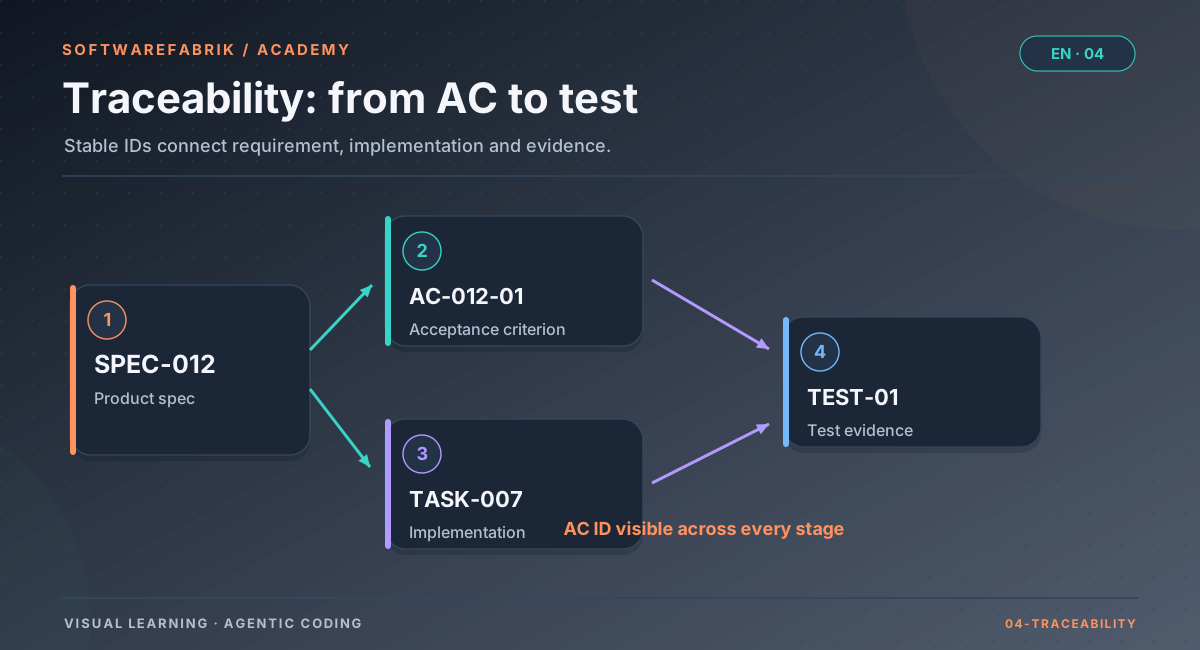
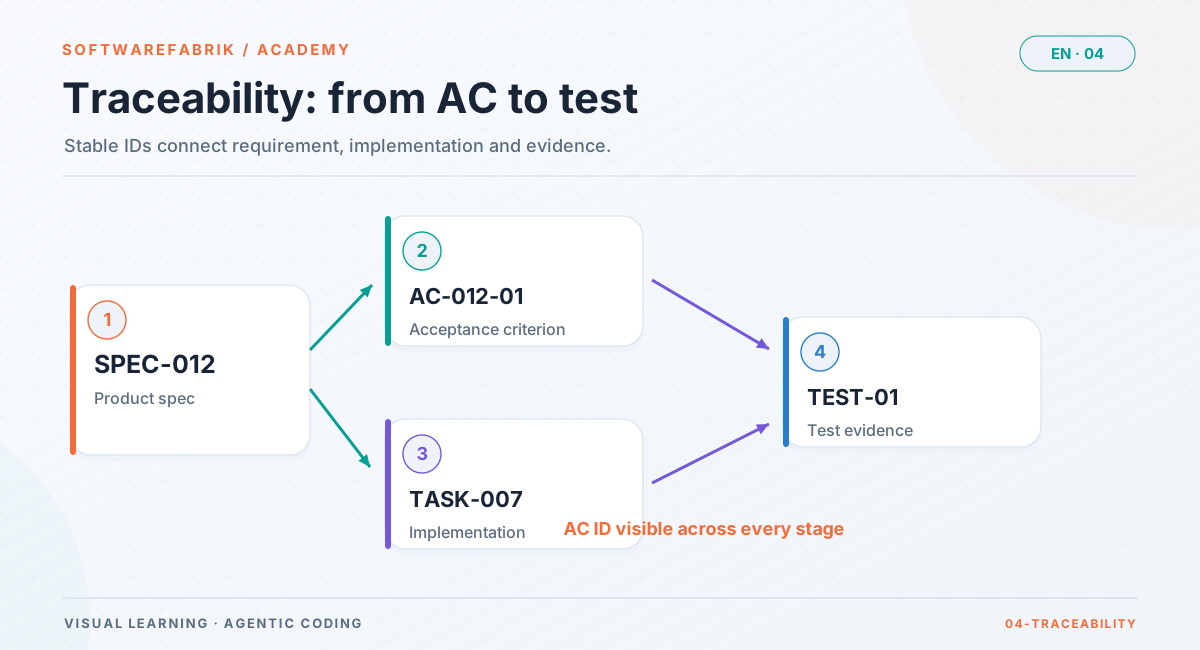
Traceability means: for every code change you can say which requirement it implements, and for every requirement which changes and tests belong to it. That sounds like bureaucracy, but it is the foundation for three very practical things: impact analysis (what is affected if AC-012-03 changes?), review (does this diff match what it is supposed to implement?) and evidence (which requirement was built against and accepted?).
Open full-size graphicOpen full-size graphic
TASK-007 and TEST-01 are placeholders; the stations the factory actually links are shown in the chain below.IDs instead of text
Traceability via text does not work: texts get refined, reworded, translated. The factory therefore consistently tracks IDs (ADR-0027, decision E6). The AC ID is the thread that runs through all artifacts:
SPEC-012 v3 (APPROVED, sha256 …)
   └─ AC-012-03 ─┬─ Plan:     plans/0007-csv-export.md      (Spec: SPEC-012 / AC: AC-012-01, AC-012-03)
                 ├─ Backlog:  item with spec and AC reference
                 ├─ Run:      RUN_SPEC_GEBUNDEN spec=SPEC-012;version=3;hash=…;ac=AC-012-01,AC-012-03
                 ├─ Commit:   Implements: AC-012-01, AC-012-03
                 ├─ Test:     @Spec("AC-012-03") ac_012_03_obergrenze
                 ├─ Review:   acceptance criteria in the review request of all reviewers
└─ Trace: the run’s why-trace shows spec, version, hash, AC IDsCommit trailers
Git knows trailers: lines of the form Key: Value in the last paragraph of a commit message. Well-known examples are Signed-off-by: and Co-authored-by:. Tools such as git interpret-trailers or git log --format='%(trailers)' read them programmatically. For SDD the factory uses two trailers:
feat(export): CSV export of the filtered order list

Delivers the filtered order list as CSV (UTF-8, semicolon) and rejects
exports of more than 50,000 rows with an understandable message.

Spec: SPEC-012
Implements: AC-012-01, AC-012-03Spec: and Implements: in the last paragraph.This lets you ask at any time: Which commits implement AC-012-03? A git log --grep="AC-012-03" is enough to start with.
In the factory
Binding, trailers, why-trace: how the factory tracks an AC ID
Everything in this box applies only if SDD is enabled and the project’s spec mode is not AUS. Otherwise the factory behaves exactly as before.
- The plan run writes references. In mode
LEICHT/STRENGthe plan directive requires the linesSpec: SPEC-<nnn>andAC: AC-<nnn>-<nn>, …in every plan and lists the available specs with their approval status for the agent. When indexing, the factory stores the spec ID and AC IDs on the backlog item. - The backlog warns. The backlog (
/projects/{id}/backlog) shows the spec reference and hints when the spec is missing, has no approved version or AC IDs are unknown. In modeSTRENG, activation rejects such items (Chapter 5). - Binding at start. When a run with a spec reference starts, the factory binds the version approved at that moment and writes
RUN_SPEC_GEBUNDENwithspec=…;version=N;hash=…;ac=…into the signed audit chain. If (in modeLEICHT) there is no approved version yet, the run starts without a binding, with a hint in the run log. - Objective header. The agent receives the bound criteria (ID and text) directly after the engineering guardrails in its objective, the same for every adapter (verified for Claude, Codex and Gemini). Only the bound criteria, not the whole spec: that lives as a file in the workspace. The guardrails themselves and their hash do not change as a result.
- Spec index in
AGENTS.md. In addition, the factory projects a marked “spec index” section with ID, title, status and path of all specs into the workspace’sAGENTS.md. - Trailers on the factory commit. The factory’s commit and the pull request text carry
Spec: SPEC-<nnn>andImplements: AC-…, even if the agent set no trailers in its own commits. - Why-trace. Under
/runs/{id}/tracethe why-trace shows the spec ID, bound version, content hash and AC IDs, read from exactly theRUN_SPEC_GEBUNDENevent.
This is what the header the agent receives looks like (abridged, shown here in English):
## Spec binding: SPEC-012 v3 (sha256 4f1c…)

This task implements the following acceptance criteria (full spec:
specs/SPEC-012-csv-export/spec.md). Only these criteria are bound; check at
the end that each one is met and backed by at least one test:
- AC-012-01 — When a dispatcher …
- AC-012-03 — If the filter yields more than 50,000 orders, …

Commit rule: append the trailer lines `Spec: SPEC-012` and
`Implements: AC-012-01, AC-012-03` to every commit message.Parallel agents: the same version for everyone
In the workflow layer (Chapter 7) you declare the spec and AC IDs per task, when adding it or later via “Declare spec reference”. When the child run starts, the factory binds the approved version to the task (WORKFLOW_TASK_SPEC_GEBUNDEN). All child runs of a workflow work against the same version, even if the spec has been re-approved in the meantime. In mode STRENG a workflow plan can only be approved once every writing task names an approved spec.
In addition, every spec approval mirrors the acceptance-criteria block as contract SPEC-<nnn>-ac of kind ACCEPTANCE_CRITERIA into the contract registry (under Contracts). An unchanged block does not create a new contract version.
4.9 Spec drift: when spec, plan and code diverge
Spec drift is the divergence between spec, plan and code. It arises in two ways:
- The spec changes, the work does not. A criterion is refined or removed while a backlog item or a running task is still planned against the old version. Whoever builds now builds against a requirement that no longer applies.
- The code changes, the spec does not. A bug fix, a “small” extension, an optimisation changes observable behaviour without anyone updating the spec. The spec then quietly lies, and the next person (or the next agent) who relies on it builds on sand.
Against the second path, discipline helps most: change the spec first, then the code. A change in behaviour starts with a new draft version, gets approved and is then implemented. The hints about “uncovered behaviour” (section 4.7) make violations visible. Against the first path, technology helps: if every piece of work is bound to a specific version and versions can be compared at AC level, a system can calculate which work a change makes outdated.
What “changed” means
A comparison at AC level distinguishes three cases: a criterion is new (no existing work is affected, but someone has to implement it), removed (work that implements it is superfluous or even harmful) or changed (work must be reviewed and perhaps adjusted). Because IDs stay stable and are never reused, this comparison is unambiguous.
In the factory
Detecting spec drift
Today the spec detail page shows the comparison of two versions at the level of acceptance criteria (new, removed, changed). Use it before every approval of a new version: it shows you which criteria have moved relative to the approved version, and therefore which backlog items and tests you should look at. Because every run binds its version with version number and hash, you can also check in the why-trace at any time which state was built against.
Since v0.38.0 (SPEC-003) the factory takes over the impact analysis itself:
- When a new version is approved, the factory compares it at AC level with the previously approved one and writes the result as
SPEC_DRIFTwith the affected AC IDs (new, removed, changed) into the audit chain. On a spec’s first approval there is no comparison. - If the new version removes or changes a criterion, the factory marks open backlog items (not
DONEorREJECTED) bound to that criterion as outdated: the backlog shows them asVERALTETwith a reason; an item without AC IDs counts for all criteria of the spec. Activation clears the mark, because the new build run binds the then approved version. Bound workflow tasks that are not finished move toWAITING_FOR_REPLAN; the workflow view lists them under “Outdated basis”. - Contracts of kind
ACCEPTANCE_CRITERIAare compared structurally at AC level; the contract registry reports a removed criterion as a breaking change (HIGH) and a changed criterion text as a hint. - If the current version of a contract listed in the frontmatter under
contracts:carries a breaking change, the factory flags the spec in the spec overview as “needs review” and lists the findings.
4.10 Working out specs: alone, in a team, with the agent
A spec is rarely written in one go. A four-step approach has proven itself:
- Goal and non-goals first. Two paragraphs of goal, three to six non-goals. If there is no agreement here, there is no point discussing criteria yet.
- Main flow as criteria. The event-driven criteria of the normal case (“When …, the system shall …”).
- Ask systematically about errors and states. For each event: what if the input is invalid, the role is missing, a limit is exceeded, a dependency fails? Which states influence the behaviour? Which variants exist? This produces the “If”, “While” and “Where” criteria.
- Review with a tester’s eye. For every criterion, a test case in one sentence. Whatever cannot be tested gets rewritten. Whatever is open moves to “open questions”.
Step 3 in particular is a strength of language models: they are good at listing edge cases for a rule that you had not thought of yourself. Their weakness is that they make plausible but wrong decisions if you let them decide. The right division of labour is therefore: the agent proposes and asks, the human decides and approves.
Reverse spec: specs for existing code
Existing systems often have no spec, but code and tests that implicitly define the behaviour. A reverse spec derives a draft from them. Its value lies less in the finished text than in the questions that come up along the way: is this behaviour intended, or a bug? A reverse spec draft must therefore explicitly mark assumptions, non-goals and open questions. Approving it unchecked would mean declaring the current state, bugs included, to be the requirement.
In the factory
Spec run and reverse spec
Since v0.38.0 (SPEC-004) the factory helps work out specs. Writing them by hand or with a normal run that writes under specs/ (section 4.2) still works.
- A dedicated run type
SPEC. AlongsidePLANandBUILDthere is a spec run, which you start from the spec interface from role DEVELOPER: for a new spec from an idea in free text (the factory creates the spec from the template for this), or to sharpen an existing one. The prerequisite is enablement (section 4.1); the project’s spec mode may beAUS, because a spec run is an explicit request and not a side effect of a build run. - Only
specs/is taken over. At the end of a spec run the factory takes over exclusively changes underspecs/and discards all others (the counterpart to the plan takeover in a plan run). This produces new draft versions, never approvals. If the agent writes outsidespecs/, the run log lists the discarded paths. A spec run does not build, create a branch or merge. - Its own directive. The spec run requires goal, non-goals, acceptance criteria with IDs following the template’s scheme, negative and boundary cases for each criterion, and an “open questions” section. The rule “Do not ask questions” from
INSTRUCTIONS.md, which still applies unchanged to plan and build runs, is replaced for spec runs only by “ask questions in## Offene Fragen”. - Questions without a live dialog. If a spec run leaves questions in the “open questions” section of the new version, the factory reads them, stores them individually and ends the run in status
WAITING_FOR_INPUT. This state does not occupy a capacity slot, since no process is running. The spec detail page shows the questions under “Open questions from spec runs” one by one for answering (from role DEVELOPER) and records who answered what and when. You can continue (follow-up pass) only once no question is open any more, i.e. all are answered or explicitly marked as “not relevant”. The factory then starts a new spec run linked to its predecessor, which receives your answers as input and again creates a new draft version; the waiting run is closed asCOMPLETED. Without open questions, the spec run ends normally asCOMPLETED. - Reverse spec. For a project with an imported repository you start a reverse spec on the spec overview: the factory creates a spec “Reverse-Spec: <project>” from the template and starts a spec run with an import directive that derives a draft from code and tests, names the source for each criterion and explicitly marks assumptions, non-goals and open questions. Without an imported repository (import source on the project), the start is rejected with a hint.
- Robust against format errors. If a spec run produces a file that the parser rejects, it is still taken over as a draft and the findings appear on the version and in the run log, instead of the run failing.
- Model choice and vendor. Spec runs get their own routing role
SPECwith its own overriderun.routing.spec-model(without an override, as for plan runs); the resolution is attested asRUN_MODELL_AUFGELOESTwithrolle=SPEC(Chapter 10). The directive and the question rule travel via the objective andINSTRUCTIONS.mdand are therefore vendor-neutral, verified with the Claude and the Codex adapter.
In the factory
Approving a spec
Approval is a separate, audited gate, distinct from run approval:
- On the spec detail page, review the draft version: content, recognised acceptance criteria, validation result and, if applicable, the comparison with the previously approved version.
- Go through the checklist from section 4.5. Open questions? Then do not approve; resolve them first.
- Choose Approve on the version. Allowed from role MAINTAINER, the same level as run approval.
What the factory does in the process:
- It validates mandatory sections, ID scheme and uniqueness. Errors appear as a validation message (HTTP 400), and the status remains unchanged.
- It sets the version to
APPROVEDand a previously approved version of the same spec toSUPERSEDED. - It records the decision in the approval history (visible on the detail page) and writes
SPEC_APPROVEDwith spec ID, version and content hash into the signed audit chain. - It publishes the AC block as contract
SPEC-<nnn>-acin the contract registry. - It locks the spec header in the database, so that even two simultaneous approvals leave at most one
APPROVEDversion.
Anyone with a role lower than MAINTAINER gets HTTP 403, and the status remains unchanged. An agent can never approve a spec: its changes are always taken over as a draft.
pflichtSpecFreigabe, target state per SPEC-005, Chapter 9).
Summary
- Tests and reviews check whether code is good. Whether it does the right thing can only be checked against an agreed, verifiable description: the spec.
- A product spec has frontmatter, goal, non-goals and acceptance criteria with stable IDs
AC-<nnn>-<nn>; context, edge cases and open questions complement it. Lifecycle: DRAFT → APPROVED → SUPERSEDED; approved versions are immutable. - EARS has five templates: ubiquitous (The system shall), event-driven (When), state-driven (While), unwanted behaviour (If … then), optional feature (Where), plus complex forms.
- Vague words, compound requirements, implementation instead of behaviour and untestable statements are the most common mistakes; each has a standard rewrite.
- Given/When/Then describes examples; it complements EARS, especially for flows and boundary value tables.
- Every criterion needs positive, negative and boundary tests that carry the AC ID in their name, in an annotation or in a comment.
- The factory tracks AC IDs from the plan through the binding (
RUN_SPEC_GEBUNDEN), the objective header and the commit trailers into the why-trace; since v0.38.0,spec-conformancechecks coverage and spec drift marks outdated work. - People and agents write specs together; approving (from MAINTAINER) is always done by a human.
Exercise
Exercises: from vague requirement to criteria and tests
Four exercises that build on one another. Work through them in writing before you open the solution sketches. For exercise 4 you need a running factory with SDD enabled (feature flag softwarefabrik.spec.enabled) and the mock adapter, so that no costs are incurred. The quickest way is the demo instance: SDD is switched on there; its data is reset every night.
Exercise 1: Translating a vague requirement into EARS
A business department writes to you: “After several wrong passwords, the account should be locked for a while for security reasons. The admin should of course be able to lift that, and the user ought to be informed.”
- Mark all vague words and all hidden compound requirements.
- Note down the questions you need to ask the business department.
- Using plausible values explicitly marked as assumptions, write four to six acceptance criteria in EARS, with IDs of a fictitious SPEC-020. Use at least three different templates.
Solution sketch
Vague: “several”, “for a while”, “of course”, “informed” (how, when, about what?), “ought to”. Compound: locking, lifting by the admin and notification are three independent requirements.
Questions: How many failed attempts, within what time period? How long does the lock last? Does the counter reset after a successful sign-in? Through which channel is the user informed? Is the admin notified? What does an attacker see (may the message reveal that the account exists)?
Criteria (assumptions: 5 attempts in 15 minutes, 30-minute lock):
- AC-020-01 — If 5 sign-in attempts with a wrong password occur for an account within 15 minutes, then the system shall lock the account for 30 minutes.
- AC-020-02 — While an account is locked, the system shall reject sign-in attempts for that account, even with the correct password.
- AC-020-03 — If a sign-in is rejected, then the system shall display the same message “Sign-in failed”, regardless of whether the account is locked, unknown or the password is wrong.
- AC-020-04 — When an account is locked, the system shall send the account holder an email stating when the lock started and when it ends.
- AC-020-05 — When a user with the role ADMIN lifts the lock on an account, the system shall unlock the account immediately and reset the failed-attempt counter.
- AC-020-06 — When a sign-in succeeds, the system shall reset the account’s failed-attempt counter.
Note AC-020-03: it is a security requirement that was not in the original text at all, but follows from the question “What does an attacker see?”. Exactly these kinds of criteria emerge when you systematically ask about unwanted situations. Until they are clarified, the assumptions belong in “open questions”.
Exercise 2: Determining the EARS form and finding mistakes
Determine the EARS form of each criterion. Find the three that are faulty and rewrite them.
- When a technician completes an order, the system shall notify the dispatcher.
- The system shall be performant and secure.
- While the mobile app is offline, the system shall store recorded times locally.
- Where multilingual support is enabled, the system shall use the browser’s language.
- If an uploaded photo is larger than 10 MB, then the system shall reject the upload and display the message “File too large (at most 10 MB)”.
- The system shall sort the orders by due date using a Hibernate query.
- The system shall save the order and send a PDF confirmation to the customer.
Solution sketch
a) event-driven, correct (more precise would be: which dispatcher, through which channel). c) state-driven, correct. d) optional feature, correct. e) unwanted behaviour, correct; “reject and display a message” is one coherent response.
Faulty: b) vague and compound; split into measurable criteria, for example “When a dispatcher opens the order list, the system shall display it with up to 500 entries within 2 seconds” and a concrete security requirement. f) implementation instead of behaviour; better “The system shall sort the order list by due date in ascending order by default.” g) compound requirement with a hidden trigger; better two event-driven criteria: “When a dispatcher saves an order, the system shall …” and “When an order is saved for the first time, the system shall send the customer a confirmation as a PDF by email.”
Exercise 3: Deriving tests from a criterion
Take AC-020-01 from exercise 1 (5 failed attempts in 15 minutes lead to a 30-minute lock). Form the equivalence classes, determine the boundary values and write the list of test cases with expected results. Write at least two of them as a JUnit or Vitest test with the AC ID.
Solution sketch
Dimensions: number of failed attempts (4 / 5 / 6), time window (all 5 within 15 minutes / the first was 15 minutes and 1 second ago), lock duration (sign-in after 29:59 rejected / possible after 30:00), counter behaviour (a successful sign-in in between resets it, strictly AC-020-06).
- 4 failed attempts in 15 minutes → not locked (negative, boundary below).
- 5 failed attempts in 15 minutes → locked (positive, boundary).
- 5 failed attempts, the first 15:01 minutes ago → not locked (time window boundary; clarify beforehand whether 15:00 is included).
- Locked, sign-in after 29:59 → rejected; after 30:00 → possible (lock duration boundaries; strictly speaking AC-020-02).
@Spec("AC-020-01")
@ParameterizedTest(name = "AC-020-01: {0} failed attempts → locked = {1}")
@CsvSource({ "4, false", "5, true", "6, true" })
void ac_020_01_sperre_nach_fehlversuchen(int versuche, boolean gesperrt) {
    var uhr = new VerstellbareUhr();
    var konto = kontoService(uhr).neuesKonto("anna");
    for (int i = 0; i < versuche; i++) {
        konto.anmelden("falsch");
        uhr.vor(Duration.ofMinutes(2));
    }
    assertThat(konto.istGesperrt()).isEqualTo(gesperrt);
}The exercise also shows that a precise criterion immediately places a testability requirement on the code: without a controllable clock, 15-minute windows cannot be tested sensibly. That belongs as a note in the spec’s context.
Exercise 4: The flow in the factory
Play through the SDD flow once from start to finish, preferably with the mock adapter:
- In a practice project, create a new spec from the template under Specs and transfer the criteria from exercise 1.
- Deliberately introduce a mistake (for example
AC-20-1instead ofAC-020-01, or a duplicate ID) and try to approve. Read the validation message. - Fix the mistake (new draft version), approve the spec and then compare a further change with the approved version.
- Set the spec mode to
LEICHT, start a plan run and check in the backlog which spec and AC references the items carry. - Set the mode to
STRENGand try to activate an item without an approved spec. - Activate an item with a spec reference and look at the why-trace after the run.
What to look out for
- Step 2: The approval is rejected with an understandable validation message, not with an error page. The detail page already shows the finding on the version beforehand.
- Step 3: After approval the version is immutable; “Edit” creates a new draft version. Your name appears in the approval history. The comparison shows changed criteria at AC level.
- Step 4: With the
mockadapter, the content of the plans depends on the mock; with a real adapter the plans carry theSpec:andAC:lines. Watch for the hints in the backlog. - Step 5: Activation is rejected. That is exactly the point of
STRENG. - Step 6: The why-trace shows spec ID, version, hash and AC IDs. Compare the hash with the approved version on the detail page.
Chapter questions
-
An agent delivers a green build, 95 % test coverage and no findings from the static reviewers. Why does that not show that it has fulfilled the task?
Model answer
Build, coverage and reviewers answer the verification question: is the code good? Whether it does the right thing (validation) can only be checked against an agreed description of what is wanted. The tests come from the same agent and check its own assumptions; they are green because they share the same understanding as the code. Only acceptance criteria with IDs approved by a human, and tests that back exactly those criteria, close the gap.
-
Which three sections of a product spec are mandatory in the factory, and why are the non-goals more than a formality?
Model answer
Goal, non-goals and acceptance criteria are mandatory (
Ziel,Nicht-Ziele,Akzeptanzkriterien). Non-goals delimit the scope, prevent scope creep and make uncovered behaviour checkable: if an agent builds something explicitly listed as a non-goal, that is a clear finding rather than a matter of taste. They also prevent an agent from “helpfully” adding obvious extensions that nobody ordered. -
Classify: “While maintenance mode is active …”, “Where the cost centres module is enabled …”, “If the database is unreachable …”, “When an order is completed …”. How do a state and an optional feature differ?
Model answer
State-driven, optional feature, unwanted behaviour, event-driven. A state changes during operation and has a duration (maintenance mode on/off). An optional feature describes the system’s configuration, that is setup, variant, module or license tier, and typically does not change during use. Accordingly, you test states with transitions into and out of them, and optional features with and without the feature.
-
Rewrite: “The upload should work quickly and reliably and handle large files appropriately.” Which mistake patterns does it contain?
Model answer
Vague words (quickly, reliably, large, appropriately) and a threefold requirement. A rewrite, for example: “When a user uploads a file of up to 10 MB, the system shall confirm the upload within 5 seconds.” – “If an upload is incomplete because the connection drops, then the system shall store no partial file and display the message ….” – “If a file is larger than 10 MB, then the system shall reject the upload and display the message ‘File too large (at most 10 MB)’.” The concrete values are assumptions and belong in the open questions until clarified.
-
Why is a single positive test not enough for AC-012-04 (“While an export is running, the system shall disable the export button”)? Which tests belong with it?
Model answer
An implementation that always disables the button would pass the positive test. What is needed: button disabled while an export is running (positive); button enabled when no export is running (negative); button becomes enabled again when the export ends (transition). Given “for that user”, additionally: an export by user A does not disable user B’s button.
-
Why must AC IDs never be reused after a criterion has been removed?
Model answer
Tests, commits (
Implements:), backlog items, audit events and why-traces refer to the criterion via its ID. If the ID were reused for a new criterion, an old test would suddenly back a completely different criterion, and historical evidence would change its meaning. Stable, never-reused IDs also make the comparison of two versions (new, removed, changed) and drift detection unambiguous. -
In a build run, an agent changed the file
specs/SPEC-012-csv-export/spec.mdand “refined” a criterion. What happens to this change in the factory, and what do you have to do?Model answer
The factory takes the change over after the build as a new draft version (DRAFT), never as an approval; the approved version remains unchanged and continues to apply to bound runs. You review the draft, ideally with the comparison against the approved version, and decide: approve (from MAINTAINER), revise or discard. An agent can never approve a spec itself.
-
Your project is in spec mode
LEICHT. A backlog item refers to SPEC-012, which exists only as a draft. What happens on activation, and what would be different inSTRENG?Model answer
In
LEICHTthe backlog shows a hint, and the build run starts anyway, but without a spec binding:RUN_SPEC_GEBUNDENis not written, the run log contains a hint, and the agent receives no objective header with bound criteria. InSTRENGthe factory rejects the activation, because an approved spec is a start condition. -
Three child runs of a workflow are building SPEC-012. While the second is running, someone approves version 4. Which version do the child runs work against, and why is that intended? What changes through spec drift detection (since v0.38.0)?
Model answer
All child runs work against the version that was bound to the task at start; the factory guarantees that all child runs of a workflow receive the same bound version, even if the spec has been re-approved in the meantime. Otherwise parallel agents would build against different requirements and the integration result would be contradictory. Since v0.38.0, the factory compares version 4 with version 3 at AC level, writes
SPEC_DRIFTinto the audit chain, marks open backlog items bound to changed or removed criteria as outdated and moves bound tasks that are not finished toWAITING_FOR_REPLAN. A human then decides on replanning. -
Transfer: you take over an existing repository without specs and want to switch to
STRENG. How do you proceed, and what danger does a reverse spec carry?Model answer
Import the repo, set the spec mode to
LEICHTfirst. Work out specs for the most important areas: by hand, with a normal run that writes underspecs/, or with a reverse spec (since v0.38.0) that derives a draft from code and tests. Review every draft from a domain perspective: is the described behaviour intended, or a bug? Resolve assumptions and open questions, then approve. Gradually add AC IDs to existing tests. Only switch toSTRENGonce the relevant areas have approved specs. The danger of a reverse spec: it describes the current state, bugs included. Approved unchecked, bugs would be declared requirements. That is why it marks assumptions explicitly and is never approved automatically.