Learning goals
After this chapter you can …
- explain why agents work much more reliably with small, scoped tasks than with large, open-ended assignments.
- decompose a piece of work — vertically rather than horizontally — into tasks that can be built, verified and merged individually.
- describe each task with rationale, scope, acceptance criteria and an effort estimate, and formulate a Definition of Done.
- identify dependencies between tasks, model them as a directed graph without cycles and derive a sensible order from it.
- in the factory, start a plan run, work the backlog generated from
plans/*.md, and activate, reject and add dependencies to items. - close the loop: use the spec reference on a backlog item, understand automatic follow-up suggestions and routines, and bundle work into a release via milestones.
5.1 Why agents need planning
With agents, the temptation to skip planning is strong. The agent is fast, it can “just get started”, and one big assignment seems to save time. In practice the opposite happens. The larger and more open an assignment, the more decisions the agent makes on its own — and the larger and harder to verify the result becomes.
The reasons are structural:
- Errors compound. An agent works in a loop of reading, acting and observing (Chapter 2). An early wrong assumption feeds into every later step. For a small task the chain is short; for a large one it is long.
- The context fills up. Long runs accumulate files, command output and intermediate states. As the history grows, so do costs and the risk that earlier instructions drop out of view.
- Reviews don't scale. A human reads an 80-line diff thoroughly. A 3,000-line diff gets skimmed. A review that doesn't actually happen is no review.
- Undoing gets expensive. If a small task was implemented wrongly, you discard a branch. If half of a large assignment is wrong, you have to separate good results from bad ones.
With agents, planning is therefore not bureaucratic overhead but the tool you use to control the size of every single decision. The rule of thumb: A task is cut correctly when you can fully judge its result in one review.
5.2 Decomposition: vertical rather than horizontal
There are two fundamental ways to decompose a piece of work.
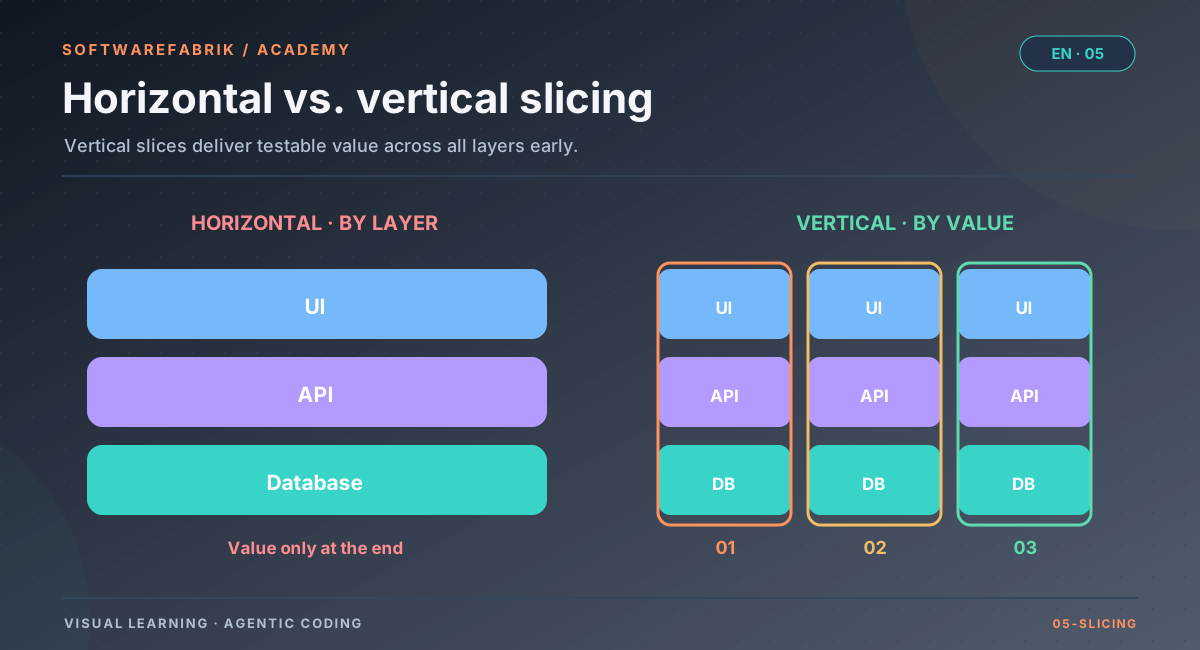
- Horizontal (by layer): “First the database schema, then all repositories, then all services, then all controllers, then the UI.” Each task is technically homogeneous, but none delivers anything usable on its own. Errors in the interfaces between layers only surface at the very end.
- Vertical (by value): “First ‘create work order’ from database to UI, then ‘list work orders’, then ‘assign work order’.” Each task is a thin end-to-end slice that can be tested end to end.
For agents, vertical decomposition is almost always better. Each task can be backed by a real test, every merge leaves a working system, and architectural deviations show up in the first slice instead of the last. Horizontal tasks remain useful for genuine cross-cutting concerns: a build setup, a migration of the test infrastructure, a security header for all endpoints.
Good slice sizes
A usable task for one agent run typically has these properties:
- a clear goal that can be stated in one sentence,
- a manageable set of affected files or modules,
- two to six acceptance criteria — significantly more suggests the task is too large,
- a result that can be merged without the next task, without breaking anything.
Spikes for the unknown
Sometimes you simply don't know how something works: Which library fits? Does the integration with the legacy system work at all? Then the first task is not an implementation but an investigation (spike) with a clear outcome — such as a short decision note or a throwaway prototype. Only then do you plan the actual implementation. Agents are well suited for spikes, as long as the result is explicitly treated as insight and not as production code.
Work item: Manage maintenance orders
| Horizontal (unfavourable) | Vertical (favourable) |
|---|---|
| 1 Schema of all tables | 1 Create order (DB → API → UI) |
| 2 All repositories | 2 List and filter orders |
| 3 All services | 3 Assign order to a technician |
| 4 All REST endpoints | 4 Close order with feedback |
| 5 Entire UI | 5 Cross-cutting: audit log for changes |
5.3 Describing a task well
A task is the assignment for exactly one run. It should be described so that an agent can implement it without asking back and a human can verify the result without guesswork. A small, fixed schema has proven itself:
| Section | Purpose | Example |
|---|---|---|
| Title | What, in one sentence | “Assign order to a technician” |
| Rationale | Why now, what value | “Dispatchers currently distribute orders by email.” |
| Scope | What is included — and what is not | “Assignment and reassignment; no email notification.” |
| Acceptance criteria | How you know it is done | “When a dispatcher assigns an order, the system shall …” |
| Effort | Rough size, a signal for tasks that are too large | “small” / “medium” / “large” |
Acceptance criteria per task
The most important element is the acceptance criteria. They turn an intention into something verifiable. Without them, the only question after the run is “Does this look good?” — with them, it is “Is every criterion backed by evidence?”. Good criteria describe observable behaviour, not implementation, and also cover the failure case:
- “When a dispatcher assigns an open order to an active technician, the system shall store the technician on the order and set the status to ‘assigned’.”
- “If the technician is deactivated, then the system shall reject the assignment with an understandable message.”
These are already phrased in the EARS pattern. How to write such criteria systematically, give them IDs and turn them into tests is the topic of Chapter 4. For planning it is enough that every task references the criteria it fulfils instead of rephrasing them slightly differently.
Definition of Done
Acceptance criteria are task-specific. In addition, there are conditions that apply to every task: build green, tests present and green, no new critical findings in the quality gate, documentation updated where necessary. That is the Definition of Done. It belongs in the project, written down once — not copied into every task.
In the factory
The plan run: the agent plans without changing code
The factory knows two kinds of runs: BUILD (the normal run, which implements an objective and is validated by the build gate) and PLAN (a planning run). You start a plan run on a project's Backlog / Plans page (/projects/{id}/backlog); optionally you supply a focus, such as “error handling in the import”.
What the agent does in a plan run
The plan run receives a fixed planning directive: it must not change production code, it should analyse the existing code as well as MEMORY.md and PROJECT.md, and create a separate Markdown file for each sensible next development step:
plans/0007-assign-order.md

# Assign order to a technician

## Rationale
Dispatchers currently distribute orders by email …

## Scope
Assignment and reassignment. No notification.

## Acceptance criteria
- When a dispatcher assigns an open order to an active technician, …
- If the technician is deactivated, then …

## Rough effort
mediumplans/NNNN-short-title.md, starting with # Title, followed by rationale, scope, acceptance criteria and rough effort.What the factory does afterwards
- Only plans are kept. At the end of a plan run the factory commits only the files under
plans/and discards all other changes in the workspace. Even if an agent ignores the directive, no code lands. - No build. A plan run does not go through a build gate; it is completed directly.
- Indexed as a backlog. The factory reads the plans and creates them as backlog items. The plan content lives in the repository (
plans/), status and order in the database.
You can configure a separate model for plan runs (run.routing.plan-model); without an override, the team's preferred model and the role default apply. Planning can thus get a stronger model than mechanical implementation — more on this in Chapter 10.
mock adapter you go through the complete loop of plan run, backlog and build run without a real agent and without token costs.
5.4 Dependencies and order
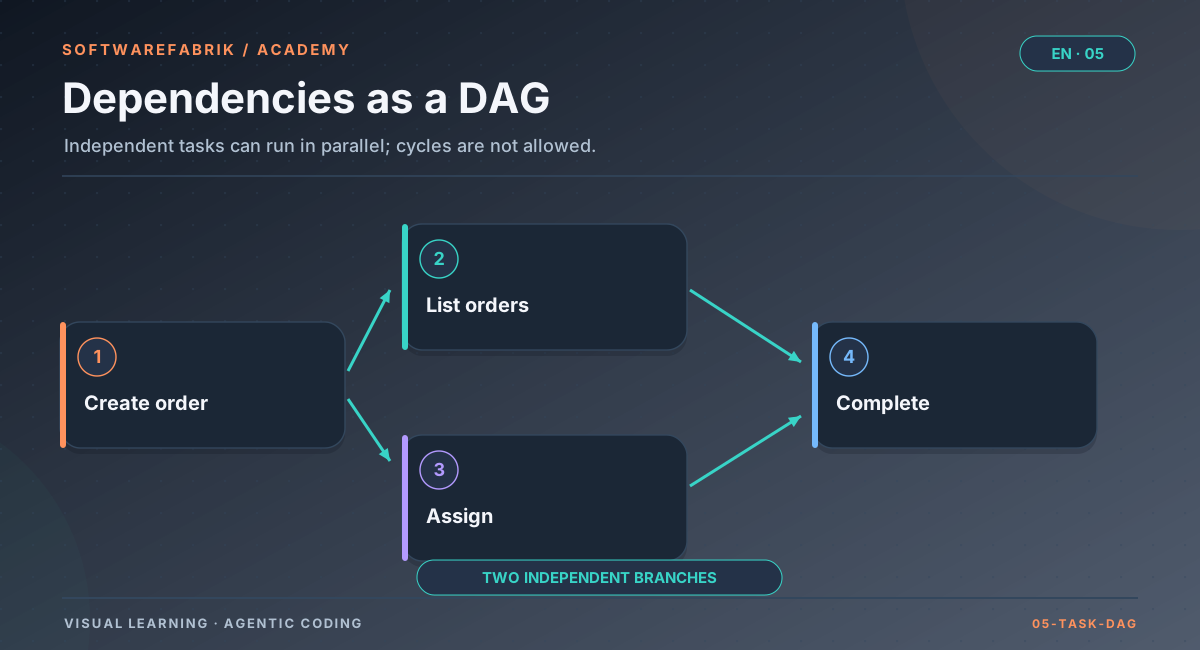
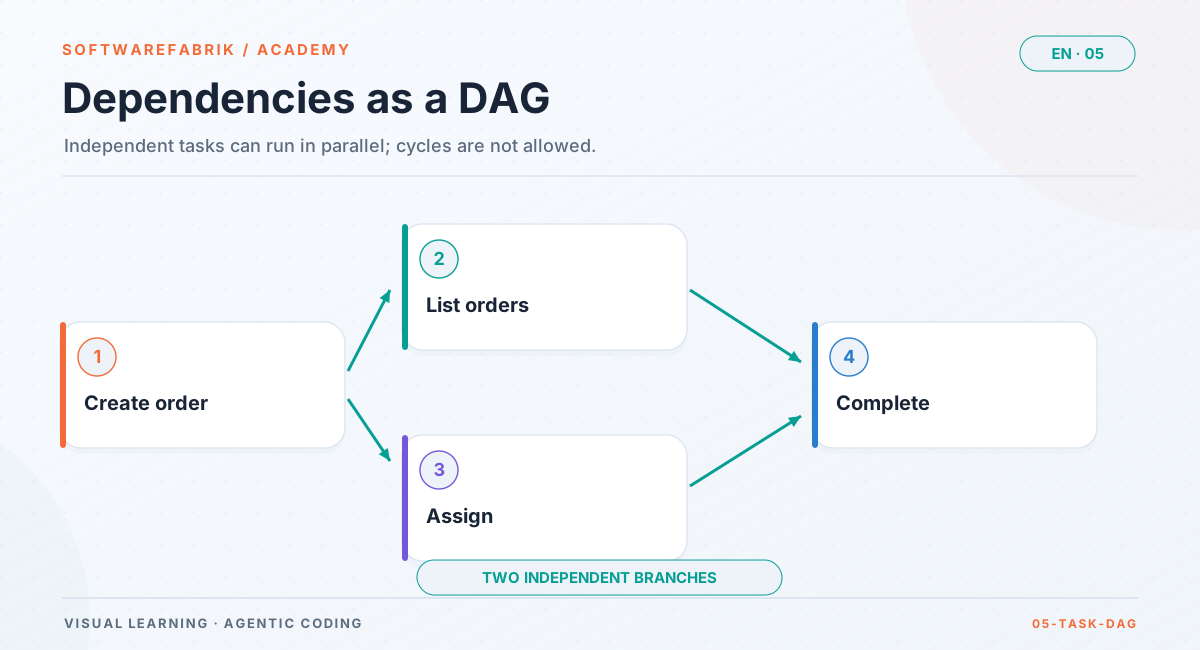
Tasks are rarely completely independent. “List orders” requires “create order”; “close order” needs the assignment. Such relationships form a directed graph: each edge says “B can only start once A is done”. For an order to exist, this graph must contain no cycles — if A depends on B and B on A, neither can ever start. This is called a DAG (directed acyclic graph).
What a dependency graph gives you
- Order: The graph tells you which tasks can start now — all those whose predecessors are done.
- Parallelism: Tasks without mutual dependencies could run at the same time. When that is safe is covered in Chapter 7.
- Risk: Tasks that many others depend on deserve special care. An error there blocks everything behind it.
What “done” means
A seemingly small question with a big impact: Is a task done when the agent has written code? When the build is green? Or only when the result is on the main branch? For dependencies only the last one counts. If B builds on A and A is still on a branch, B works against a state that does not exist on the main branch. “Done” should therefore mean “merged”.
Minimising dependencies
Every dependency constrains the order and lengthens the critical path. Good planning tries to reduce them: with an early, small slice that creates a shared foundation (such as the data model of the core object), with clear interfaces between modules, or with contracts agreed in advance. The latter is the foundation of parallel work in Chapter 7.
In the factory
The backlog: activate, reject, add dependencies
Under Backlog / Plans (/projects/{id}/backlog) you see all backlog items of the project. Each item has a status:
| Status | Meaning |
|---|---|
PROPOSED | Proposed by the plan run, not yet scheduled |
ACCEPTED | Part of the status model, but currently not set by any flow (activating goes directly to IN_PROGRESS) |
IN_PROGRESS | Currently being implemented by a build run |
DONE | Implemented — the build run was merged (for the limitation in PR mode, see below) |
REJECTED | Discarded |
The actions
- Activate: creates a build run whose objective is the content of the plan file, and starts it — on the project's existing code, on its own branch. The item moves to
IN_PROGRESS. - Reject: sets the item to
REJECTED. Not every suggestion from an agent makes sense — rejecting is a normal, important step. - + Blocker: makes one item depend on another. An item with an open blocker cannot be activated; the factory then names the titles of the blocking items.
- Mark done manually / remove blocker: The factory has endpoints for this (setting an item to
DONEmanually, removing a blocker), but currently does not offer them as controls in the UI.
The factory enforces two rules technically: a dependency that would create a cycle, directly or indirectly, is rejected. And an item automatically becomes DONE only when its build run has been merged — not as soon as code has been written. “Done” thus matches the meaning from 5.4.
git.pr-feedback.enabled, off by default) merely opening the pull request counts as completion: the run becomes COMPLETED and the item DONE, even though the PR is still open. If you want “done = merged” there too, enable PR feedback.Activating items, starting plan runs and maintaining blockers require the appropriate role in the project (starting runs requires DEVELOPER or higher).
5.5 Connecting plan and requirement
A plan describes what gets built next. A requirement describes what must hold. The two are related but not the same: a requirement can be implemented across several tasks, and one task can serve several requirements. If acceptance criteria exist only in the free text of the task, two problems arise:
- Two sources of truth: The task phrases the criterion slightly differently from the requirement. Which version applies?
- No traceability: If the requirement changes, nobody knows which planned tasks are affected.
The solution is to have tasks reference requirements by ID instead of copying them: “This task implements AC-012-03 and AC-012-04 from SPEC-012.” Then there is exactly one wording, and when something changes it is computable which tasks are affected. This is the core of traceability, covered in detail in Chapter 4.
In the factory
Spec and AC reference on the backlog item
If a project works in spec mode LEICHT (light) or STRENG (strict) (see Chapter 4), the factory extends the planning directive: every plan file begins, directly after the heading, with two lines naming the spec and the acceptance criteria. For this, the plan run receives the list of existing specs with their approval status. The agent marks plans without a matching spec with Spec: keine.
# Assign order to a technician
Spec: SPEC-012
AC: AC-012-03, AC-012-04

## Rationale
…specs/SPEC-012-*/spec.md.During indexing, the factory stores the spec ID and AC IDs on the backlog item. The backlog shows the reference and displays warnings when
- an item names no spec,
- the named spec has no approved version, or
- an AC ID does not exist in the approved version.
In mode LEICHT these remain warnings. In mode STRENG the factory refuses to activate such an item: building happens only against an approved spec with known criteria.
When an item with a spec reference is activated, the build run carries the reference forward: the bound acceptance criteria go into the agent's assignment and to all reviewers of the quality gate, the version approved at run start is attested as RUN_SPEC_GEBUNDEN, and the factory commit as well as the pull request carry the trailers Spec: and Implements:.
Spec drift (since v0.38.0): If an approved spec later changes such that an acceptance criterion is removed or modified, the factory marks open backlog items bound to that criterion (an item without AC IDs counts for all criteria of the spec) as outdated and shows them in the backlog as VERALTET with a reason. Activation clears the mark, because the new build run binds the then approved version. That way you see which planned work needs to be re-assessed before activation.
5.6 Milestones and releases
Tasks are the smallest planning unit, milestones the next larger one. A milestone bundles several tasks into a state that means something to users — typically a version. Milestones answer questions that tasks alone cannot:
- What goes into the next version, and what doesn't?
- When is the version finished? (When all assigned tasks are done.)
- What changed compared with the last version? (The changelog.)
A clean release process turns a milestone into three things: a changelog entry summarising the completed tasks, an immutable marker in version control (a Git tag) and, where applicable, a release on the Git host's platform. Immutability is key: a released state is not rewritten after the fact; corrections go into the next version.
Time-based rhythms
Alongside content-driven planning there are time-based rhythms: a weekly planning session, a nightly run that updates dependencies, a regular inventory of technical debt. Such routines can be automated. The boundary is the same as everywhere in this course: automation does not replace the human approval points; it ensures that something verifiable is reliably ready at those points.
In the factory
Milestones, routines and automatic follow-up suggestions
Milestone release
Under /projects/{id}/milestones you create milestones with a name and target version and assign backlog items to them. A milestone is OPEN while items are being assigned and implemented, and RELEASED after the release. On release the factory
- generates a changelog section in Keep a Changelog style from the milestone's
DONEitems and inserts it into the workspace'sCHANGELOG.md, - commits it and sets a Git tag
v<target version>, - pushes the tag and creates a GitHub release if a GitHub remote is set and a GitHub token is stored; otherwise it stays with a local tag and changelog.
Routines
Under /projects/{id}/routines you create scheduled runs: each routine has a name, a cron expression, a kind (PLAN or BUILD) and optionally a focus that serves as the run's objective. Routines can be switched on and off. One cron trigger starts at most one run.
Automatic follow-up suggestions
If the setting run.auto-followup-plan is enabled, every successfully completed build run automatically triggers a plan run that proposes the next sensible steps based on what was just built. Together with routines, the loop plan → build → verify → merge → plan again then keeps going without manual triggering — with the approval points as deliberate stops.
   ┌──────────── Routine (cron) / auto follow-up suggestion ──────┐
   ▼                                                              │
Plan run ──► plans/NNNN-*.md ──► Backlog (PROPOSED)               │
                                   │  review, reject,             │
                                   │  blocker, milestone          │
                                   ▼                              │
                           Activate ──► Build run (branch)        │
                                              │ build, gate,      │
                                              │ approval, merge   │
                                              ▼                   │
                                       Item DONE ─────────────────┘
                                              │
Milestone release (changelog, tag)5.7 Common planning mistakes
| Mistake | Symptom | Remedy |
|---|---|---|
| Oversized assignment | Huge diff, review gets skimmed | Decompose vertically; two to six criteria per task |
| Task without criteria | After the run, only “Looks good?” | At least one positive and one negative criterion |
| Copied criteria | Task and requirement contradict each other | Reference by ID instead of copying |
| Hidden dependency | Build run fails because groundwork is missing | Set blockers explicitly |
| “Done” without merge | Follow-up task builds on a state that doesn't exist | Done means merged |
| Blind acceptance | Backlog full of unreviewed agent suggestions | Review, reject, prioritise — planning remains a human job |
| Planning as a one-off event | Plan is outdated after the third run | Repeat plan runs regularly, maintain memory |
5.8 Summary
- Small, scoped tasks make agent work reliable and verifiable. A task is cut correctly when its result can be fully judged in one review.
- Vertical decomposition delivers testable value with every task; spikes clarify the unknown before implementation.
- Every task has a title, rationale, scope, acceptance criteria and effort; the Definition of Done applies to all of them.
- Dependencies form a cycle-free graph; “done” means “merged”.
- In the factory, a plan run proposes tasks as
plans/NNNN-*.mdwithout keeping any code; the backlog manages status, dependencies and spec reference; activating starts a build run; milestones produce a changelog, a tag and optionally a GitHub release; routines and automatic follow-up suggestions close the loop.
Exercise
Exercise: Turn a feature into a backlog
Starting point: For the room booking app from the exercise in Chapter 3, the next feature reads: “Employees should be able to book rooms for a time slot, see their bookings and cancel them. Double bookings must not occur. Admins should be able to block rooms.”
- Decompose: Decompose the feature vertically into four to six tasks. Check each one: does it deliver something testable on its own?
- Describe: For two of the tasks, write a complete plan file in the format
plans/NNNN-short-title.mdwith rationale, scope (including “not included”), acceptance criteria and effort. Each task needs at least one criterion for the failure case (e.g. double booking, blocked room). - Dependencies: Draw the dependency graph of your tasks. Are there tasks that are independent of each other? Which task is on the critical path?
- Milestone: Decide which tasks belong in version 1.1 and which in 1.2, and justify the boundary.
- In the factory (optional, with
mock): Under/projects/{id}/backlog, start a plan run with the focus “room booking”. Deliberately reject at least one suggestion, set a blocker between two items and then try to create a dependency in the opposite direction. Note the factory's message. Under/projects/{id}/milestones, create a milestone “1.1” and assign items to it.
Chapter questions
-
Name three structural reasons why agents work more reliably with small tasks than with large ones.
Model answer
Errors compound in the agent loop — with small tasks the chain is short. In long runs the context fills up with intermediate states, which increases costs and the risk of overlooking earlier instructions. Reviews don't scale: small diffs get checked thoroughly, large ones get skimmed. In addition, discarding a small, wrong task is cheap.
-
What is the difference between vertical and horizontal decomposition, and when does horizontal still make sense?
Model answer
Horizontal slices by technical layer (first all database tables, then all services …), vertical by value (one use case through all layers). Vertical tasks can be tested and merged individually and expose interface errors early. Horizontal makes sense for genuine cross-cutting concerns such as build setup, test infrastructure or a security header for all endpoints.
-
How do acceptance criteria differ from the Definition of Done?
Model answer
Acceptance criteria are task-specific and describe observable behaviour that this task must deliver. The Definition of Done is the same for every task and describes the hand-over state (build green, tests present, gate without critical findings, docs updated). In the factory, the Definition of Done lives in the project as
DEFINITION_OF_DONE.md. -
What happens in the factory at the end of a plan run if the agent, contrary to the directive, also changed a Java file?
Model answer
At the end of a plan run the factory commits only the files under
plans/and discards all other changes. The Java change therefore does not end up in the workspace state. No build gate runs for a plan run; the plans are indexed as backlog items and the run is completed. -
Why should a task only count as done once it is merged, and how does the factory implement this?
Model answer
Dependent tasks build on the main branch. If the groundwork is only on a branch, the follow-up task works against a state that doesn't exist there. The factory automatically sets a backlog item to
DONEonly when its build run has been merged (in PR mode only with PR feedback enabled; otherwise opening the PR already counts); an item with an unfinished blocker cannot be activated. -
You try to enter item A as a blocker of item B, although B is already (via C) a blocker of A. What happens, and why does that make sense?
Model answer
The factory rejects the dependency, pointing out that it would create a cycle; it also checks indirect cycles. This makes sense because in a cyclic dependency graph none of the tasks involved could ever be activated — there would be no valid order.
-
A project is in spec mode
STRENG. A plan run produces a plan withSpec: SPEC-004andAC: AC-004-07, but SPEC-004 only has a draft. What does the backlog show, and what happens on activation?Model answer
The backlog shows a warning on the item that the spec has no approved version. In mode
STRENGthe factory refuses activation until a version of SPEC-004 that contains AC-004-07 is approved. In modeLEICHTit would only be a warning; the build run would then run without spec binding. -
Why is it better for a plan to reference acceptance criteria by ID instead of repeating them in free text?
Model answer
There is then only one binding wording (in the spec) instead of two that can drift apart. In addition, it is computable which tasks are affected by a change to the requirement, and the chain can be traced into commits, tests and the why-trace.
-
Your team wants “the factory to simply keep working every night”. Which building blocks would you combine, and what precautions do you take?
Model answer
A routine (
/projects/{id}/routines) with a cron expression, such as a nightly plan run, possibly complemented by automatic follow-up suggestions (run.auto-followup-plan) after successful build runs. Precautions: set budgets or token limits, keep approval points (before execution, before merge) active so that nothing gets merged unreviewed, and schedule fixed time for reviewing the backlog. Use BUILD routines only with a clearly scoped focus, because they produce code without plan approval. -
What does the factory produce when a milestone is released, and what is different if no GitHub remote is set?
Model answer
It generates a changelog section from the milestone's completed items in the workspace's
CHANGELOG.md, commits it and sets a Git tagv<target version>; the milestone moves toRELEASED. With a GitHub remote and token it pushes the tag and additionally creates a GitHub release. Without a remote it stays with a local tag and changelog.