Learning goals
After this chapter you can:
- explain why parallel agents fail on shared state and what “single writer” does about it.
- decompose an initiative into a dependency graph and recognise which parts can genuinely run in parallel.
- justify why shared contracts must come before parallel implementation.
- place leases, merge order and integration checks as building blocks of bringing work back together.
- in the factory, create a workflow, explain write scopes and contracts, read the merge queue, and handle conflicts, stale tasks and replanning.
- use spec binding per task so that all parallel agents work against the same version of the requirements.
7.1 Why parallel at all?
A single agent works sequentially: read, plan, change, test, fix. For larger initiatives that takes time, and much of it is mutually independent. The backend module for invoices and the frontend form for addresses barely touch each other. Why should they be built one after the other?
Parallelism promises three things:
- Lead time: independent parts are built at the same time.
- Focus: each agent gets a smaller, clearly scoped assignment and therefore a more manageable context. In practice, small assignments succeed more often than large ones.
- Specialisation: analysis, implementation and review can be handled by different agents, models or tools.
The catch: software is not a stack of independent sheets. Parts share interfaces, data models, build configuration and database migrations. As soon as two agents touch the same spot or rely on different assumptions about a shared interface, integration work arises. In the worst case it outweighs the time saved. The factory’s parallel roadmap names exactly this as the main risk: integration costs can exceed the gain from parallelism.
7.2 The core problem: shared state
Imagine two agents working in the same working directory. Agent A is changing a class and is halfway done. At that moment agent B runs the tests, sees a compile error in A’s half-finished code and “fixes” it. Then B commits with git add -A and takes A’s half-done work along. After that, nobody knows who caused which line. A review, a why-trace or an attestation would make statements about a state that no single agent is accountable for.
This is not an edge case but the inevitable consequence of several writers on one shared state. Human teams solve it by having each person work in their own working copy and combine changes via branches and merges. The same solution applies to agents, only more strictly, because agents don’t coordinate with each other along the way.
Single writer per workspace
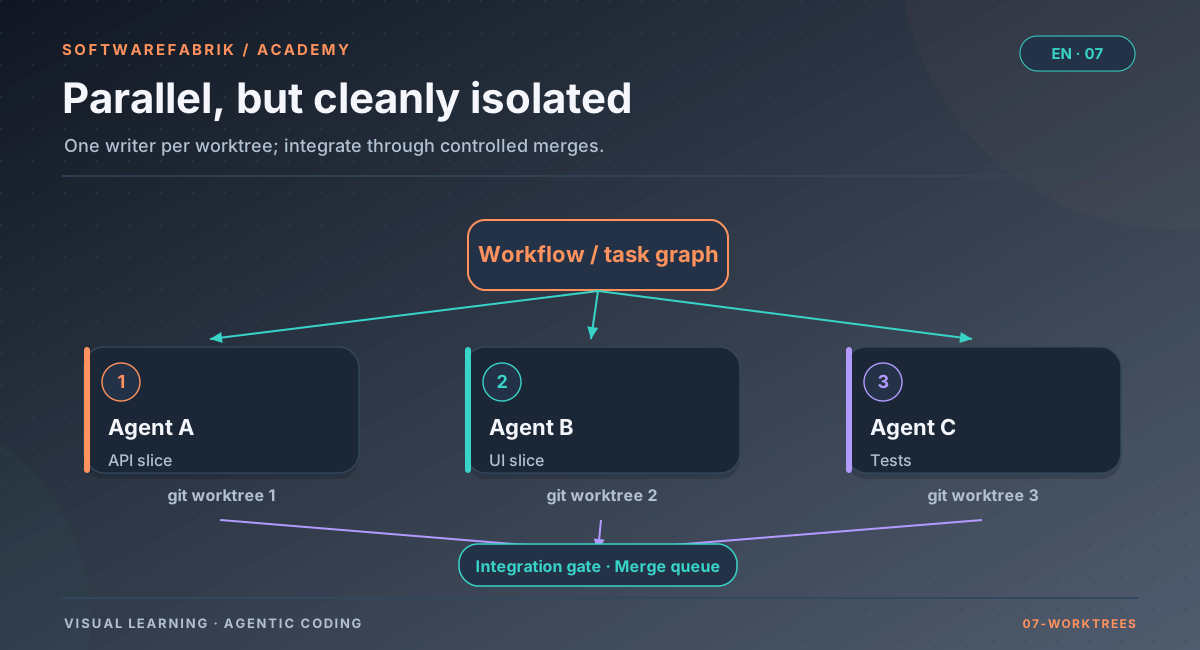
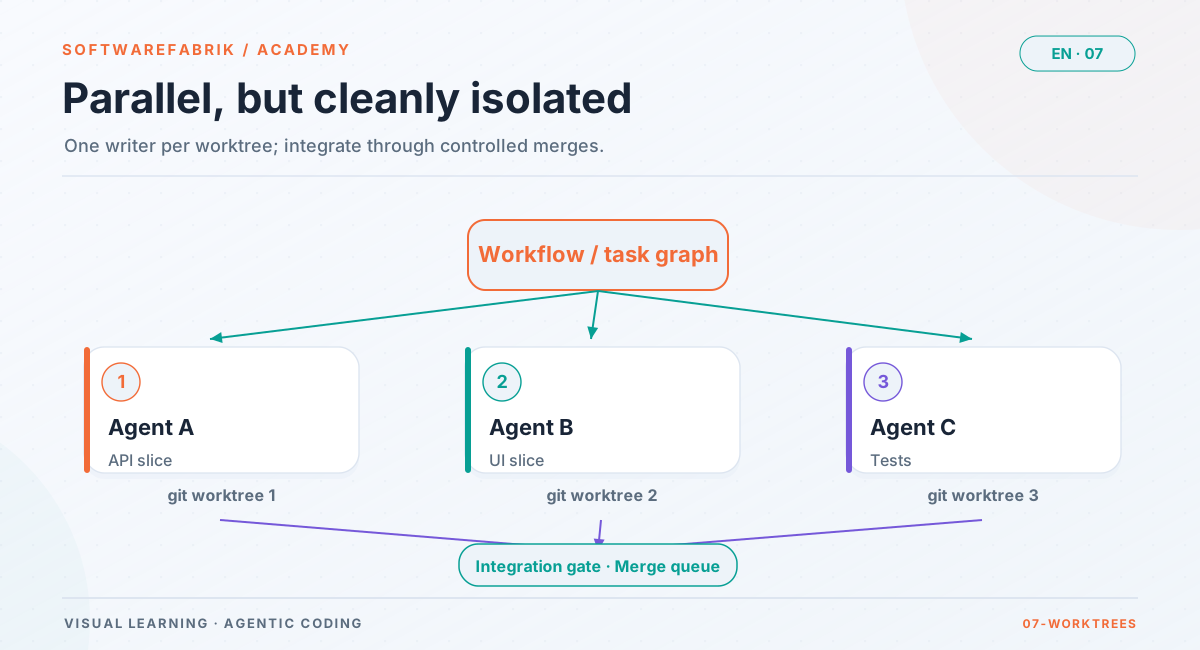
At any given time, exactly one agent writes in a working directory. Parallelism comes from more working directories, not from more writers per directory.
This rule (ADR-0015 in the factory) sounds strict but simplifies everything that follows: every state is attributable to one agent, conflicts only arise between finished branches, and both sides of a conflict are internally consistent. A merge conflict between two finished branches can be analysed and formulated as a work assignment. A conflict in the middle of a shared directory cannot.
Reading agents are not affected by the rule. Reviewers and analysis agents that write nothing may look at the same state in parallel as much as they like.
Git worktrees as the tool
Technically, Git offers a fitting mechanism with worktrees: several working directories share one repository, each on its own branch. This saves space compared with full clones, and all branches are immediately visible in the shared object store, which makes merging them later easier.
In the factory
The workflow layer above the run
Without the workflow layer, the factory allows one run per project workspace at a time (Chapter 6). For parallelism there is the workflow layer on top:
- Enabling it: feature flag
softwarefabrik.workflow.enabled, default off. When it is off, the platform behaves exactly as before; the UI under/workflowsthen shows an explanatory notice. - Structure: a workflow represents an initiative and breaks down into tasks with dependencies. Each task runs as an independent child run in its own Git worktree below
<workspace.root>/worktrees/, at most three at a time per workflow. - Architecture: the workflow layer is a slice of its own with the direction
workflow → run, never the other way round (ADR-0014). The existing run remains the atomic unit of execution and does not know that it is part of a workflow. - Run lock per workspace: the lock compares the effective workspace, not the project as a whole. Separate worktrees may run in parallel; the same directory still may not.
- Roles: reading for all roles; editing, starting and replanning from
DEVELOPER; plan approval, integration and conflict decisions fromMAINTAINER. Workflows inherit the tenant of their project; other tenants see “not found”. - Budget: a workflow budget takes effect before the next task starts.
A workflow passes through business states such as PLANNING, WAITING_FOR_PLAN_APPROVAL, RUNNING, INTEGRATING, WAITING_FOR_APPROVAL and COMPLETED. No agent starts before the plan is approved.
7.3 Decomposition: the dependency graph
Before anything can run in parallel, the initiative has to be decomposed. The result is a directed acyclic graph (DAG): nodes are tasks, edges say “B can only start when A is finished”. Exactly those tasks may run in parallel that do not depend on each other in this graph and whose predecessors are finished.
Kinds of dependencies
Not every dependency is “first A, then B”. The factory’s parallel roadmap distinguishes, for example:
- Completion: B needs the result of A.
- Contract: B needs an agreed interface, not A’s implementation.
- Artifact: B needs a specific output, such as a generated file.
- Approval: B may only start after a human decision.
- Exclusive resource: A and B touch the same file, which cannot tolerate two simultaneous changes.
The distinction pays off: a contract dependency can be resolved by agreeing on the contract first. After that, provider and consumer of the interface can be built at the same time. A completion dependency cannot be resolved that easily.
Good decomposition
- Cut along write scopes, not along domain terms. Two tasks that change the same files are not parallel, no matter how different they sound in business terms.
- Shared things first: put the data model, interfaces, migrations and build changes into an early, separate task.
- Small but complete: each task should build and be testable on its own.
- Analysis before implementation: read-only analysis tasks are ideal for parallelism because they write nothing. Their results feed into the planning of the writing tasks.
How to plan in general and define acceptance criteria per task is covered in Chapter 5.
In the factory
Analysis tasks, synthesis and capabilities
The workflow layer was built step by step; the first step (v0.21) was parallel read-only analysis:
- Several analysis runs execute at the same time, each in its own worktree, coordinated via a task graph.
- A synthesis step automatically depends on all tasks, builds its assignment from their results and records which inputs went into it. The assignment explicitly asks for contradictions and forbids smoothing them over.
- The why-trace of a child run shows its workflow context.
Since v0.22, writing capabilities can be selected as well. The roadmap classifies tasks not by fixed roles but by capabilities, such as implementation of domain, API, persistence, frontend or tests (writing), requirements, architecture or security analysis (analysing), and code, architecture or security review (reviewing). You create tasks under /workflows/{id}, including goal, capability and dependencies.
7.4 Contracts before parallel implementation
When frontend and backend are built at the same time, both need to know what the interface between them looks like. If you let each agent make its own assumption, you get two builds that are each green and don’t work together. No test of an individual change points to this problem, because the break lies between the components.
Hence the principle Contracts before Parallel Implementation: interdependent components may only be implemented in parallel once the shared contract exists in a versioned form. Contracts can be:
- API descriptions (OpenAPI for REST, AsyncAPI for events),
- data schemas (JSON Schema, DTO definitions),
- Java or TypeScript interfaces,
- domain events,
- acceptance criteria.
Three properties of a usable contract
- Immutable versions. A change creates a new version; the old one remains. Otherwise the evidence “agent B built against version 3” refers to content that may have changed in the meantime.
- Content checksum. A hash over the content makes versions unambiguously comparable.
- Binding at the right moment. Which version applies is fixed when the work starts, not already at planning time. The contract can still change between planning and start.
When the contract changes
If a contract changes while tasks are working against the old version, those tasks are stale. Their result must not be accepted unchecked, even if their own build is green. The task has to be reassessed: run it again against the new version, or discard it.
In the factory
The contract registry
Under /vertraege you find the contract registry (since v0.23):
- Immutable versions with a number and content hash (SHA-256 over the normalised content). Normalisation is deliberately minimal: line endings, trailing whitespace, final newline. Reformatting counts as a change. A false “stale” costs a re-check; a missed one costs a silent contract break.
- Binding at start: in the plan, a task only declares the name of the contract it uses (contract form on the task under
/workflows/{id}). The concrete version is fixed when the child run starts. - Stale detection: a new version sets every unfinished task bound to it to
WAITING_FOR_REPLAN, synchronously in the same transaction. Even a task whose contract changes during its run is not promoted toPASSED. - Merge block: before enqueuing into the merge queue and before the merge, the factory checks whether the bound version is still current.
- Resolution by a human: run again against the new version, or discard. A workflow with stale tasks moves to
WAITING_FOR_APPROVALinstead of silently remaining inRUNNING. - Validation: structural validation for OpenAPI, AsyncAPI and JSON Schema; an unparseable contract is
CRITICAL. Breaking-change detection between two versions: removed paths, channels, operations, fields and schemas as well as new required fields areHIGH, purely additive changesINFO. Findings flow as normalReviewFindings. - Non-blocking: a breaking change is sometimes exactly the goal. The integration gate therefore downgrades from
PASSEDtoWARNINGinstead of failing.
$ref references and does not understand type narrowing (such as string to enum). Consumer/provider contract tests are not included.
7.5 Ownership and leases
Single writer per directory prevents two agents from wrecking each other’s working copy. It does not prevent two agents from changing the same file in their separate worktrees. You only notice that when merging, and by then the work is already done. It is better to detect overlaps before the start.
Declared ownership
For this, each writing task declares which areas it intends to change (write scopes), which it only reads and which it must not touch. If the write scopes of two active tasks overlap, the second one does not start. Certain files are always exclusive because two simultaneous changes there almost certainly collide: central build configuration, database migrations, shared API specifications.
Leases instead of permanent locks
An ownership claim needs an expiry date. If an agent process crashes, its lock must not block the rest of the initiative permanently. That is why ownership is granted as a lease: a claim with a duration that is renewed via heartbeat. If the heartbeat stops, the claim is considered orphaned and can be released.
A related problem arises with several executing processes: two workers could pick up the same task at the same time. The solution is an atomic claim before anything happens: only one can win it. And if a worker fails, the rule is: a task that has not run yet may go back into the queue. One that has already run has left behind a working state of unknown quality and must not be silently repeated.
In the factory
Path ownership model, leases and coordination layer
- Three kinds of area per task:
OWNED(write scopes),READ_ONLY(read scopes),PROTECTED(protected zones). You declare them on the task under/workflows/{id}; the page shows the write scopes per task. - Check before start: if the areas overlap with those of an active task, the task does not start at all. Comparison happens on segment boundaries so that
src/mainandsrc/mainxdo not falsely collide. - Always exclusive: among others, build configuration (
pom.xml,build.gradle,build.gradle.kts), the migrations directory,openapi.yamlanddocker-compose.yml, even if a task does not declare them. - Leases with a duration:
softwarefabrik.workflow.lease-laufzeit-minuten(default 120), renewed via heartbeat. A crashed agent therefore does not paralyse the workflow permanently; its lease is considered orphaned and is released at the next acquisition. - Coordination layer (v0.26): workers register with a heartbeat and claim a task atomically before the worktree and child run are created. If the claim on a task that has not run yet expires, it goes back to
READY; if it had already run, it goes toFAILED. The way back leads through replanning with a stated reason. - Automatic dispatch:
softwarefabrik.workflow.dispatcher.enabled(default off) starts successors that have become ready on its own. Automatic starting costs tokens, which is why you switch it on deliberately.
<workspace.root>/worktrees/. They are removed after completion; after a hard abort, git worktree prune in the project workspace may be necessary.
7.6 Bringing it together: order, conflicts, integration
When all parallel tasks are finished, there are several branches, each built and checked on its own. Now comes the hardest part: merging them into an overall state that works as a whole.
Fixed order
You could merge branches in the order in which they finish. But then the result depends on random run times, and two runs of the same plan produce different states. It only becomes reproducible with a fixed order, such as the plan order, and a sequential queue (merge queue).
Not all conflicts are alike
To Git, every conflict looks the same: two sides that contradict each other at the same spot. In practice they call for very different responses:
- Two migrations with the same number: renumber, but carefully, because database states depend on them.
- Two added dependencies in the build file: usually solvable mechanically.
- Pure formatting differences: harmless.
- A stale branch: a rebase onto the current state may be enough.
- A genuine content contradiction: here someone has to decide what should apply.
An agent that is only told “resolve the conflict” guesses. If you classify conflicts, you can respond in a targeted way: automate mechanical cases, escalate content ones. And a rebase is not a cure-all: it resolves conflicts that exist only because a branch is old, but not content contradictions.
Checking the integration
Each task was checked on its own. That does not answer whether the changes work together. That is why, after merging, a separate check of the overall state is needed: full build, integration tests, architecture tests across the integrated state, contract compatibility. Only when this integration check passes is the initiative finished.
In the factory
Merge queue, integration gate and conflict classification
- Merge queue (v0.22): successful child branches are merged sequentially and in plan order into an integration branch
wf/<id>/integration, not in the order in which they happened to finish. - Integration gate: only the merged overall state is checked. The local gate per child run checks a change on its own; the integration gate checks whether they work together. A workflow reaches
COMPLETEDonly through this verdict. You trigger integration under/workflows/{id}(fromMAINTAINER). - A conflict halts: the workflow switches to
WAITING_FOR_APPROVALand shows the conflicting files. The decision is between retry (at most two attempts) and discard branch. A discarded branch makes the gateFAILED, because a workflow whose work was partly left behind is not successful. - Cascading abort: if a task fails, all tasks that build on it, even indirectly, are aborted, and open merge entries are discarded.
- Conflict classification (v0.25) into seven kinds:
MIGRATIONSNUMMER,BUILD_KONFIGURATION,SPERRDATEI,NUR_FORMATIERUNG,VERALTETER_BRANCH,INHALTLICHER_WIDERSPRUCH,UNBEKANNT. The check proceeds from the most expensive to the most harmless kind. The analysis runs without side effects viagit merge-tree --write-tree. - Rebase before merge, not instead of merge: it is only attempted when the classification rates it as promising; deliberately not for
MIGRATIONSNUMMERandINHALTLICHER_WIDERSPRUCH. - Escalation report: names branch, task, capability, conflict kind, files, previous attempts, rebase result, contract versions involved and the recommendation. The classification is recorded on the queue entry.
7.7 Replanning with a reason
No plan survives execution unchanged. A task turns out to be too large, a contract changes, a conflict shows that two tasks are really one. Replanning is therefore normal. It becomes dangerous when it happens without a trace or serves as a pretext for blind repetition.
Two rules help:
- Every plan change is versioned and justified. Not just “plan version 4”, but: what changed, why, and who triggered it? The question that comes weeks later is not “which version” but “why this one”.
- A task is only restarted with new input. This is the same rule as for correction loops in Chapter 6. A different cut or a new order rearranges work but gives the agent nothing it didn’t have on the last attempt.
In the factory
PlanRevision, metrics and spec binding per task
Versioned plan changes (v0.24)
PlanRevisionrecords every change immutably: version, reason (category from a fixed list), mandatory description, trigger, affected tasks. Attested asWORKFLOW_REPLANNED.- AP-6 strictly enforced: a task is only reset if the reason carries new input: contract change, merge conflict, build error, reviewer finding, failed task or human instruction.
- Plan operations under
/workflows/{id}: split a task (the parts inherit dependencies and capability, not the write scopes), merge tasks (the new task inherits the union of the write scopes), change the order. A running task cannot be re-cut. - The why-trace shows the plan history with reasons.
Metrics (v0.27)
Under /kennzahlen the factory measures without a schema of its own, derived from existing data: time to accepted merge, first-pass rate, correction loops, plan changes, cost per workflow and child run, merge conflict rate by conflict kind, approval waiting time and interventions (including plan approval). What cannot be measured honestly, such as active human working time, is reported as a gap; a rate without a denominator appears as a dash, not as 0 %.
Spec binding per task (v0.36)
Parallel agents must work not only against the same interface but also against the same requirements:
- A task declares spec and AC IDs, when it is created or later via “Declare spec reference” (
/workflows/{id}/tasks/{taskId}/spec, fromDEVELOPER, tenant-checked). - When the child run starts, the version approved at that moment is bound to the task (version, hash, AC IDs) and attested as
WORKFLOW_TASK_SPEC_GEBUNDEN. All child runs of a workflow work against the same version, even if the spec was re-approved in the meantime. The child run receives the bound criteria in the objective header and in the ReviewRequest. - In spec mode
STRENG(strict), plan approval is rejected if a writing task has no spec reference to an approved version. - Every spec approval mirrors the acceptance criteria block as contract
SPEC-<nnn>-acof kindACCEPTANCE_CRITERIAinto the contract registry; an unchanged block creates no new version. - Since v0.38.0 (SPEC-003): the registry compares
ACCEPTANCE_CRITERIAcontracts at AC level and reports removed criteria as a break. If a newly approved spec version changes or removes a criterion, the factory moves bound workflow tasks that are not finished toWAITING_FOR_REPLAN(shown under “Outdated basis”) and marks bound open backlog items as stale (spec drift,SPEC_DRIFTin the audit chain).
More on specs, approval and spec modes in Chapter 4.
7.8 When you should not parallelise
Parallelism is a tool, not a goal. Do without it when:
- the tasks change the same files, such as a central service or a shared data model. The ownership check would start them one after the other anyway.
- no contract exists yet and the interface only emerges while building. In that case, first create a task “agree on the contract”.
- the initiative is small. Planning, approval, integration and checks take time; for a change that a single run can manage in one pass, a workflow isn’t worth it.
- the requirements are unclear. Three agents interpreting a vague requirement differently produce three inconsistent parts. Clarify the spec first.
- nobody owns the integration. Conflicts and stale tasks need human decisions. Without someone who makes them, the workflow stalls.
Exercise
Exercise: decomposing an initiative into a workflow
Initiative: “Customers should be able to download invoices as PDF. This requires a REST endpoint, PDF generation in the backend, a new column for the storage location in the database and a download button in the React frontend.”
- Draw the dependency graph with four to six tasks. For each edge, mark whether it is a completion, contract or resource dependency.
- Determine which contract has to exist first so that frontend and backend can be built in parallel, and in which format (e.g. OpenAPI).
- For each writing task, note the
OWNED,READ_ONLYandPROTECTEDareas. Which task gets the migration, and why may only one task have it? - Consider which conflict kind from the factory’s classification is most likely to occur and how you avoid it.
- If you have access to an instance with
softwarefabrik.workflow.enabled=true: create the workflow under/workflowswith the mock adapter, declare write scopes and the contract, approve the plan and observe the merge queue and integration gate.
Solution sketch
Task 1: agree on the contract (OpenAPI for GET /rechnungen/{id}/pdf), writes only the contract file. Task 2: migration and persistence (owns the migrations directory exclusively). Task 3: PDF generation in the backend (depends on task 2). Task 4: REST endpoint (contract from task 1, completion of task 3). Task 5: frontend button (only a contract dependency on task 1, runs in parallel with 2 to 4; OWNED is the frontend directory, the backend is READ_ONLY). Most likely conflict: BUILD_KONFIGURATION, if task 3 and task 5 add dependencies; avoidable by adding the required libraries in an early task. The migration belongs to exactly one task because the factory treats the migrations directory as exclusive anyway and competing numbers would end in a MIGRATIONSNUMMER conflict.
Chapter questions
-
What does the principle “single writer per workspace” state, and which problem does it prevent?
Model answer
At any given time exactly one agent writes in a working directory; parallelism comes from more working directories. It prevents an agent from committing or “fixing” another agent’s half-finished work, which would make states attributable to no one and rob review, why-trace and attestation of their meaning.
-
Why may reviewers and analysis agents run in parallel as much as they like, but writing tasks may not?
Model answer
Reading agents don’t change any state, so they cannot disturb each other or mix up work. Writing agents produce changes that must remain attributable and be merged in a controlled way; that is why they get their own worktrees and declared write scopes.
-
Explain “Contracts before Parallel Implementation” using an example from frontend and backend.
Model answer
Before the frontend form and the backend endpoint are built in parallel, the interface is fixed as a versioned contract, for example as an OpenAPI document. Both agents work against the same version, bound at start. Without a contract, each would make its own assumptions; both builds would be green, but together they would not work.
-
What happens in the factory when a contract gets a new version while a task bound to it is still running?
Model answer
Stale detection sets the task to
WAITING_FOR_REPLAN. Even if its run then finishes successfully, the result is only recorded, but the task is not promoted toPASSED. The merge block prevents integration, and the workflow moves toWAITING_FOR_APPROVAL. A human decides: run again against the new version, or discard. -
Why does the merge queue merge branches in plan order and not in the order in which they finish?
Model answer
Otherwise the integrated result would depend on random run times, and two runs of the same plan could produce different states and conflicts. The fixed order makes integration reproducible and traceable.
-
An agent suggests resolving every merge conflict via rebase. What do you reply?
Model answer
A rebase only resolves conflicts that exist because a branch is stale. It does not resolve content contradictions and merely shifts migration number collisions. That is why the factory classifies conflicts first and only attempts the rebase when the classification rates it as promising; deliberately not for
MIGRATIONSNUMMERandINHALTLICHER_WIDERSPRUCH. -
Why do you need an integration gate when every child run has already passed its own gate?
Model answer
The local gate checks a change on its own. Whether several changes work together is only shown by checking the integrated overall state. In the factory, a workflow reaches
COMPLETEDonly through the integration gate’s verdict; a discarded branch makes itFAILED, a contract break downgrades it toWARNING. -
Someone wants to simply “run a failed task again”. Under which condition does the factory allow this, and why?
Model answer
Only via replanning whose reason carries new input, such as a build error, reviewer finding, merge conflict, contract change or a human instruction. The change is recorded as a
PlanRevisionwith a description and attested asWORKFLOW_REPLANNED. The reason is AP-6: a repetition without new information costs tokens without specifically increasing the chance of success. -
Transfer: three child runs of a workflow implement parts of the same spec. While the second is running, a maintainer approves a new spec version. Which version do the three runs work against, and why is that intended?
Model answer
Against the version that was bound to the task at start (
WORKFLOW_TASK_SPEC_GEBUNDEN); all child runs of a workflow verifiably work against the same version. This prevents parallel parts from being built against different requirements and only falling apart at integration. The new version is deliberately adopted through new planning or a new workflow; since v0.38.0, spec drift detection moves affected tasks that are not finished toWAITING_FOR_REPLAN. -
Name three situations in which you do without a workflow and prefer a single build run.
Model answer
When the subtasks change the same files, when the initiative is so small that planning and integration cost more than parallelism brings, and when requirements or interfaces are still unclear. A workflow also stalls without a person responsible for integration decisions.