
Learning goals
After this chapter you can …
- explain why context is the most important lever for the quality of a coding agent’s results and what “garbage in, garbage out” concretely means for agents.
- distinguish the kinds of context: project description, conventions, guardrails, memory, task and acceptance criteria.
- assess how a limited context budget shapes your decisions: what belongs in, what doesn’t, and how contradictions arise.
- describe what
AGENTS.mdachieves as a cross-tool convention and why one source with several projections beats one copy per tool. - in the factory, create a project with the project wizard, fill the 13 fields of the project definition sensibly, review and edit the generated artifacts, maintain project memory and assemble a team of agent roles.
- trace how the engineering guardrails get into every run, how they are weighted against project requirements and how their use is attested.
3.1 Why context determines quality
A language model has no memory between two calls and no knowledge of your project that is not in the call itself. What it “knows” about your application comes from exactly two sources: its general training (languages, frameworks, common patterns) and whatever lies in the context window of this one run. A coding agent does extend its context window on its own by reading files, running commands and evaluating results (see Chapter 2). But what it reads, what it searches for and how it weighs what it finds depends on what you start it with.
That sounds trivial, but it has far-reaching consequences. Imagine you give an experienced developer who has never set foot in your company just one sentence: “Build a user management system.” They will build something reasonable — but their idea of reasonable. Perhaps with a different framework, a different package scheme, their own password logic instead of your SSO, English comments in a German-speaking team. None of this is “wrong” in the sense of broken. All of it is wrong in the sense of “doesn’t fit us”. An agent behaves exactly the same way, only faster and without asking.
Garbage in, garbage out — in three variants
For classic programs, “garbage in, garbage out” refers to faulty input data. For agents there are three typical forms:
- Missing context. The agent guesses. It picks plausible defaults — which are not yours. The result is internally consistent but alien: wrong stack, wrong structure, wrong language.
- Contradictory context. The README says “Java 21”, the project description “Java 25”, an old guide “Java 17”. The agent picks one variant — which one is hard to predict. Contradictions are worse than gaps because they make the result random.
- Overloaded context. Twenty pages of company guidelines, old minutes and entire wikis “just to be safe”. What matters drowns in what doesn’t, the context budget is used up before the agent tackles the actual task, and every additional line increases the chance of contradictions.
Good context is therefore not a lot of context but accurate, concise and contradiction-free context. These three properties run through the whole chapter.
3.2 The kinds of context
It helps not to think of context as one big block of text but as layers with different lifetimes and different purposes. The more stable a piece of information is, the further “down” it belongs — and the less often it should change.
| Layer | Question it answers | Lifetime | Example |
|---|---|---|---|
| Project description | What are we building, for whom, why? | months to years | Vision, target audience, domain, non-goals |
| Technical conventions | With what and how are we building? | months | Stack, architecture style, package structure, commit conventions |
| Guardrails | How should the agent behave in principle? | very stable | “Small, surgical changes”, “make success verifiable” |
| Memory | What have we learned and decided along the way? | grows continuously | “We use Testcontainers instead of H2”, “module X is legacy” |
| Requirements | What exactly must hold for it to be done? | per feature | Spec with acceptance criteria (Chapter 4) |
| Task | What should this run do? | one run | “Implement the work-order CRUD per PROJECT.md” |
Two observations. First: the task is the only layer that changes with every run. If you put everything into the task, you rewrite the same fundamentals for every run — and each time slightly differently. Second: the layers have a natural ranking. A project-specific decision (“we deliberately don’t use Lombok annotations here”) should be able to override a general guardrail, not the other way round. This ranking must be stated explicitly somewhere, otherwise the agent decides it for itself.
Conventions as context
Many teams have conventions that are written down nowhere: how tests are named, where DTOs live, whether commit messages are in German or English, which libraries are unwanted. People learn this through code reviews and by reading along. An agent can only do so if it reads enough representative existing code — and even then it adopts past mistakes as readily as good patterns. Written conventions are therefore more valuable for agents than for humans. They are a lever with a long-lasting effect: phrased cleanly once, they work in every run.
Memory as context
An agent starts every run from zero. Everything that was painstakingly figured out in run 1 — that a certain test is flaky, that a module must not be touched, that a library was decided against — is forgotten in run 2 unless it is recorded somewhere. A well-maintained project memory is the answer: a curated, short list of decisions and insights passed along to every follow-up run. Curated means: a human decides what holds permanently. A memory into which every run writes unfiltered grows into exactly the overloaded context that 3.1 warns about.
In the factory
The project wizard builds the bottom layer
In the factory every undertaking begins with a project. There are two ways to create one:
- Project wizard under
/wizard— guided, recommended for getting started. - Quick create under
/projects/new— a short form with title and product name; afterwards you fill in everything yourself in the editor.
The wizard guides you through creation in six steps and thinks in three independent dimensions: target platform × backend × frontend(s). This also lets you express products that have one backend and several clients.
| Step | Content | Context created |
|---|---|---|
| 1 – Target platform & project type | Web, mobile, desktop (multi-select) or “import existing repo” | What is being built for? Greenfield or existing code? |
| 2 – Backend | e.g. Spring Boot, Quarkus, ASP.NET, FastAPI/Flask, Node — or “no backend” | Basic technology decision |
| 3 – Frontend(s) | Multi-select, filtered by platform and backend | Clients and their stacks |
| 4 – Questions | Base data and stack-specific fields (e.g. Java version, database, architecture style) | Conventions and vision |
| 5 – Quality gates | Optional toggles (e.g. ArchUnit, OWASP Dependency-Check, Trivy, ESLint, Playwright); where enabled, also the spec mode | What will be checked later |
| 6 – Summary | Review, local token/cost estimate, preview of the initial prompt | The first task |
At the end the wizard creates a project in draft status and takes you to the normal project editor, where all fields remain editable. Incidentally, the filter in step 3 only warns if a target platform is not covered by any frontend — it does not block. A pure API without a frontend is thus explicitly possible.
The spec mode in step 5 — AUS (off), LEICHT (light) or STRENG (strict); default AUS — only appears when spec-driven development is enabled (feature flag and, with an active license system, tier Professional or Enterprise). You will learn in detail what the modes do in Chapter 4.
3.3 Writing a good project description
The project description is the charter of the undertaking. It answers the questions a new team member would ask in their first week. For agents, a few rules apply that go beyond normal “good writing”.
Concrete rather than nice-sounding
“Modern, scalable, secure architecture” is worthless to an agent — every architecture considers itself modern, scalable and secure. What is valuable: “Hexagonal (ports & adapters), base package io.beispiel.maint, REST under /api/v1, no JPA annotations in the domain.” Rule of thumb: if a sentence would be true for any project at all, it contributes nothing.
Spell out versions and names
Agents know many versions of a framework and like to mix them. Write down the version you want and the build command that must be green. The closer a statement is to something verifiable, the more reliably it is followed.
Name the non-goals
Agents tend to over-deliver: they add features, configuration options or abstractions “for completeness”. A section that clearly states what will not be built (“no multi-tenancy in version 1”, “no custom user management, login only via OIDC”) is one of the most effective measures against scope creep. That is why the section Nicht-Ziele (non-goals) is mandatory in specs (Chapter 4).
Fix the domain language
Is it “work order”, “ticket” or “job”? “Customer” or “tenant”? If the description fixes the terms, the agent adopts them in class names, tables and UIs. If not, it invents its own — and from the second run on you have two terms for the same thing.
Security and quality requirements belong in it
Every model “knows” that passwords are not stored in plain text. It does not know that you log in exclusively via OIDC, have the roles ADMIN and DISPONENT and must comply with WCAG 2.1 AA. Project-specific requirements are precisely the ones that get lost unless written down.
Weak:     "A secure, modern web app for maintenance work orders."

Strong:   "Web portal + REST API for managing maintenance work orders.
           Dispatchers plan on the web; the API will later serve a mobile app.
           Backend Spring Boot / Java 21 / PostgreSQL / Maven, hexagonal,
           base package io.beispiel.maint, REST under /api/v1.
           Login only via OIDC, roles ADMIN and DISPONENT.
Not in version 1: mobile app, multi-tenancy."In the factory
The 13 fields of the project definition
In the project editor (/projects/{id}/edit) you maintain the project definition. It is the core from which the factory generates the input artifacts for the agent. Besides the master data title and product name, it has 13 content fields:
| Field | Meaning | What to watch out for |
|---|---|---|
shortDescription | One or two lines | Must clearly distinguish the project from others |
vision | Target picture | 2–4 sentences: what will be different at the end compared to today? |
targetAudience | Who uses the product | Name roles that will later show up in permissions |
technologyPreferences | Stack and versions | Spell out versions, name the build tool |
architecturePreferences | Architecture style, layers, packages | State base package and layering rules concretely |
securityRequirements | Security requirements | Authentication method, roles, data classes |
accessibilityRequirements | Accessibility | Standard and level, e.g. WCAG 2.1 AA |
nonfunctionalRequirements | NFRs, quality gates | Measurable values instead of adjectives |
gitWorkflowPreferences | Branching, commit conventions | e.g. Conventional Commits, trunk-based |
documentationRequirements | Desired documentation | README, ADRs, OpenAPI — what exactly? |
languagePreference | Language for comments and docs | de or en |
sectorContext | Industry and domain context | Regulation, domain terms, data-protection relevance |
freeText | Everything else | The prompt from the wizard also ends up here |
Empty fields appear in the generated prompt as open placeholders. This is made visible on purpose: you can fill them in the editor before you start the first run. An empty field is not an error — but a sign that the agent will guess at this point.
3.4 The context budget: what belongs in and what doesn’t
Every model has a limited context window, measured in tokens. What fits has grown with model generations, but two things remain: first, every token costs time and — depending on billing — money, and it does so again at every step of the agent loop, because the history so far is sent along again and again (caching mitigates this, see Chapter 10). Second, models do not automatically get better with very long contexts: experience shows that information in the middle of long texts is taken into account less reliably than at the beginning or end, and every additional piece of information competes with the actual task for attention.
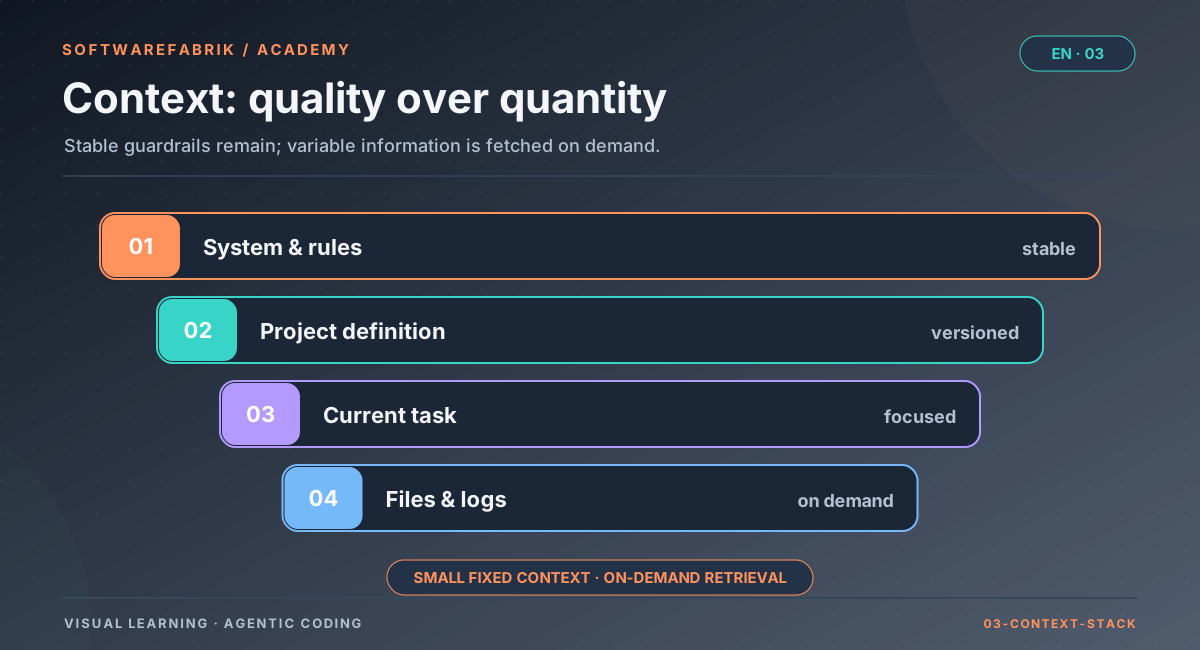
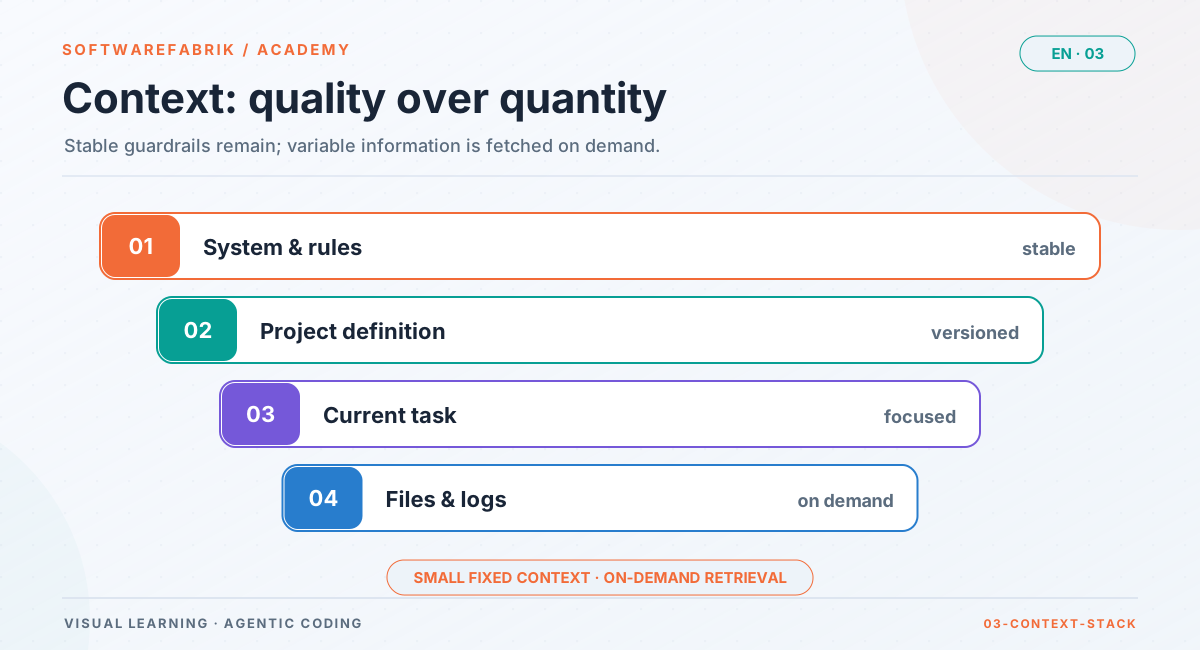
This yields a simple budgeting rule: the fixed context that goes into every run should be small and high-quality. The variable context — existing code, logs, documentation — the agent should fetch itself when needed, by reading and searching files.
Belongs in the fixed context
- Target picture and non-goals in a few sentences
- Stack, versions, build and test command
- Architecture rules that cannot be read from the code
- Behavioural guardrails (small changes, disclose assumptions, make success verifiable)
- Curated decisions from memory
- The acceptance criteria of this task — not those of all features
Does not belong in the fixed context
- Entire wikis, minutes, email threads
- Information that is in the code and can be read there
- Outdated guides “just to be safe”
- Secrets of any kind (API keys, passwords, tokens) — more in Chapter 8
- Repetitions of the same rule in slightly different wording
Actively look for contradictions
The most dangerous form of bad context is the contradiction nobody notices. It almost always arises when the same information is maintained in several places: in the wiki, in the README, in a tool-specific configuration file, in the prompt. The most effective countermeasure is structural: one source, several projections. Each piece of information is maintained in exactly one place and automatically distributed from there to wherever it is needed. This is exactly the principle the factory follows with its artifacts and guardrails.
In the factory
Prompt artifacts: the definition becomes files
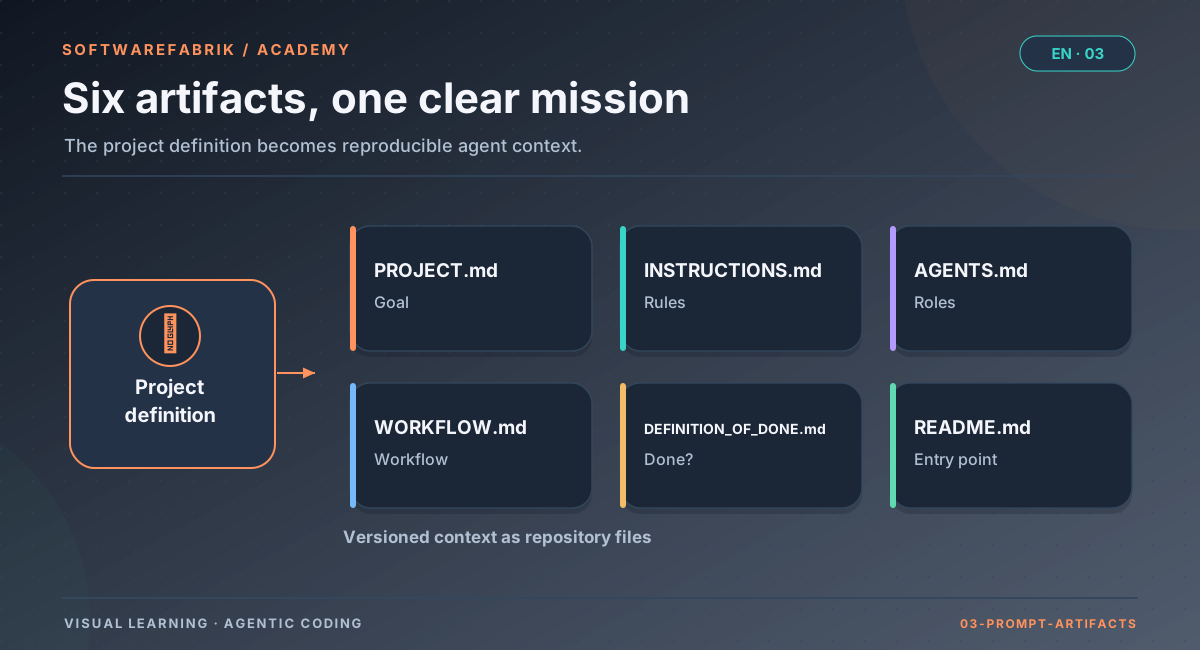
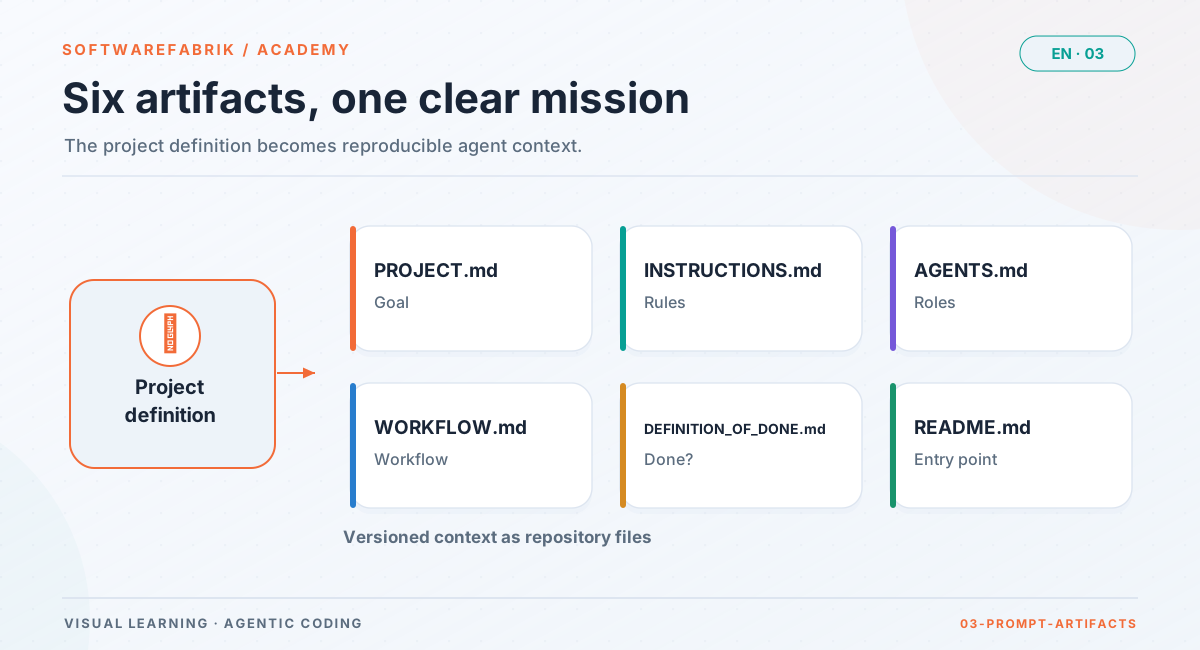
On the project page, “Generate Markdown artifacts” creates versioned Markdown files from the project definition. The overview is under /projects/{id}/artifacts, each individual artifact under /projects/{id}/artifacts/{kind}.
| Artifact | Content |
|---|---|
PROJECT.md | The charter: numbered sections, 1:1 from the fields (target picture, stack, architecture, security, NFRs, Git, docs, language, sector, free text) |
INSTRUCTIONS.md | Way of working, architecture and security guardrails, build/test, Git discipline, forbidden shortcuts |
AGENTS.md | The active agent roles; for runs additionally headed by the engineering guardrails |
WORKFLOW.md | Phase model and approval points |
DEFINITION_OF_DONE.md | When a run is done: build and tests green (mvn verify, coverage), plus the project requirements on NFRs, security, accessibility and docs |
README.md | Reading entry point into the workspace |
Three properties matter:
- Versioned and editable. You can adjust every artifact in the browser. Every change creates a new version (nothing is overwritten) and an audit entry
PROMPT_EDITED; generation itself is recorded asPROMPTS_GENERATED. Users with role DEVELOPER or higher may edit. - In the workspace and in the call. During a run, the files are written to the workspace and committed.
PROJECT.mdandINSTRUCTIONS.mdadditionally go directly into the agent call. - Non-destructive. The workspace belongs to the project, not to the run; the artifacts are updated on every run without touching the agent’s code.
PROJECT.md is cheap to fix — the same typo spread across twenty generated classes is not.
The data model also contains the artifact type UX_CONCEPT; however, the generator does not produce it in the current version. So expect the six files listed above in the UI.
3.5 AGENTS.md: one convention for all tools
Almost every coding tool reads a project file with hints at startup — but historically each has its own: Claude Code reads CLAUDE.md, Gemini CLI GEMINI.md, other tools their own files or configuration directories. If you use several tools, you quickly end up maintaining three files with almost the same content — and after a few weeks you have three slightly different truths.
AGENTS.md has established itself as the cross-tool convention for this: a plain Markdown file in the repository root that describes how work is done in this project — build and test commands, conventions, prohibitions, hints. Many tools read it directly; others can be pointed to it via configuration or get a small file of their own that merely points to AGENTS.md.
What belongs in a good AGENTS.md
- Commands: how to build, test, format — exact, copy-pasteable.
- Structure: where things are, which modules are off-limits.
- Conventions: naming, test patterns, commit format.
- Boundaries: what the agent must not do (e.g. change existing database migrations).
- References: where more detailed documents live, instead of copying them in.
What does not belong in it
Anything that has a better home of its own: requirements belong in specs, decisions with rationale in ADRs, lessons learned in a memory. AGENTS.md is the repository’s operating manual for agents, not a catch-all.
3.6 Guardrails: behaviour rather than content
The project description and conventions tell the agent what to build and with what. Guardrails tell it how to behave while doing so — independently of the project. Typical misbehaviours of coding agents are astonishingly consistent across models and tools:
- Silent guessing: When things are ambiguous, an interpretation is chosen without stating it.
- Over-delivery: extra features, abstractions “for later”, unnecessary configurability.
- Collateral damage: neighbouring code is reformatted, refactored or “tidied up” along the way, which bloats diffs and makes reviews harder.
- Unverifiable success: “Done, should work” — without a test that proves it.
Good guardrails address exactly these patterns, are short and apply equally to every tool. They are default behaviour: a project may override them if it has a reason. This ranking — project before guardrail — must be stated in the guardrails themselves, so that the agent does not have to weigh things up in case of conflict.
One detail deserves special attention: an agent running autonomously has nobody to ask. A guardrail like “ask if something is unclear” is therefore pointless for a headless run. Better: “Disclose assumptions, choose the most conservative of several interpretations, and make decisions that change scope, cost or risk impossible to miss in the plan and in the PR description.” That is the idea behind surface, don’t ask.
In the factory
Engineering guardrails: one source, every adapter
The factory ships a vendor-neutral behaviour policy, the engineering guardrails. They flow into the context of every coding agent on every run — whether Claude Code, Codex, Gemini or a local model. The four guardrails (originally in English):
- Think first — surface, don’t ask: record assumptions, choose the most conservative of several interpretations and justify the alternatives, flag consequential decisions in the plan and in the PR description.
- Simplicity first: minimal code that fulfils the objective; nothing speculative.
- Surgical changes: every changed line must be traceable to the objective; don’t “improve” neighbouring code.
- Make it verifiable: phrase the task as verifiable success criteria before coding and deliver the test or check along with it — the verification loop itself is the pipeline’s job.
How they get into the run
The factory does not rely on a tool automatically reading a particular file. Instead, it places the guardrails text as a stable header in front of the run’s objective (Objective) — the only field all adapters process. In addition, it projects from the same source into the repository:
AGENTS.md— guardrails as the header above the role documentation,CLAUDE.md— only a minimal pointer toAGENTS.md,.gemini/settings.json— points Gemini toAGENTS.mdas its context file.
Nobody duplicates the content by hand. This is the “one source, several projections” principle from 3.4 in its purest form.
Precedence, switch, evidence
- Precedence: The guardrails are default guardrails. Project-specific requirements in
INSTRUCTIONS.mdorMEMORY.mdtake precedence in case of conflict; the guardrails header says so explicitly. - Switch:
run.guardrails.mode(defaulton), effective with the precedence project > user > global.offswitches off injection, projection and attestation together. - Evidence: The guardrails version is a short SHA-256 hash of their content. Every run records it as
RUN_GUARDRAILS_ANGEWENDETin the signed audit chain; the run’s why-trace displays it (more in Chapter 9).
AGENTS.md then additionally receives a marked spec index (ID, title, status, path). Details in Chapter 4.
Objective of a build run (simplified)
-------------------------------------
[1] Engineering guardrails          (fixed, versioned, hash attested)
[2] Acceptance criteria AC-…        (only with spec reference)
[3] Objective of this run           (free text, up to 4000 characters)

Workspace (additionally readable by the agent)
----------------------------------------------
PROJECT.md  INSTRUCTIONS.md  AGENTS.md  WORKFLOW.md
DEFINITION_OF_DONE.md README.md MEMORY.md specs/… (code)3.7 Memory: learning across runs
A project memory closes the gap between two runs. It is not a log (what happened?) but a distillate (what holds since then?). Three kinds of entries have proven useful:
- Decisions: “We use Testcontainers with PostgreSQL instead of H2 because H2 doesn’t support the JSONB queries.”
- Pitfalls: “The integration test
ImportITneeds a free port range; do not parallelise.” - Boundaries: “The package
legacy.billingis being replaced; bug fixes only, no new features.”
Good entries are short, dated or versioned, and contain a rationale. Without a rationale, nobody — neither human nor agent — can later decide whether the rule still applies. And the memory needs maintenance: outdated entries are contradictory context waiting to happen.
Who writes to the memory?
There is a real trade-off here. If only humans write, the memory stays clean, but it goes stale because nobody has time. If agents write freely, it stays current, but it sprawls and soon contains half-truths. A good middle ground: agents may add suggestions, a human curates regularly — deletes, sharpens, consolidates.
In the factory
Project memory: curated in the database, mirrored as MEMORY.md
Every project has a project memory that you edit in the UI under Memory (/projects/{id}/memory). The flow:
- Before each run the factory mirrors the content into the workspace as
MEMORY.md. - During the run the agent can read the file — and update it.
- After the run the factory reads a
MEMORY.mdupdated by the agent back into the database (re-ingest).
The database is the source, the file the projection. This makes the memory adapter-independent: a follow-up run with a different agent gets the same memory, because it is not locked in a tool-specific configuration.
Note the precedence from the previous box: requirements in MEMORY.md take precedence over the general guardrails. The memory is thus also the right place for deliberate exceptions (“In this project, please don’t rename existing tests, even if their names are unfortunate”).
3.8 Roles and teams as context
“You are an experienced security reviewer” is more than a courtesy phrase. A role bundles expectations: what to pay attention to, what is allowed, when to escalate. For humans this is self-evident — a reviewer doesn’t write feature code, an architect plans before building. For agents it has to be stated explicitly.
Roles as context have two advantages. First, responsibilities are separated: whoever writes does not approve their own work. Second, rules become reusable: you write a security reviewer’s security rules once, not anew in every task.
An important limitation: a role in the prompt is a request, not a technical boundary. Whether a reviewer really cannot write is decided by the tool permissions it is started with, not by its role description. Roles and permissions belong together — this is explored further in Chapter 6 (read-only reviewers) and Chapter 8 (permissions).
In the factory
Agent roles, teams and the skill library
The factory does not model agents as prompt fragments but as configured roles. Agent definitions are managed under /agents, and teams are assembled from them under /teams. Both are global building blocks and can only be edited by the ADMIN role; when creating a run, you select an existing team.
Role types
Fields of an agent definition
Name, role, short description, mission, default instructions, quality rules, security rules, build rules, Git rules, language preference, allowed tools, boundaries, escalation notes, an optional preferred model (preferredModel) and an active status. From the active agents the factory generates the role documentation in AGENTS.md.
Teams in the run
When creating a run (/runs/new) you choose a team in addition to adapter and objective. Among other things, the team influences model selection: if no routing override is set, the preferred model of the team’s developer agent applies (otherwise that of the first agent with a model), then the role default. The actual resolution is attested as RUN_MODELL_AUFGELOEST together with its source — details in Chapter 10.
Skill and plugin library
Under /skills (ADMIN only), versioned, tenant-scoped skills and plugins are managed (origin CATALOG, INSTALLED or FORKED). Before every run, the factory materialises them into the workspace:
<workspace>/.claude/skills/<name>/SKILL.md
<workspace>/.claude/agents/<role>.md
<workspace>/.claude/settings.local.jsonThis makes it possible to answer later which extension in which version was in the agent’s context at the time of a run — the question on which reproducibility discussions otherwise founder. The engineering guardrails are deliberately kept separate from this: they are not an optional extension but the basic stance of every run.
3.9 Summary
- An agent knows only what lies in its context about your project. Missing, contradictory and overloaded context are the three forms of “garbage in, garbage out”.
- Think of context in layers: project description, conventions, guardrails, memory, requirements, task. Stable information belongs at the bottom; only the task changes per run.
- The fixed context should be small and high-quality; the agent fetches variable context itself.
- “One source, several projections” prevents contradictions:
AGENTS.mdas a cross-tool file, generated from one maintained source. - In the factory, context is built from the project definition (13 fields), prompt artifacts, engineering guardrails in the objective header, project memory and teams — versioned, editable and attested.
Exercise
Exercise: From a one-liner to a solid project definition
Starting point: Your business department sends you the following request: “We need a small app that lets employees book rooms. Should be modern and secure.”
- Find the gaps: For each of the 13 fields of the project definition, write down what you can derive from the request and what you would have to guess. Mark the guessed fields.
- Disclose assumptions: For each guessed field, phrase an explicit assumption (e.g. “Assumption: login via existing OIDC, roles EMPLOYEE and ADMIN”) and a follow-up question to the business department.
- Non-goals: Write down at least three non-goals for version 1.
- Prepare the memory: Phrase two entries you would probably write into the project memory after the first run — each with a rationale.
- In the factory (optional, free of charge): Set the adapter to
mock, create the project with the wizard under/wizard, transfer your fields in the editor, generate the artifacts and readPROJECT.mdandINSTRUCTIONS.mdunder/projects/{id}/artifacts. Find at least one spot where the generated text still contains a placeholder, and close the gap.
Chapter questions
-
Name the three forms of “garbage in, garbage out” for agents and explain why contradictory context is often worse than missing context.
Model answer
Missing context (the agent guesses plausible but alien defaults), contradictory context (several sources say different things) and overloaded context (what matters drowns, the budget is used up). Contradictions are more insidious because the result becomes random: which variant the agent chooses is hard to predict and can change from run to run. A gap at least leads reproducibly to the same default behaviour and is more likely to be noticed.
-
Why should the fixed context of a run be small, even though modern models have very large context windows?
Model answer
Every token costs time and possibly money, and it does so again at every step of the agent loop. Moreover, every additional piece of information competes with the task for attention; information in long texts is not taken into account equally reliably. More text also increases the likelihood of contradictions. The agent fetches variable context such as existing code itself anyway.
-
What does the principle “one source, several projections” mean, and how does the factory apply it to the engineering guardrails?
Model answer
Each piece of information is maintained in exactly one place and automatically distributed to wherever it is needed, instead of maintaining several copies. The guardrails exist as one versioned source; the factory places them as a header in front of the objective of every run (for all adapters) and projects from them
AGENTS.md, a minimalCLAUDE.mdwith a pointer and.gemini/settings.json, which points toAGENTS.md. Nobody copies the text by hand. -
Why doesn’t the factory rely on a coding tool reading
AGENTS.mdorCLAUDE.mdby itself?Model answer
The autoload logic differs by tool and version (file names, size limits, configuration). Relying on it creates a silent point of failure. The objective is the only field all adapters process; context placed there reaches every agent deterministically. The files in the repository are there in addition so that agent and human can read the same basis.
-
INSTRUCTIONS.mdsays “comments in English”, the guardrails contain no language rule, and the memory says “comments in German, decision from March”. What happens, and what should you do?Model answer
Project requirements in
INSTRUCTIONS.mdandMEMORY.mdboth take precedence over the guardrails, but they contradict each other — the agent has to guess. This is exactly the contradictory context from 3.1. You should clean up the source: if the March decision applies, set the fieldlanguagePreferencein the project definition tode, regenerate the artifacts or correctINSTRUCTIONS.md, and keep or delete the memory entry so that only one statement remains. -
How does project memory work technically, and why is it adapter-independent?
Model answer
The memory lives in the database and is maintained under Memory (
/projects/{id}/memory). Before every run the factory mirrors it into the workspace asMEMORY.md; after the run it reads back a file updated by the agent. Because the source is the database and not a tool-specific configuration, every adapter gets the same memory — even after switching adapters. -
A colleague suggests copying the entire team wiki (300 pages) into the project definition as
freeText“so the agent knows everything”. How do you argue?Model answer
That creates overloaded context: high token volume in every run, important rules drown, outdated pages create contradictions. Better: distil the few project-relevant, stable rules and write them into the appropriate fields (architecture, security, NFRs), decisions into memory, requirements into specs. Refer to detailed documents in the repository so the agent reads them when needed.
-
Why is a role like “reviewer” in the prompt alone no security guarantee, and what needs to go with it?
Model answer
The role description is a request to the model, not a technical boundary. Whether a reviewer can write is decided by the tool permissions it is started with. In the factory, reviewers therefore run technically read-only (restricted tool permissions, no writing to the workspace). Role and permissions belong together.
-
You are bringing an existing project into the factory whose repository already contains a hand-maintained
CLAUDE.mdwith important conventions. How do you proceed so that these conventions take effect in every run in future — also with other adapters?Model answer
With guardrails enabled, the factory projects its own minimal
CLAUDE.mdthat points toAGENTS.md; a convention maintained only there is therefore no longer a reliable source and would be Claude-specific anyway. The content belongs in the factory’s tool-neutral sources: lasting technical conventions in the project definition (architecture, Git, docs), generated from there intoINSTRUCTIONS.md/PROJECT.md; learned decisions in the project memory. After that they take effect for every adapter, and project requirements take precedence over the general guardrails.