Learning goals
After this chapter you can:
- explain why traceability in agentic development is not bureaucracy but a prerequisite for liability, audit, regulatory compliance and reproducibility.
- explain how a hash chain and a digital signature make tampering visible, and what they do not achieve.
- place policy-as-code, human oversight and segregation of duties as control principles.
- in the factory, verify the audit chain, read a why-trace, publish a policy and apply a compliance profile.
- generate an audit export and have it verified independently with the offline verifier.
- describe how specs are integrated into governance: mandatory spec approval, minimum coverage of acceptance criteria, spec versions in the export.
- evolve a project’s control artifacts in a controlled way with drift protection, three-way comparison and approval, also for existing repositories and for the factory itself.
9.1 Why traceability?
In classic development, the Git history answers many questions: Who changed what, and when? In agentic development that is no longer enough. The commit author is an agent or a neutral identity, and the interesting questions come earlier: Who gave the task? Which model did the work? Which rules applied? Was the code reviewed, and who approved it? Against which requirement was it built?
Four reasons make these questions pressing:
- Responsibility and liability: An agent cannot bear responsibility. People and organizations remain responsible. For responsibility to be attributable, it must be recorded who made which decision.
- Audit and internal review: Internal audit, external auditors and customers ask for evidence. A claim (“our code is always reviewed”) is not evidence. Evidence is a record that can be verified independently.
- Regulation: Various regulatory frameworks require records, human oversight and control of ICT and third-party risks. Which obligations specifically apply to your organization is a legal question. Technically, however, you can make sure that the necessary records are created and are reliable.
- Reproducibility and failure analysis: When a defect appears, you want to know under which conditions the code was created: model, context, rules, review results. Only then can you find the cause and improve the process.
9.2 Hash chains and signatures in five minutes
Hash functions
A cryptographic hash function such as SHA-256 maps arbitrary data to a value of fixed length. If even a single character of the input changes, the hash changes completely. And it is practically impossible to find two different inputs with the same hash. A hash is therefore a fingerprint of the content.
Chaining
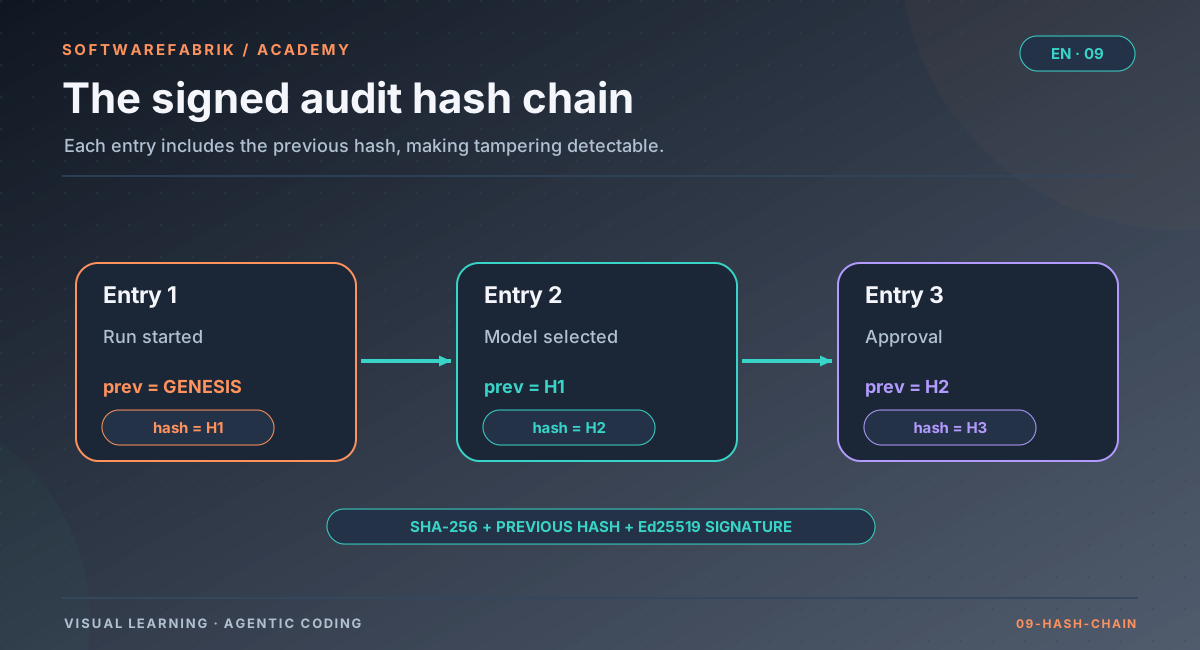
In a hash chain, every entry contains the hash of its predecessor. The hash of an entry is computed over its content and the predecessor’s hash:
Open full-size graphicOpen full-size graphic
This makes every modification, deletion, insertion and reordering within the chain detectable, at least for anyone who recomputes it. The only thing that cannot be detected is truncating the most recent entries at the end; a signed chain head and a known reference state help against that (section 9.7). A consecutive sequence number additionally makes gaps visible.
Signatures
A hash chain alone does not protect against someone who recomputes all hashes. That is why each entry is additionally digitally signed: a private key produces a signature that anyone can verify with the corresponding public key. Without the private key, no valid signature can be created. A widely used, modern scheme is Ed25519.
What this does not achieve
- Whoever holds the private key can produce valid signatures, including for false content. Key protection is therefore part of the evidence.
- Whoever obtains the public key from the same source as the data verifies nothing: a forger swaps both. The trust anchor must arrive through a second channel.
- A chain proves that entries have not changed since they were created. It does not prove that the system that wrote them recorded the truth.
In the factory
The signed audit chain under /attestierung
Every audit event in the factory carries the fields of a signed hash chain:
| Field | Purpose |
|---|---|
seq | gapless sequence, unique |
prev_hash | hash of the predecessor |
entry_hash | hash over the entry’s own content including prev_hash |
signature | Ed25519 signature |
key_id | key used |
Under /attestierung (ADMIN only) you verify the chain. The verification distinguishes three failure patterns:
| Finding | Meaning |
|---|---|
HASH_MISMATCH | An entry was modified afterwards |
CHAIN_BREAK | An entry was removed or inserted |
BAD_SIGNATURE | The entry does not come from the expected key |
Legacy entries without a signature are transparently reported as such instead of failing the verification. On the same page you find the fingerprint of the signing key as the trust anchor for the offline verifier.
Setting up the key
SOFTWAREFABRIK_ATTESTATION_SIGNING_ENABLED=true
SOFTWAREFABRIK_ATTESTATION_KEY_ID=<descriptive-id>
SOFTWAREFABRIK_ATTESTATION_PRIVATE_KEY=/path/to/ed25519-key.pem
# optional: SOFTWAREFABRIK_ATTESTATION_KEYRING_PATH for key rotation- In development and test, the factory generates an ephemeral key. In the
container/prodprofiles, “enabled without a key” is a startup error. Anyone who wants to run without signing must declare this explicitly (…SIGNING_ENABLED=false). Security should be a decision, not an accident. - The key belongs in the backup. Without it, the chain can no longer be verified later. After a key rotation, keep providing the old key via the keyring path; otherwise the verification reports
BAD_SIGNATUREfor old entries. - Run the chain verification after every restore and regularly. An incomplete backup shows up as
CHAIN_BREAK. The evidence structure thus doubles as an integrity check of your backup.
9.3 What to record? Decisions, not just results
A good audit log for agentic development does not record every keystroke but the decision-relevant events: task, rules, resources, checks, approvals. A useful question is which information an auditor would need a year from now to explain a specific state of the code.
- Lifecycle: created, started, paused, cancelled.
- Configuration at runtime: which model, from which source, which behavioral rules in which version.
- Rules: which policy was applied and which runs were rejected. A rejection is evidence too.
- Checks: gate result, SBOM, artifact signatures.
- Human decisions: approvals with person and timestamp.
- Requirement reference: against which requirement, in which version, the code was built.
A second principle: content only where necessary. Tool arguments may contain confidential data. Often a hash is enough to prove later that and what was passed, without storing the content in the log.
In the factory
Attested events and the why-trace
Among others, the factory writes these events to the signed chain (a selection; see docs/governance-compliance.md and the administration manual):
| Event | What it records |
|---|---|
RUN_CREATED, RUN_STARTED, RUN_PAUSED, RUN_CANCELLED | lifecycle of a run |
RUN_LIMIT_PAUSIERT, RUN_FORTGESETZT, RUN_FORTSETZUNG_ABGELEHNT, RUN_FORTSETZUNG_FEHLGESCHLAGEN | pause on usage limit and automatic resumption (since v0.43.0) |
RUN_MODELL_AUFGELOEST | selected model with source (override, team, rollen-default, adapter-default) |
RUN_GUARDRAILS_ANGEWENDET | version of the engineering guardrails (SHA-256 short hash of the content) |
RUN_POLICY_ANGEWENDET / RUN_POLICY_DENIED | applied policy version, or rejection with reason |
QUALITY_GATE_EVALUATED | result of the quality gate |
SBOM_ERZEUGT, ARTEFAKT_SIGNIERT | supply chain evidence |
POLICY_AS_CODE_PUBLISHED, COMPLIANCE_PROFILE_APPLIED | changes to the rules |
SPEC_APPROVED | approval of a spec version with spec;version;hash |
RUN_SPEC_GEBUNDEN | the spec version bound at run start with spec=…;version=N;hash=…;ac=… |
MCP_TOOL_AUFRUF and others | calls via the MCP gateway with hashes instead of content (see Chapter 8) |
The why-trace
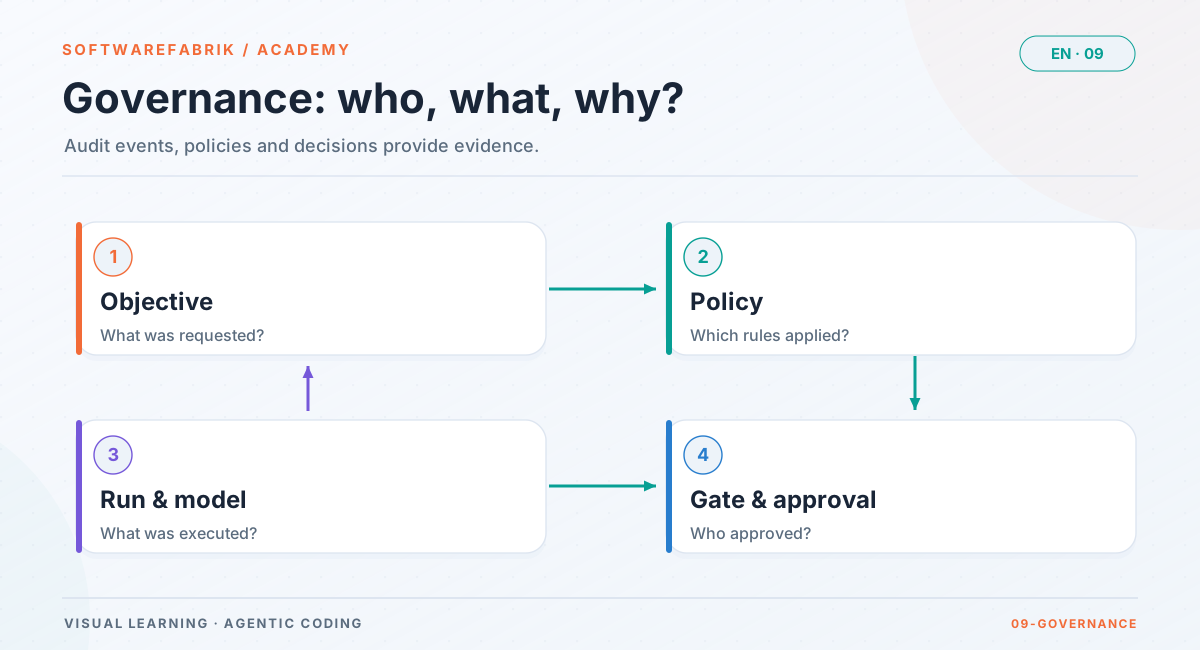
The chain is complete, but hard for humans to read. The why-trace under /runs/{id}/trace answers, for a single run, the question of why the code came out the way it did. It correlates:
- run and metrics: model, cost, duration. In Claude subscription mode, costs are labeled “estimate (API rate), not billed”.
- plan origin: which plan run and backlog item the build run came from.
- approval decisions and actors.
- prompts and artifacts used.
- the attested audit events, including policy version, guardrails version and gate result.
- for runs with a spec reference: spec ID, bound version, content hash and AC IDs from
RUN_SPEC_GEBUNDEN. Without a spec reference the trace is unchanged. - for child runs of a workflow: the workflow context.
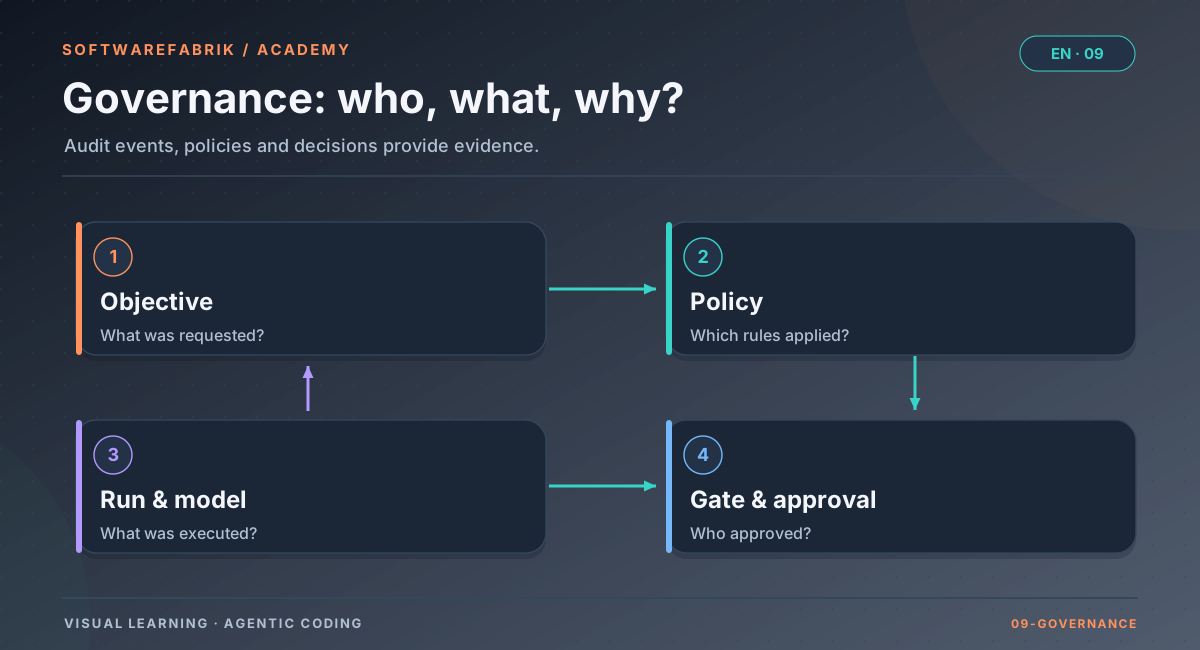
The trace is tenant-protected: you only see runs of your own tenant. How spec binding and commit trailers work in detail is explained in Chapter 4.
9.4 Policy-as-code: rules as a document
Rules such as “only these providers”, “quality gate blocking” or “approval before execution” can be managed in two ways: as scattered settings in a user interface, or as policy-as-code, i.e. as a structured document that is versioned, verified and evidenced.
The advantages of the second approach:
- Versioned: Every change creates a new version; the old one is retained. You can always say which rules applied at a given point in time.
- Signed: A signed version cannot be changed unnoticed.
- Unambiguously in effect: There is exactly one active version, no mixed states.
- Enforced rather than recommended: The system checks the rules at defined points and rejects violations.
- Layerable: A narrower level (such as a tenant) may tighten rules but not relax them.
An important detail is the point of enforcement. If a system only checks when a task is created, a task created before a rule change can bypass the new rule. A second check immediately before execution is more robust.
In the factory
Policy-as-code under /policy-as-code
The /policy-as-code page is accessible to ADMIN only. A policy contains these fields:
| Field | Meaning |
|---|---|
erlaubteAdapter | vendor restriction (empty = no restriction) |
gateModus | off / advisory / blocking |
pflichtFreigabePhasen | e.g. EXECUTION, VALIDATION |
pflichtAttestierung | mandatory signing |
erlaubtePlugins | enabled Claude Code plugins (empty = none) |
mcpStandardverbot | agent CLIs only with proof of isolation |
erlaubteMcpServer | servers reachable via the MCP gateway, including pins (empty = none) |
pflichtSpecFreigabe (since v0.39.0, Enterprise) | start of a BUILD run and plan approval of a workflow with writing tasks only with a reference to an approved spec version (default off) |
minAcAbdeckung (since v0.39.0, Enterprise) | minimum share of bound acceptance criteria that must be covered by tests (fraction 0 to 1, can also be entered as a percentage in the UI; default empty) |
Procedure: edit the content → Publish (creates a new Ed25519-signed version and deactivates the previous one, event POLICY_AS_CODE_PUBLISHED) → Verify checks the signature.
- Exactly one active version per tenant, technically enforced.
- Double enforcement: when a run is created and again at execution time. The why-trace and export therefore show the version that was actually enforced.
- Global policy floor: A tenant policy can only tighten the global one, never undercut it. For allowed plugins and MCP servers, the intersection applies.
- Rejected runs produce
RUN_POLICY_DENIED; since v0.39.0 the entry remains permanently in the chain, even though the rejected action itself is rolled back. If you see this rejection as a user, check together with the admin whether the adapter is allowed by the active policy.
mcpStandardverbot (ADR-0017) and, since v0.39.0, likewise for pflichtSpecFreigabe and minAcAbdeckung.
In addition, /policies holds the approval policies for individual approval points, and at project level there is the model policy (/projects/{id} → Model policy), i.e. the allowed adapters per project; it is enforced when a run is created, and a violation produces RUN_POLICY_DENIED. Which model was actually selected, and why, is recorded by RUN_MODELL_AUFGELOEST.
9.5 Human oversight and segregation of duties
Human oversight does not mean that a human types every line, but that a human must consent at the decisive points and that this consent is documented. In agentic development there are two natural checkpoints:
- Before execution: May the agent start at all with this task, this model and these permissions?
- Before adoption: May the reviewed result enter the shared state, i.e. be merged or opened as a pull request?
The second point is decisive. Without it, the code lands in the base branch before anyone has seen it. An “approval” after the fact would then be mere facade.
Segregation of duties means that the same person may not both trigger and approve. The classic four-eyes principle protects against mistakes and against abuse. With agents it also applies in a second form: the writing agent may not approve its own work. That role is taken by independent, read-only reviewers and a human.
A third principle is fail-closed: if a check cannot be performed, for example because a reviewer crashes or a policy cannot be read, this must never count as success.
In the factory
Two approval points, roles and segregation of duties
| Approval point | Effect |
|---|---|
before EXECUTION | The agent only runs after approval; the run sits in WAITING_FOR_APPROVAL. Without an active approval policy this is the default (run.approval-vor-merge, on) |
before the merge (in VALIDATION) | The validated state is only merged or opened as a PR after approval; the inline diff on the detail page now shows the agent’s changes. Activated via an approval policy or pflichtFreigabePhasen with VALIDATION |
run.approval-vor-merge(default on) makes every run without an active approval policy wait for approval before execution; despite its name, it concerns theEXECUTIONphase. You require approval before the merge via an approval policy under/policiesor the mandatory approval phaseVALIDATIONin policy-as-code; the BAIT/MaRisk/DORA and BSI/VS-NfD profiles set it.run.approval-segregationenables segregation of duties: whoever triggered the run (run.triggered_by) may not approve it themselves.- Approving requires role
MAINTAINERor higher. The role model isVIEWER < DEVELOPER < MAINTAINER < OWNER < ADMIN. Spec approval requires the same level. - Every decision is recorded as an
approval_decisionand as an attested event. Optionally, you record your effort in minutes when approving; the field is a voluntary self-report and feeds into the metrics separately from derived values. - A crashed reviewer leads to
ERROR, never to a silent pass.
WAITING_FOR_APPROVAL because there is only one person with the MAINTAINER role on the team, and segregation of duties excludes her as the person who triggered it. In regulated teams, plan for at least two people authorized to approve.
9.6 Regulation: what technology can and cannot do
Many organizations must demonstrate that they control the risks of using software and AI. A few examples, without any claim to completeness and without constituting legal advice:
- The EU AI Act (Regulation (EU) 2024/1689) contains, among other things, requirements on record-keeping (Art. 12) and human oversight (Art. 14) for certain AI systems.
- In the financial sector, BaFin’s MaRisk, the BAIT (whose requirements overlap with DORA for institutions subject to DORA; current supervisory practice is decisive) and the Digital Operational Resilience Act (DORA, Regulation (EU) 2022/2554) set out requirements for ICT risk management, third-party risks and documentation of evidence.
- For the public sector, BSI IT-Grundschutz and the rules for classified information (VS-NfD) are relevant.
Whether and how these frameworks apply to your use case is for legal and compliance experts to determine. Technology can contribute two things: it can enforce the technically enforceable parts (approvals, mandatory signing, blocking checks, provider restrictions) and produce the necessary records in a tamper-evident way. It does not replace organizational obligations such as responsibilities, training, risk analyses and contracts with providers.
In the factory
Compliance profiles under /compliance-profile
A compliance profile is a prepared policy. Applying it means: the factory publishes a matching signed policy version and writes COMPLIANCE_PROFILE_APPLIED to the chain. The page is accessible to ADMIN only.
| Profile | Gate | Mandatory approvals | Attestation | MCP default ban |
|---|---|---|---|---|
| Baseline | advisory | — | no | no |
| EU AI Act | blocking | EXECUTION | yes | no |
| BAIT / MaRisk / DORA | blocking | EXECUTION, VALIDATION | yes | yes |
| BSI-Grundschutz / VS-NfD | blocking | EXECUTION, VALIDATION | yes | yes |
Since v0.39.0, the EU AI Act and BAIT/MaRisk/DORA profiles additionally set pflichtSpecFreigabe = true; the profile page shows this in the column “Spec-Freigabe Pflicht” (spec approval mandatory). Baseline and BSI/VS-NfD remain unchanged; for VS-NfD you set the spec obligation per project via the policy if needed. It only takes effect with the Enterprise tier or without an active license system.
Keep in mind: profiles with the MCP default ban block all agent CLIs until a canary isolation proof is available (Chapter 8). Schedule the canary run before switching over.
9.7 Independent verification: handing evidence to outsiders
Evidence is only strong when someone who does not trust the system can verify it. This leads to requirements for an export:
- Deterministic: The same data yields the same bytes, regardless of library versions. Otherwise a hash cannot be recomputed.
- Self-contained: The export contains everything needed for verification, without access to the originating system.
- Data-minimal: Entries that are not part of the subject of the audit, such as other projects or tenants, appear only as hash placeholders. Their number is visible, their content is not.
- Independently verifiable: The verification tool does not come from the installation being verified; it is small, open source and reproducibly built.
- Trust anchor via a second channel: The fingerprint of the signing key arrives by letter, ticket or signed email, not in the same package as the data.
In the factory
Audit export under /export and the offline verifier
Generating the export
Under /export (ADMIN only) you generate an auditable bundle per project or run, as JSON and as HTML. It contains the why-trace, chain verification, the applicable policy state and the public key. The bundle is deliberately serialized deterministically: only strings, primitives and UUIDs, timestamps as ISO-8601.
From schema 2.0 (ADR-0023) on, the export contains a verifiable evidence section: full entries of the affected runs, content-free hash placeholders for all other entries up to the signed chain head, the policy versions applied in the run, the keys with fingerprint, and a signed run manifest attesting which events belong to a run. Since v0.39.0 (schema 2.1, Enterprise tier) the bound spec versions are added, which the offline verifier checks from version 1.1.0 (see below).
Verifying independently
You download the offline verifier softwarefabrik-verifier.jar from softwarefabrik.io/verifier.html, not from the factory installation being verified. It only needs a JDK version 25 or later, has no runtime dependencies and can be built reproducibly.
java -jar softwarefabrik-verifier.jar audit-export-my-project.json \
     --schluessel 3f6a…c21e \
[--bekannt 4711:9b2d…e0f1]docs/verifier.md. --bekannt passes a previously seen chain state.| Exit code | Meaning |
|---|---|
| 0 | Proven: chain, signatures and run evidence confirmed against the trusted keys |
| 1 | Violation: altered, incomplete, signed by a foreign key or contradictory |
| 2 | No violation, but not everything is provable, e.g. without --schluessel or with unsigned entries |
| 3 | Invocation error |
Without --schluessel, verification never ends with 0. Fields in which the factory judges itself do not count as evidence for the verifier; it recomputes.
The typical audit case
- An auditor asks about a specific change.
- You look up the run; the why-trace shows model, rule, approval and, where applicable, the spec version.
- Under
/exportyou generate the bundle. - The admin transmits the fingerprint from
/attestierungthrough a second channel. - The auditor runs the verifier. Exit 0 means proven.
docs/verifier.md): What is proven is integrity from the first exported entry up to the head at export time. Someone with database access before the export could delete the newest entries and reset the head; --bekannt with the head of an earlier export helps against that. No export verifier helps against a factory that attests falsely with the real key. Agent tool calls on files and the shell are not yet part of the chain; MCP calls via the gateway are.
9.8 Requirements under governance: mandatory specs
So far, governance answers how code was created. One question remains: Was the right thing built? That requires approved, versioned requirements. The concept of the product spec with acceptance criteria is covered in Chapter 4. Here the focus is on how specs become part of governance.
Three building blocks interlock:
- Obligation: A build may only start if it references an approved requirement.
- Coverage: A result is only accepted if a minimum share of the bound acceptance criteria is covered by tests.
- Evidence: The export contains the requirement version itself, signed and with its approval, so that an auditor can independently trace which text the build was made against.
On top of this come metrics that show whether the process works: How many criteria are covered by tests? How often do approved requirements change during implementation? How many starts had an approved requirement at all?
In the factory
Spec approval, policy obligation, export 2.1 and SDD metrics
Approval and binding (as of v0.39.0)
- Spec approval is a separate, audited gate requiring role MAINTAINER or higher. It writes
SPEC_APPROVEDwithspec;version;hashto the chain; approved versions are immutable. - In a project’s spec mode
STRENG(strict; the other modes areAUS(off) andLEICHT(light)), an approved spec is a precondition for backlog activation and for the plan approval of a workflow with writing tasks. - Runs with a spec reference bind the version approved at start time as
RUN_SPEC_GEBUNDEN; the why-trace shows it.
Since v0.39.0: spec governance via policy (SPEC-005, Enterprise tier)
pflichtSpecFreigabe: If an effective policy requires spec approval (global or tenant; a tenant policy cannot switch off an obligation set globally), the factory checks at two points: a BUILD run starts only with a reference to an approved spec version, and the plan approval of a workflow requires this reference for every writing task. PLAN and SPEC runs are not affected; child runs are covered by the plan approval. The policy wins even if the project is in spec modeAUS: the stricter rule applies. The rejection gives an understandable reason (spec modeAUS, no spec reference, no approved version, SDD not enabled) and is recorded permanently in the audit chain asRUN_POLICY_DENIED(…;zeitpunkt=start) orWORKFLOW_PLAN_DENIED.minAcAbdeckung: If the share of bound acceptance criteria covered by tests is below the value, the quality gate blocks the run regardless of whether it runs in advisory or blocking mode (RUN_POLICY_DENIEDwithzeitpunkt=quality-gate, followed by the correction loop). The share is supplied by thespec-conformancereviewer; if it delivers no result, no criterion counts as covered (fail-closed). If several policies apply, the highest value counts. The field does not apply to runs without a spec reference;pflichtSpecFreigabeis responsible for those. If the gate is switched off entirely (off), this check does not run either, except in spec modeSTRENG, which raises the gate.QUALITY_GATE_EVALUATEDcarries the coverage asacAbgedeckt=…;acGebunden=….- Profiles: EU_AI_ACT and BAIT_MARISK_DORA set
pflichtSpecFreigabe = true. - Audit export schema 2.1: Under
nachweis.specVersionen, for each spec version bound within the scope (fromRUN_SPEC_GEBUNDEN), the export lists content, content hash, signature, key ID and the approval (who, when). The versions are signed at export time with the attestation key, following the same rule as policies. Resolution happens only within the project and tenant; versions of other tenants do not appear. Without a spec reference the list stays empty and the export keeps the same content as before. Without spec governance enabled (for example with the Professional tier), the export stays at schema 2.0 without the field. - Offline verifier 1.1.0: Step 6b checks the hash and signature of every spec version, step 7 matches every
RUN_SPEC_GEBUNDEN(spec=…;version=N;hash=…) against the supplied versions. A tampered, missing or hash-mismatched version is a violation (exit 1). The verifier reports who approved and when; the approval itself is evidenced bySPEC_APPROVEDin the chain. 2.0 exports continue to pass, with the spec bindings reported as not verifiable; the previous verifier (v0.38.0) accepts 2.1 exports because it ignores the new field. - SDD metrics: Under
/kennzahlen?projectId=…(independent of the workflow flag) you find the share of starts with an approved spec (RUN_SPEC_GEBUNDENper started build run), AC coverage (final state fromQUALITY_GATE_EVALUATED), the number ofSPEC_DRIFTevents and spec changes per approved milestone and since the last release, for individual runs and per workflow. Everything is derived from the chain and the milestones, without a table of its own; empty samples show “—”, and known measurement gaps (coverage before v0.39.0, releases outside the factory) are listed alongside. - License: Policy obligation, minimum coverage, export 2.1 and SDD metrics depend on the feature
SPEC_GOVERNANCEwith minimum tier Enterprise (the switch remainssoftwarefabrik.spec.enabled; without an active license system it is enabled, as SDD is). With Professional, the remaining spec features stay available; spec obligation and minimum coverage have no effect there, the pages/policy-as-codeand/compliance-profilestate the reason, and the SDD metrics do not appear.
docs/verifier.md.
9.9 Control artifacts under governance
The files from Chapter 3 that steer the agent (PROJECT.md, INSTRUCTIONS.md, AGENTS.md, WORKFLOW.md, DEFINITION_OF_DONE.md, README.md) are rules in the sense of this chapter: whoever changes them changes the behaviour of every subsequent run. But they have two authors. A generator creates them from the project definition and templates, and humans or agents add to them directly in the repository. Generating only loses the additions; maintaining by hand only misses template improvements.
You know the pattern that brings both sides together from Git: the three-way comparison. For each section, three versions are compared: the last adopted one (BASE), the one in the repository (CURRENT) and the newly generated one (NEW).
| BASE → CURRENT | BASE → NEW | Result |
|---|---|---|
| same | same | unchanged |
| changed | same | CURRENT stays (the manual change) |
| same | changed | NEW comes in (template or project definition) |
| changed | changed identically | adopt |
| changed | changed differently | Conflict; CURRENT stays until a decision is made |
Most cases can thus be decided without a model, and reproducibly. Only genuine conflicts need judgement. A model may make suggestions for them but has no authority of its own: security requirements and guardrails rank above policies, those above the project definition and specs, and the AI suggestion ranks at the very bottom. Adoption only happens after approval, as a set, with versions and an audit trail. Three rules sum it up: nothing added gets lost, nothing changes without a preview, and a conflict in a security section blocks.
In the factory
Drift protection and artifact evolution (since v0.41.0)
You set the mode under Settings → Control artifacts, globally or per project (artifact-evolution.mode, env SOFTWAREFABRIK_ARTIFACT_EVOLUTION_MODE):
| Mode | Effect |
|---|---|
off (default) | Previous behaviour: every run rewrites the six files. |
protect | Drift protection: a file changed in the workspace is saved as an immutable version (SNAPSHOT) and not overwritten; the agent works with the changed version, and the run log warns. |
approval | Like protect; in addition, on drift the run creates an artifact update for approval. |
auto-safe | The run adopts unambiguous updates without conflict immediately; everything else waits for approval. |
The factory manages the guardrails header and the spec index in AGENTS.md itself; they do not count as changes. Under Project → Artifacts you see all versions of each file with status, origin (GENERATED, MANUAL_UI, WORKSPACE_SNAPSHOT, RESTORED) and SHA-256. Restore makes an earlier version or a snapshot the new valid version. A generation with unchanged content does not create a new version.
The workflow under Artifact evolution
- Analyse runs the three-way comparison for all six files. Analyse with AI additionally has a model merge the conflicts; how the factory secures this is described in Chapter 8, which model runs in Chapter 10.
- The preview shows, per file, the diff, the decision per section, the conflicts, the AI rationales and contradictions between the files. The latter are a heuristic and only warn.
- Approve and adopt (MAINTAINER or higher) adopts all files as a set: the factory checks that the workspace has not changed since the analysis (otherwise the update becomes
VERALTET), writes atomically, versions and commits only these files. A critical conflict without a valid suggestion blocks. On an error it restores the previous state; an adoption left hanging by a crash is cleaned up at the next start (APPLIEDorROLLED_BACK). Reject discards the update.
If a run is in progress for the project, the adoption waits; while an adoption is in progress, no run starts. The audit chain records, among others, ARTEFAKT_DRIFT_ERKANNT, ARTEFAKT_UPDATE_ANALYSIERT, ARTEFAKT_KI_ZUSAMMENFUEHRUNG, ARTEFAKT_UPDATE_UEBERNOMMEN, ARTEFAKT_UPDATE_ABGELEHNT and ARTEFAKT_WIEDERHERGESTELLT.
Existing repositories: adopt what is there
If a file does not follow the factory structure, i.e. shares no section with the template (typical when importing a grown repository), the analysis does not append any template sections. Instead it proposes to adopt the workspace version as the baseline. After that the factory never overwrites this version with a generated one. It measures template changes against the template state at the time of adoption, so only genuine changes arrive as a suggestion or conflict.
Self-development: the factory as target project
The same procedure lets the factory work on its own repository, as a completely normal target project:
- Import the repository (Git URL or released local path), set the build directory
app(Chapter 6), modeapproval. - The first run leaves the repository files untouched and creates an update “adopt existing” (Bestand übernehmen). After approval, the repository files are the baseline, and later template changes only arrive as a delta.
- After that the factory works as in any project, in its own workspace and on its own branch.
The running instance stays separate from this: no deploy and no migration of the production database from the SDLC loop. The build gate runs without the factory’s secrets and refuses a workspace that contains the instance’s working directory (Chapter 8). Releasing a new factory version remains a separate, human-approved step, with rollback to the previous version.
9.10 Summary
- Evidence must be complete, unaltered and attributable. Hash chains make changes visible, signatures make entries attributable, and the trust anchor arrives through a second channel.
- Policy-as-code makes rules versioned, signed, unambiguously in effect and doubly enforced.
- Human oversight needs two checkpoints (before execution, before merge) and segregation of duties.
- Compliance profiles enforce technically enforceable parts, not organizational obligations.
- The audit export with the offline verifier lets third parties verify without trusting the factory.
- With mandatory specs, it also becomes provable against which approved requirement the code was built.
- The control artifacts are under governance too: drift protection preserves additions, the three-way comparison separates unambiguous changes from conflicts, and adoption only happens after approval, as a versioned set.
How costs, budgets, tenants and roles govern operations follows in Chapter 10.
Exercise
Exercise: Walk through an audit case
You operate the factory for a team in a regulated environment. The goal is a configuration that lets you prove to an external auditor, for any run, who initiated and approved it and which rules applied.
- Set up the attestation key and note where it is backed up. Verify the chain under
/attestierungand note the fingerprint. - Choose a suitable profile under
/compliance-profile. Justify your choice and note what consequences it has for adapters (canary) and approvals. - Ensure an approval before the merge (approval policy or a profile with mandatory approval
VALIDATION) and enablerun.approval-segregation. Check that at least two people with the MAINTAINER role exist. - Let a run complete (for practice, the mock adapter is fine, provided your profile allows it) and open
/runs/{id}/trace. Find the model source, policy version, guardrails version, gate result and approver. - Under
/export, generate the run export as JSON, download the verifier from verifier.html and verify the export with the fingerprint you noted. Which exit code appears, and why? - Extra: Verify the same export once without
--schluessel. What changes?
Solution outline
For a banking environment, BAIT/MaRisk/DORA fits: blocking gate, mandatory approvals before EXECUTION and VALIDATION, mandatory attestation and MCP default ban. Consequence: agent CLIs only run after a passed canary for the installed version; until then only the mock. The why-trace shows RUN_MODELL_AUFGELOEST with source, RUN_POLICY_ANGEWENDET with version, RUN_GUARDRAILS_ANGEWENDET, QUALITY_GATE_EVALUATED and the approval decisions with actor. With the correct fingerprint, the verifier returns exit 0, provided all entries are signed; without --schluessel at most exit 2, because then only internal consistency is proven.
Chapter questions
-
Which three properties does evidence need, and which technical building block provides each of them?
Model answer
Complete (gapless sequence
seqand chaining viaprev_hash, plus the signed head and the run manifest in the export), unaltered (entry_hashover content and predecessor) and attributable (Ed25519 signature withkey_id, verified against a fingerprint transmitted through a second channel). -
After a restore, the chain verification reports
CHAIN_BREAK. What does that mean, and what is a likely cause?Model answer
An entry is missing or was inserted; the chaining does not match at one point. After a restore, an incomplete backup is an obvious cause. This is exactly why the administration manual recommends running the chain verification after every restore: it doubles as an integrity check of the backup.
-
Why is it not enough to send the auditor the public key together with the export?
Model answer
Anyone who forges entries can also swap the enclosed key and re-sign everything. The trust anchor must come from an independent source. That is why the admin transmits the fingerprint from
/attestierungthrough a second channel, and why the verifier never returns exit 0 without--schluessel. -
Why does the factory enforce a policy twice, when a run is created and when it is executed?
Model answer
Otherwise a run created before a new policy was activated could bypass it. In addition, the why-trace and export should show the policy version that was actually enforced. The same pattern applies to the isolation proof: a CLI update between creation and start is detected this way.
-
A colleague suggests setting up only one approval point before execution: “that’s enough.” What do you reply?
Model answer
Without approval before the merge (approval policy or mandatory approval phase
VALIDATION), the code lands in the base branch or in the PR before a human has seen the validated result. Approval before execution only assesses the task, not the result. For regulated profiles the second point is decisive; otherwise the signed commitment would be a facade. -
A tenant admin wants to disable the MCP default ban in their policy, which is set in the global policy. Is that possible?
Model answer
No. Across multiple effective policies, the stricter one applies: a tenant policy can only tighten the global one, never undercut it (global policy floor). Correspondingly, for plugins and MCP servers the intersection applies.
-
Your management asks: “If we apply the EU AI Act profile, are we compliant?” How do you answer?
Model answer
No, not automatically. The profile enforces the technically enforceable parts (blocking gate, mandatory approval before EXECUTION, attestation) and produces tamper-evident records. It does not replace legal advice and does not cover organizational obligations. Whether and which obligations apply is for legal and compliance to determine; the factory provides reliable technical building blocks and evidence for this.
-
The offline verifier returns exit 2. What does that mean, and how do you get to exit 0?
Model answer
No violation was found, but not everything is provable, typically because
--schluesselis missing or entries are unsigned or legacy. With the fingerprint confirmed through a second channel as--schluesseland active signing for the affected entries, exit 0 is achievable. Legacy entries from before attestation remain unverifiable. -
A policy requires
pflichtSpecFreigabe, but the project is in spec modeAUS. What happens when a build run is started?Model answer
The policy wins as the stricter rule. The start is rejected, with an understandable reason (spec mode
AUS) and aRUN_POLICY_DENIEDentry in the audit chain that remains permanently after the rejection. This requires spec governance to be enabled (Enterprise tier or no active license system). Remedy: enable spec mode, create a spec and have it approved, and start the build from a backlog item with a spec reference. -
Transfer: Six months after delivery, a customer wants to know against which requirement a particular state of the code was built. Which traces do you use, and what can the customer verify themselves?
Model answer
The factory commit carries the trailers
Spec: SPEC-<nnn>andImplements: AC-…. Via the run, the why-trace shows spec ID, bound version, content hash and AC IDs fromRUN_SPEC_GEBUNDEN, plusSPEC_APPROVEDwith the approval. The customer can verify the run export themselves with the offline verifier; since v0.39.0 (Enterprise tier), export 2.1 contains the spec version including signature and approval, and the verifier from 1.1.0 matches the binding against the supplied version. -
A colleague has added a rule to
AGENTS.md. Afterwards, someone changes the project definition so that exactly this section would be regenerated, and a factory update changes the template of another section. The project is in modeapproval. What happens on the next run, and what does the analysis show?Model answer
The run detects the changed file, saves it as a
SNAPSHOT, does not overwrite it and creates an artifact update; the AI does not run in this case. The analysis compares BASE, CURRENT and NEW per section: the section only the template changed comes in as NEW. The section with the rule was changed differently on both sides and is a conflict; until a decision is made, the version with the rule stays. With “Analyse with AI”, a model can make a suggestion, which the validator checks. Adoption only happens with the approval by MAINTAINER or higher, as a set and only if the workspace has not changed since the analysis; otherwise the update becomesVERALTET. Had the conflict been in a security section, it would block the approval without a valid suggestion. -
The factory is to contribute to its own repository. What do you set up, what happens on the first run, and which steps deliberately stay with humans?
Model answer
The repository is imported as a normal project (Git URL or released local path), with build directory
appand modeapproval. Because the repository files share no section with the template, the first run leaves them untouched and creates an update “adopt existing”; after approval they are the baseline, and template changes only arrive as a delta. The build gate runs without the factory’s secrets and refuses a workspace that contains the working directory of the running instance. The approvals, the release of a new factory version, migrations and deployment stay with humans; the SDLC loop does not deploy and does not migrate the production database.