
What it is
The Agentic Software Factory is a local control plane for AI-assisted software development. It is not yet another LLM wrapper, but a structured orchestration layer: you describe the project, define your team of agent roles, start runs against coding CLIs (Claude Code, Codex, Gemini, Aider), and at the end get a reproducible workspace with Git history, build status and quality-gate verdict.
The central lever: every coding run has structure. Not "chat with AI", but plan → implement → review → validate — with approvals at the right spots and an automatic quality gate at the end.
Which problems does it solve?
Using Claude Code directly in the shell is powerful, but rough on process. These are exactly the friction points the platform addresses:
- Prompt chaos in the shellProject definitions are created ad-hoc, are not versionable and hard to reuse.
- Few commits, unclear Git historyLong Claude sessions produce large, poorly reviewable changes.
- Approvals without contextManual approvals are waved through routinely; critical phases are not visibly marked.
- No end-to-end traceabilityLogs, build results and agent decisions are scattered across terminal, editor and notes.
- Follow-up projects start from zeroProven agent roles, teams and guardrails are not preserved.
Who is it for?
The platform is built for technical decision-makers who want to use AI-assisted development in a structured way — typically midsize, regulated industries, or consultancies that need to document code results. Not a mass-consumer product; hobbyists are better served by Claude Code direct.
Software architects
Clear guardrails, traceable decisions, Git and build discipline as technical gates.
Lead developers
Efficient Claude usage without prompt chaos. Reusable project setups instead of repeated setup work.
Tech leads
Transparency over runs, logs, approvals. Approvals are granted deliberately, not nodded through.
Small product teams
Quickly robust artifacts instead of dead documents. Follow-up runs instead of overlong single runs.
Enterprise teams
Auditability, multi-tenant operating models and compliance scenarios are planned for later versions.
A look inside the platform
This is what the running factory looks like — here the project wizard. Below it, the other working areas shown schematically.
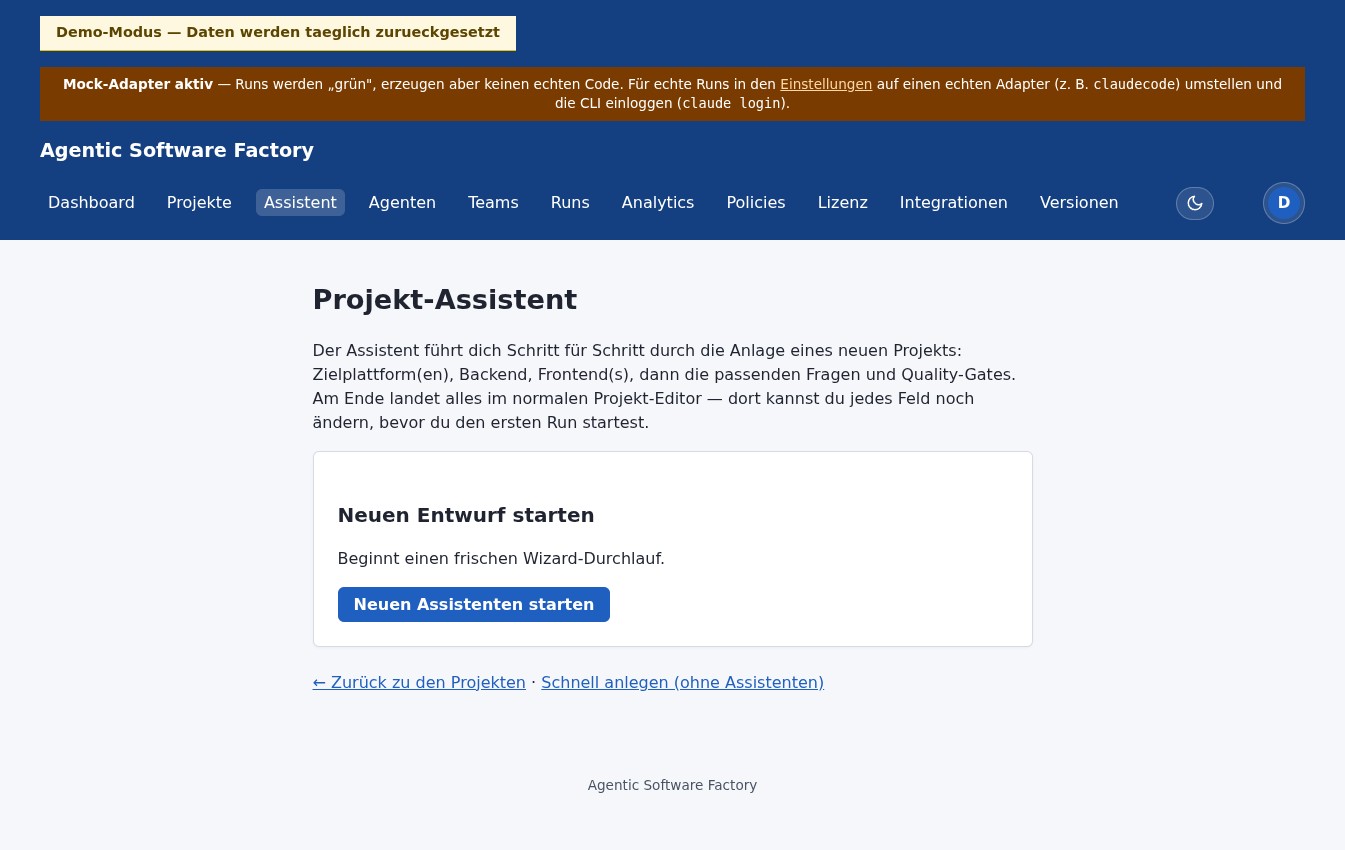
Project wizard
Structured capture instead of an empty Markdown file. Six steps, 18 templates across target platform (web/mobile/desktop) × backend × frontend.
Project contents
[ Project name       ]
[ Target picture     ]
[ Constraints / DoD  ]
        Back  [ Next ]
Run view
Phases, status and current step at a glance — phase 4 / 7.
✓ INTAKE
✓ PROMPT_ASSEMBLY
✓ WORKSPACE_PREPARATION
⟳ EXECUTION · running…
· VALIDATION
· COMPLETION
Git & build
Commits, working tree and build status directly in the UI.
a1f2e3b feat: persist DoD
7c9d4a2 test: policy paths
e2b8f6c feat: run validation
─────────────────────────
mvn verify · PASS
42 tests · coverage 82 %
Markdown artifacts
Generated specification files as an editable preview.
Artifacts
 PROJECT.md
 INSTRUCTIONS.md
 AGENTS.md
 WORKFLOW.md
 DEFINITION_OF_DONE.md
 README.md
What this looks like in practice
Example: you want to build a simple REST API for invoices. Here is the path through the Software Factory — from the 15-second wizard to the validated commit.
Your input · 15 seconds in the wizard
Project name: Invoice API
Target:       REST API for invoices,
              CRUD + status transitions
Tech:         Spring Boot 4, PostgreSQL 16, Flyway
DoD:          all endpoints tested,
              mvn verify green, coverage ≥ 85 % line / ≥ 81 % branch
What the platform makes of it
✓ PROJECT.md             47 lines
✓ INSTRUCTIONS.md        32 lines
✓ WORKFLOW.md            19 lines
✓ DEFINITION_OF_DONE.md  14 lines
✓ AGENTS.md              21 lines
✓ README.md              28 lines
✓ Git repo               initial commit
✓ Run template           mvn verify gate
Run #42 · Invoice API · claude-code adapter        Phase 5 / 7

14:32:01  ✓ INTAKE                            2 s
14:32:03  ✓ PROMPT_ASSEMBLY                   4 s
14:32:07  ✓ WORKSPACE_PREPARATION            8 s
14:32:15  ⟳ EXECUTION (claude-code)      4 min 12 s
            ├ src/main/java/…  +247 lines
            ├ src/test/java/…  +89 lines
            └ 3 commits · feat, test, docs
14:36:27  ✓ VALIDATION (mvn verify)         52 s
            · CORRECTION skipped — validation green
14:37:19  ⏸ COMPLETION (waiting for approval)  —

Total 5 min 18 s · 336 lines of code · 42 tests · coverage 82 %
The full loop: from idea to the next iteration
A single run doesn't end at the quality gate — the factory thinks in iterations. On a persistent workspace (freshly created or imported from an existing repository via repo-import) a continuous cycle closes in eight steps:
- Plan — a plan run breaks the goal into Markdown plans that become an individually selectable backlog.
- Select — you activate a backlog item as the next task.
- Build — a build run works on its own branch, not directly on the main line.
- Self-correction — on a red build the platform repeats the correction automatically and in a bounded way until the build is green.
- Quality gate — runs in the pipeline either off, advisory or blocking.
- Deliver — with a Git remote and a GitHub token you get push and pull request; without either it merges locally into the main line.
- Learn — a project memory preserves findings and flows into follow-up runs.
- Continue — optional auto follow-up proposals lead straight into the next iteration — the loop closes.
What V1 delivers
The platform's maturity model defines five stages. V1 reaches stages M1 to M4:
| Stage | What works |
|---|---|
| M1 Reproducible | Run can be started, supervised, finished |
| M2 Solo-dev efficient | Quick-start, global defaults, wizard with six templates, per-role model routing |
| M3 Tool-integrated | AGENTS.md, plugins, skills synced; repo-import; project memory |
| M4 Operationally hardened | Container sandbox, live token stream, inline diffs, browser notifications |
| M5 Multi-tenant | Foundations in place (project-boundary isolation, RBAC, SSO, admin UI); full audit-grade multi-tenancy (separate policy/audit/reports per tenant) still to come — until then one instance per tenant recommended |
Components
Platform core (one Spring Boot application)
- Project editor and wizard — capture projects as structured Markdown artifacts.
- Run engine — phase orchestration, live streaming, status tracking.
- Adapter registry — integration with coding CLIs as Spring beans.
- Quality Gate — aggregates reviewer findings (architecture, hallucination, security, aider, claude) to the verdict.
- Settings, audit, secrets — cross-cutting concerns with override logic, audit trail and encryption.
- Conductor — writes the CLI configuration into the workspace before every run.
License service (separate microservice)
- License service — Spring Boot app with Ed25519 signature (EdDSA), issues JWT lease tokens for tier checks.
- Keycloak — identity provider for customer login on license management.
Demo infrastructure
- demo.softwarefabrik.io — public single-tenant demo instance with mock adapter and daily reset.
License model · short form
Three tiers with a deliberately low-friction entry. Detailed comparison and registration process on the License model page.
| Criterion | Community | Professional | Enterprise |
|---|---|---|---|
| Registration | none | account | by contract |
| Price | free | 20–30 € / user·month | from 20,000 € / year |
| Runs per day | 10 | 100 | 1000 |
| Parallel agents | 3 | 10 | 50 |
| Devices | 3 | 5 | per contract |
| Lease duration | 30 days | 30 days | 30 / 90 / 365 days |
| Team / SSO / audit | – | – | ✓ |
| Priority support | – | ✓ | ✓ |
/api/v1/pubkey.What the project contains
Project definition
Project title, target picture, constraints, tech preferences and DoD.
Agent definition
Roles, default instructions, tool profiles and boundaries.
Team assembly
Agent teams for project types and run types.
Prompt assembly
Automatic generation of PROJECT.md & co.
Run orchestration
Start, supervise, pause, finish.
Git & build
Commits, working tree, build results in the UI.
Technical basis of version 1
Angular is deliberately not needed in version 1. Focus on workflow, orchestration, traceability and reusability.
What V1 deliberately does not need to do
- graphical workflow designer
- cloud scaling and multi-tenancy
- full-blown CI/CD platform
Recommended domain model
Key UX guiding decision
The user should not have to write Markdown files manually first.
Idea → structured UI capture → automatically generated Markdown artifacts → editable preview → run
Deep dive: the architecture behind the Software Factory
The Software Factory is built on a well-founded architecture for agentic software development. The accompanying whitepaper describes reference architectures, agent orchestration, guardrails and SDLC integration across 165 pages — as the conceptual foundation of the product.
Become one of the first users.
The Software Factory is under active development. If you are hitting limits with AI coding tools and looking for a solution with structure: drop me a line — I will show you the system personally and get back to you within 1–2 business days.
Further reading
- → Introduction — step-by-step operation.
- → Architecture — technical structure and module boundaries.
- → News — release history up to v0.30.0.
- → License model — Community / Professional / Enterprise.